Advanced Operators高级运算符
Define custom operators, perform bitwise operations, and use builder syntax.
定义自定义运算符、执行位运算和使用构建器语法。
In addition to the operators described in Basic Operators, Swift provides several advanced operators that perform more complex value manipulation. These include all of the bitwise and bit shifting operators you will be familiar with from C and Objective-C.
除了基本运算符中描述的运算符外,Swift 还提供了几种执行更复杂值操作的高级运算符。这些包括你在 C 和 Objective-C 中熟悉的所有位运算符和移位运算符。
Unlike arithmetic operators in C,
arithmetic operators in Swift don't overflow by default.
Overflow behavior is trapped and reported as an error.
To opt in to overflow behavior,
use Swift's second set of arithmetic operators that overflow by default,
such as the overflow addition operator (&+).
All of these overflow operators begin with an ampersand (&).
与 C 中的算术运算符不同,Swift 中的算术运算符默认不会溢出。溢出行为会被捕获并报告为错误。要选择溢出行为,请使用 Swift 的第二组默认溢出的算术运算符,例如溢出加法运算符( &+ )。所有这些溢出运算符都以 & 符号开头。
When you define your own structures, classes, and enumerations, it can be useful to provide your own implementations of the standard Swift operators for these custom types. Swift makes it easy to provide tailored implementations of these operators and to determine exactly what their behavior should be for each type you create.
当你定义自己的结构体、类和枚举时,为这些自定义类型提供 Swift 标准运算符的自己实现可能会很有用。Swift 使为这些运算符提供量身定制的实现变得容易,并可以精确地确定它们对你创建的每种类型的行为应该是什么。
You're not limited to the predefined operators. Swift gives you the freedom to define your own custom infix, prefix, postfix, and assignment operators, with custom precedence and associativity values. These operators can be used and adopted in your code like any of the predefined operators, and you can even extend existing types to support the custom operators you define.
你并不局限于预定义的运算符。Swift 给予你自由定义自己的自定义中缀、前缀、后缀和赋值运算符的能力,并带有自定义优先级和结合性值。这些运算符可以像任何预定义运算符一样在你的代码中使用和采用,你甚至可以扩展现有类型以支持你定义的自定义运算符。
Bitwise Operators 位运算符
Bitwise operators enable you to manipulate the individual raw data bits within a data structure. They're often used in low-level programming, such as graphics programming and device driver creation. Bitwise operators can also be useful when you work with raw data from external sources, such as encoding and decoding data for communication over a custom protocol.
位运算符 使你能够操作数据结构内的单个原始数据位。它们经常用于底层编程,如图形编程和设备驱动程序创建。当你处理来自外部源的原始数据时,位运算符也可能很有用,例如为通过自定义协议进行通信而编码和解码数据。
Swift supports all of the bitwise operators found in C, as described below.
Swift 支持 C 中的所有位运算符,如下所述。
Bitwise NOT Operator 按位取反运算符
The bitwise NOT operator (~) inverts all bits in a number:
按位取反运算符 ( ~ )对一个数字中的所有位进行取反:
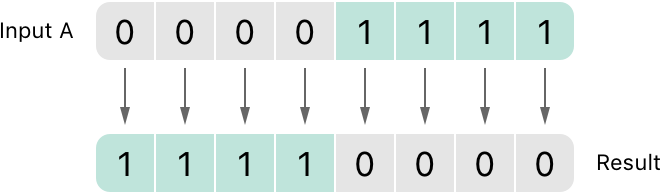
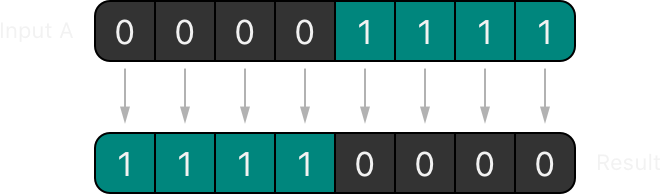
The bitwise NOT operator is a prefix operator, and appears immediately before the value it operates on, without any white space:
按位取反运算符是一个前缀运算符,它出现在其操作的值之前,中间没有任何空格:
let initialBits: UInt8 = 0b00001111
let invertedBits = ~initialBits  // equals 11110000
UInt8 integers have eight bits
and can store any value between 0 and 255.
This example initializes a UInt8 integer with the binary value 00001111,
which has its first four bits set to 0,
and its second four bits set to 1.
This is equivalent to a decimal value of 15.
UInt8 整数有八位,可以存储 0 到 255 之间的任何值。这个例子用二进制值 00001111 初始化一个 UInt8 整数,其前四位设置为 0 ,后四位设置为 1 。这相当于十进制值 15 。
The bitwise NOT operator is then used to create a new constant called invertedBits,
which is equal to initialBits,
but with all of the bits inverted.
Zeros become ones, and ones become zeros.
The value of invertedBits is 11110000,
which is equal to an unsigned decimal value of 240.
然后使用按位取反运算符创建一个名为 invertedBits 的新常量,它等于 initialBits ,但所有位都被取反。零变成一,一变成零。invertedBits 的值是 11110000 ,等于无符号十进制值 240 。
Bitwise AND Operator 按位与运算符
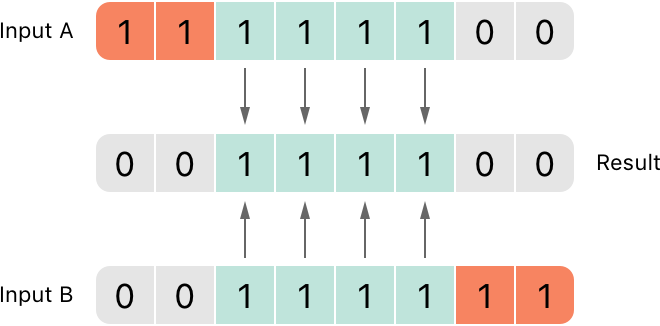
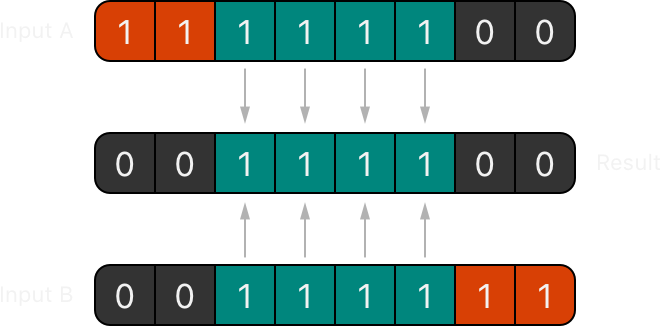
The bitwise AND operator (&) combines the bits of two numbers.
It returns a new number whose bits are set to 1
only if the bits were equal to 1 in both input numbers:
按位与运算符 (& )组合两个数字的位。它返回一个新数字,只有在两个输入数字中相应的位都等于 1 时,新数字的相应位才设置为 1:
In the example below,
the values of firstSixBits and lastSixBits
both have four middle bits equal to 1.
The bitwise AND operator combines them to make the number 00111100,
which is equal to an unsigned decimal value of 60:
在下面的例子中,firstSixBits 和 lastSixBits 的值在中间四位都等于 1 。按位与运算符将它们组合成数字 00111100 ,等于无符号十进制值 60 :
let firstSixBits: UInt8 = 0b11111100
let lastSixBits: UInt8  = 0b00111111
let middleFourBits = firstSixBits & lastSixBits  // equals 00111100
Bitwise OR Operator 按位或运算符
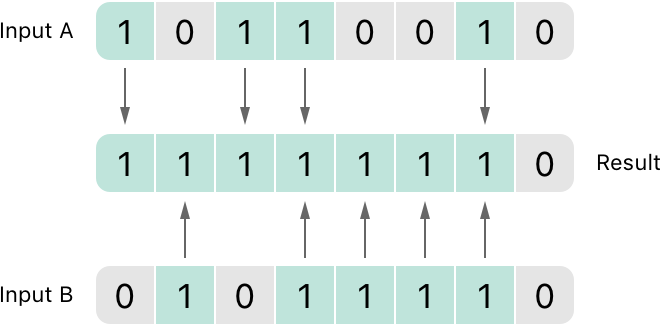
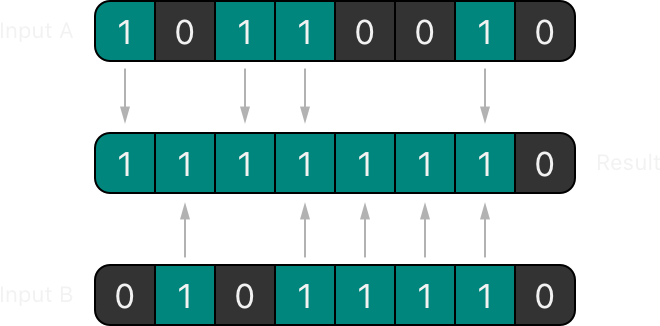
The bitwise OR operator (|) compares the bits of two numbers.
The operator returns a new number whose bits are set to 1
if the bits are equal to 1 in either input number:
按位或运算符 ( | )比较两个数字的位。如果 任一 输入数字中的位等于 1 ,则运算符返回一个新数字,其相应位设置为 1 :
In the example below,
the values of someBits and moreBits have different bits set to 1.
The bitwise OR operator combines them to make the number 11111110,
which equals an unsigned decimal of 254:
在下面的例子中, someBits 和 moreBits 的值在不同的位上设置为 1 。按位或运算符将它们组合成数字 11111110 ,等于无符号十进制值 254 :
let someBits: UInt8 = 0b10110010
let moreBits: UInt8 = 0b01011110
let combinedbits = someBits | moreBits  // equals 11111110
Bitwise XOR Operator 按位异或运算符
The bitwise XOR operator, or “exclusive OR operator” (^),
compares the bits of two numbers.
The operator returns a new number whose bits are set to 1
where the input bits are different
and are set to 0 where the input bits are the same:
按位异或运算符 ,或 "异或运算符" ( ^ ),比较两个数字的位。运算符返回一个新数字,在输入位不同的地方,新数字的相应位设置为 1 ,在输入位相同的地方,新数字的相应位设置为 0 :
In the example below,
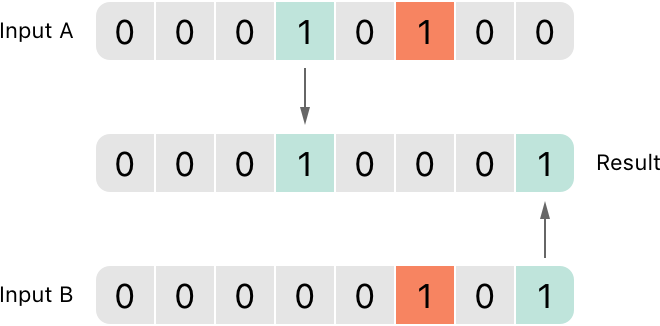
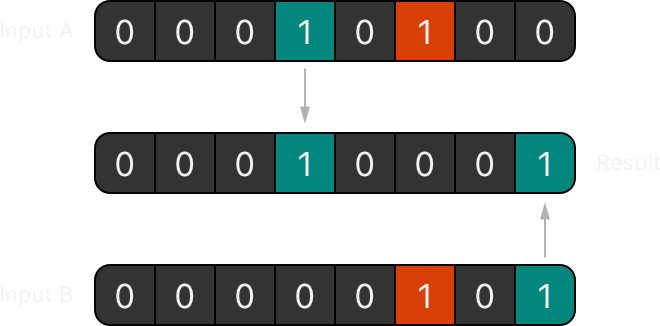
the values of firstBits and otherBits each have a bit set to 1
in a location that the other does not.
The bitwise XOR operator sets both of these bits to 1 in its output value.
All of the other bits in firstBits and otherBits match
and are set to 0 in the output value:
在下面的例子中, firstBits 和 otherBits 的值在对方没有的位置各有一位设置为 1 。按位异或运算符在其输出值中将这两位都设置为 1 。firstBits 和 otherBits 中的所有其他位都匹配,在输出值中设置为 0 :
let firstBits: UInt8 = 0b00010100
let otherBits: UInt8 = 0b00000101
let outputBits = firstBits ^ otherBits  // equals 00010001
Bitwise Left and Right Shift Operators 按位左移和右移运算符
The bitwise left shift operator (<<)
and bitwise right shift operator (>>)
move all bits in a number to the left or the right by a certain number of places,
according to the rules defined below.
按位左移运算符 (<< )和 按位右移运算符 (>> )根据下面定义的规则,将数字中的所有位向左或向右移动特定数量的位置。
Bitwise left and right shifts have the effect of multiplying or dividing an integer by a factor of two. Shifting an integer's bits to the left by one position doubles its value, whereas shifting it to the right by one position halves its value.
按位左移和右移相当于将整数乘以或除以 2 的幂。将整数的位向左移动一位会使其值翻倍,而向右移动一位会将其值减半。
Shifting Behavior for Unsigned Integers 无符号整数的移位行为
The bit-shifting behavior for unsigned integers is as follows:
无符号整数的位移行为如下:
- Existing bits are moved to the left or right by the requested number of places.
- Any bits that are moved beyond the bounds of the integer's storage are discarded.
- Zeros are inserted in the spaces left behind after the original bits are moved to the left or right.
- 现有的位按请求的位数向左或向右移动。
- 任何移动超出整数存储边界的位都会被丢弃。
- 在原始位向左或向右移动后留下的空位中插入零。
This approach is known as a logical shift.
这种方法被称为 逻辑移位。
The illustration below shows the results of 11111111 << 1
(which is 11111111 shifted to the left by 1 place),
and 11111111 >> 1
(which is 11111111 shifted to the right by 1 place).
Green numbers are shifted,
gray numbers are discarded,
and pink zeros are inserted:
下图显示了 11111111 << 1 (即 11111111 向左移动 1 位)和 11111111 >> 1 (即 11111111 向右移动 1 位)的结果。绿色数字是移位的,灰色数字被丢弃,插入的粉色零:


Here's how bit shifting looks in Swift code:
以下是 Swift 代码中位移的样子:
let shiftBits: UInt8 = 4   // 00000100 in binary
shiftBits << 1             // 00001000
shiftBits << 2             // 00010000
shiftBits << 5             // 10000000
shiftBits << 6             // 00000000
shiftBits >> 2             // 00000001
You can use bit shifting to encode and decode values within other data types:
你可以使用位移来编码和解码其他数据类型中的值:
let pink: UInt32 = 0xCC6699
let redComponent = (pink & 0xFF0000) >> 16    // redComponent is 0xCC, or 204
let greenComponent = (pink & 0x00FF00) >> 8   // greenComponent is 0x66, or 102
let blueComponent = pink & 0x0000FF           // blueComponent is 0x99, or 153
This example uses a UInt32 constant called pink to store a
Cascading Style Sheets color value for the color pink.
The CSS color value #CC6699 is written as
0xCC6699 in Swift's hexadecimal number representation.
This color is then decomposed into its
red (CC), green (66), and blue (99) components
by the bitwise AND operator (&) and the bitwise right shift operator (>>).
这个例子使用一个名为 pink 的 UInt32 常量来存储粉红色的级联样式表(CSS)颜色值。CSS 颜色值 #CC6699 在 Swift 的十六进制数字表示中写作 0xCC6699 。然后,通过按位与运算符( & )和按位右移运算符( >> )将这个颜色分解为红( CC )、绿( 66 )和蓝( 99 )分量。
The red component is obtained by performing a bitwise AND
between the numbers 0xCC6699 and 0xFF0000.
The zeros in 0xFF0000 effectively “mask” the second and third bytes of 0xCC6699,
causing the 6699 to be ignored and leaving 0xCC0000 as the result.
红色分量是通过对数字 0xCC6699 和 0xFF0000 执行按位与运算得到的。0xFF0000 中的零有效地"掩蔽"了 0xCC6699 的第二和第三个字节,导致 6699 被忽略,留下 0xCC0000 作为结果。
This number is then shifted 16 places to the right (>> 16).
Each pair of characters in a hexadecimal number uses 8 bits,
so a move 16 places to the right will convert 0xCC0000 into 0x0000CC.
This is the same as 0xCC, which has a decimal value of 204.
然后,这个数字向右移动 16 位( >> 16)。十六进制数中的每对字符使用 8 位,所以向右移动 16 位会将 0xCC0000 转换为 0x0000CC 。这与 0xCC 相同,十进制值为 204。
Similarly, the green component is obtained by performing a bitwise AND
between the numbers 0xCC6699 and 0x00FF00,
which gives an output value of 0x006600.
This output value is then shifted eight places to the right,
giving a value of 0x66, which has a decimal value of 102.
类似地,绿色分量是通过对数字 0xCC6699 和 0x00FF00 执行按位与运算得到的,得到输出值 0x006600 。然后将这个输出值向右移动八位,得到值 0x66 ,十进制值为 102。
Finally, the blue component is obtained by performing a bitwise AND
between the numbers 0xCC6699 and 0x0000FF,
which gives an output value of 0x000099.
Because 0x000099 already equals 0x99,
which has a decimal value of 153,
this value is used without shifting it to the right,
最后,蓝色分量是通过对数字 0xCC6699 和 0x0000FF 执行按位与运算得到的,得到输出值 0x000099 。因为 0x000099 已经等于 0x99 ,十进制值为 153,所以这个值不需要向右移位就可以使用。
Shifting Behavior for Signed Integers 有符号整数的移位行为
The shifting behavior is more complex for signed integers than for unsigned integers, because of the way signed integers are represented in binary. (The examples below are based on 8-bit signed integers for simplicity, but the same principles apply for signed integers of any size.)
有符号整数的移位行为比无符号整数更复杂,因为有符号整数在二进制中的表示方式。(为简单起见,下面的例子基于 8 位有符号整数,但相同的原理适用于任何大小的有符号整数。)
Signed integers use their first bit (known as the sign bit)
to indicate whether the integer is positive or negative.
A sign bit of 0 means positive, and a sign bit of 1 means negative.
有符号整数使用它们的第一位(称为符号位)来表示整数是正数还是负数。符号位为 0 表示正数,符号位为 1 表示负数。
The remaining bits (known as the value bits) store the actual value.
Positive numbers are stored in exactly the same way as for unsigned integers,
counting upwards from 0.
Here's how the bits inside an Int8 look for the number 4:
剩余的位(称为 值位 )存储实际值。正数的存储方式与无符号整数完全相同,从 0 开始向上计数。以下是 Int8 中数字 4 的位的样子:
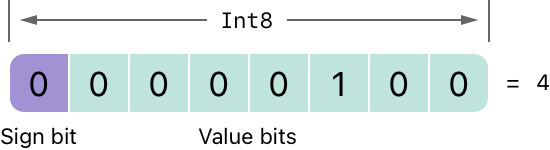
The sign bit is 0 (meaning “positive”),
and the seven value bits are just the number 4,
written in binary notation.
符号位是 0(表示“正”),其余七个值位就是数字 4 的二进制表示。
Negative numbers, however, are stored differently.
They're stored by subtracting their absolute value from 2 to the power of n,
where n is the number of value bits.
An eight-bit number has seven value bits,
so this means 2 to the power of 7, or 128.
然而,负数的存储方式不同。它们的存储值是 2 的 n 次方减去它们的绝对值,其中 n 是值位的数量。8 位数字有 7 个值位,所以这里就是 2 的 7 次方,即 128。
Here's how the bits inside an Int8 look for the number -4:
以下是数字 -4 在 Int8 中的二进制位表示:
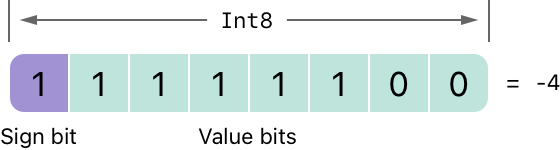
This time, the sign bit is 1 (meaning “negative”),
and the seven value bits have a binary value of 124 (which is 128 - 4):
这次,符号位是 1(表示"负数"),七个值位的二进制值是 124(即 128 - 4):


This encoding for negative numbers is known as a two's complement representation. It may seem an unusual way to represent negative numbers, but it has several advantages.
这种编码负数的方法被称为 二进制补码 表示。虽然这看起来是一种不寻常的表示负数的方式,但它有几个优点。
First, you can add -1 to -4,
simply by performing a standard binary addition of all eight bits
(including the sign bit),
and discarding anything that doesn't fit in the eight bits once you're done:
首先,你可以将 -1 加到 -4 上,只需对所有八个位(包括符号位)执行标准的二进制加法,并在完成后丢弃任何不适合八位的内容:
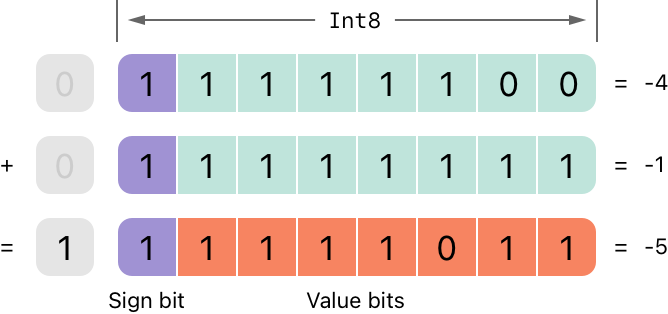
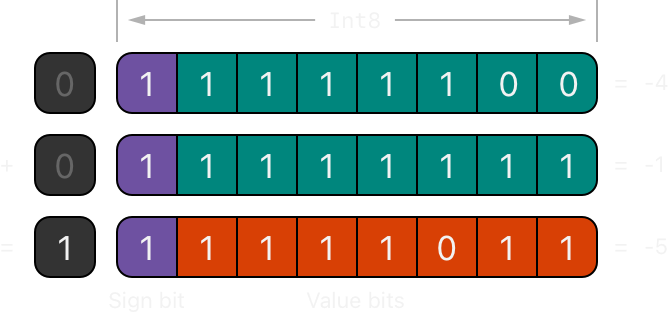
Second, the two's complement representation also lets you shift the bits of negative numbers to the left and right like positive numbers, and still end up doubling them for every shift you make to the left, or halving them for every shift you make to the right. To achieve this, an extra rule is used when signed integers are shifted to the right: When you shift signed integers to the right, apply the same rules as for unsigned integers, but fill any empty bits on the left with the sign bit, rather than with a zero.
其次,二进制补码表示还允许你像正数一样将负数的位向左和向右移动,并且每向左移动一位仍然会使其加倍,每向右移动一位则会将其减半。为了实现这一点,在对有符号整数进行右移时使用了一个额外的规则:当你将有符号整数向右移动时,应用与无符号整数相同的规则,但用 符号位 填充左侧的任何空位,而不是用零填充。


This action ensures that signed integers have the same sign after they're shifted to the right, and is known as an arithmetic shift.
这个操作确保了有符号整数在向右移动后保持相同的符号,这被称为 算术移位。
Because of the special way that positive and negative numbers are stored, shifting either of them to the right moves them closer to zero. Keeping the sign bit the same during this shift means that negative integers remain negative as their value moves closer to zero.
由于正数和负数的存储方式特殊,将它们中的任何一个向右移动都会使它们更接近零。在这个移位过程中保持符号位不变意味着负整数在其值接近零时仍然保持为负数。
Overflow Operators 溢出运算符
If you try to insert a number into an integer constant or variable that can't hold that value, by default Swift reports an error rather than allowing an invalid value to be created. This behavior gives extra safety when you work with numbers that are too large or too small.
如果你试图将一个数字插入到无法容纳该值的整数常量或变量中,默认情况下 Swift 会报告一个错误,而不是允许创建一个无效的值。当你处理太大或太小的数字时,这种行为提供了额外的安全性。
For example, the Int16 integer type can hold
any signed integer between -32768 and 32767.
Trying to set an Int16 constant or variable to a number outside of this range
causes an error:
例如,Int16 整数类型可以保存介于 -32768 和 32767 之间的任何有符号整数。试图将 Int16 常量或变量设置为超出此范围的数字会导致错误:
var potentialOverflow = Int16.max
// potentialOverflow equals 32767, which is the maximum value an Int16 can hold
potentialOverflow += 1
// this causes an error
Providing error handling when values get too large or too small gives you much more flexibility when coding for boundary value conditions.
当值变得过大或过小时提供错误处理,可以让你在编写边界值条件时拥有更大的灵活性。
However, when you specifically want an overflow condition
to truncate the number of available bits,
you can opt in to this behavior rather than triggering an error.
Swift provides three arithmetic overflow operators that opt in to
the overflow behavior for integer calculations.
These operators all begin with an ampersand (&):
然而,当你特别希望溢出条件截断可用位数时,你可以选择这种行为而不会触发错误。Swift 提供了三个算术 溢出运算符,可以选择整数计算的溢出行为。这些运算符都以 & 符号开头:
- Overflow addition (
&+) - Overflow subtraction (
&-) - Overflow multiplication (
&*)
- 溢出加法(
&+) - 溢出减法(
&-) - 溢出乘法(
&*)
Value Overflow 值溢出
Numbers can overflow in both the positive and negative direction.
数字可以在正方向和负方向上溢出。
Here's an example of what happens when
an unsigned integer is allowed to overflow in the positive direction,
using the overflow addition operator (&+):
这里有一个例子,展示了当允许无符号整数在正方向上溢出时会发生什么,使用溢出加法运算符( &+):
var unsignedOverflow = UInt8.max
// unsignedOverflow equals 255, which is the maximum value a UInt8 can hold
unsignedOverflow = unsignedOverflow &+ 1
// unsignedOverflow is now equal to 0
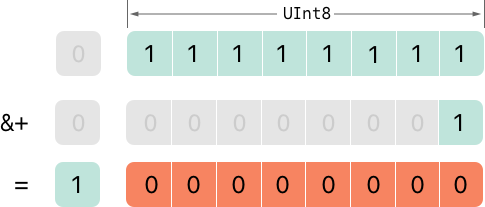
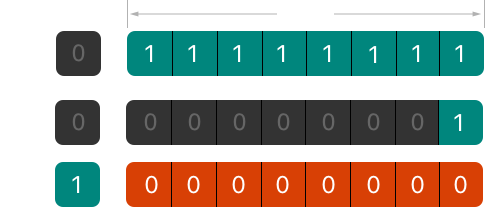
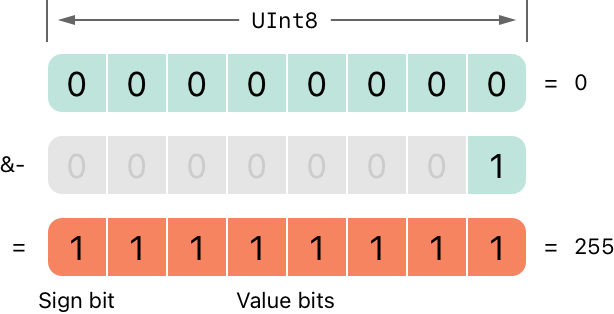
The variable unsignedOverflow is initialized with the maximum value a UInt8 can hold
(255, or 11111111 in binary).
It's then incremented by 1 using the overflow addition operator (&+).
This pushes its binary representation just over the size that a UInt8 can hold,
causing it to overflow beyond its bounds,
as shown in the diagram below.
The value that remains within the bounds of the UInt8
after the overflow addition is 00000000, or zero.
变量 unsignedOverflow 被初始化为 UInt8 可以容纳的最大值(255 ,或二进制的 11111111)。然后使用溢出加法运算符( &+ )将其加 1。这将其二进制表示推到了 UInt8 可以容纳的大小之外,导致它溢出超出其边界,如下图所示。溢出加法后留在 UInt8 边界内的值是 00000000 ,或零。
Something similar happens when
an unsigned integer is allowed to overflow in the negative direction.
Here's an example using the overflow subtraction operator (&-):
当允许无符号整数在负方向上溢出时,也会发生类似的情况。这里有一个使用溢出减法运算符( &- )的例子:
var unsignedOverflow = UInt8.min
// unsignedOverflow equals 0, which is the minimum value a UInt8 can hold
unsignedOverflow = unsignedOverflow &- 1
// unsignedOverflow is now equal to 255
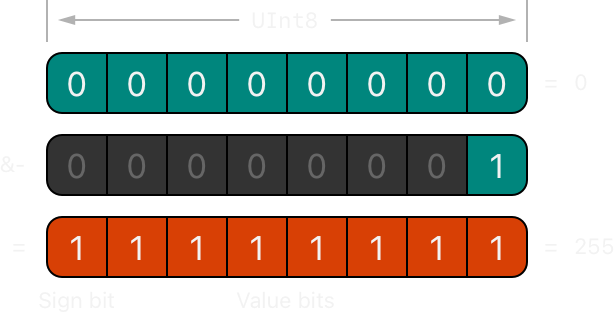
The minimum value that a UInt8 can hold is zero,
or 00000000 in binary.
If you subtract 1 from 00000000 using the overflow subtraction operator (&-),
the number will overflow and wrap around to 11111111,
or 255 in decimal.
UInt8 可以容纳的最小值是零,或二进制的 00000000 。如果你使用溢出减法运算符( &- )从 00000000 中减去 1,这个数字将会溢出并绕回到 11111111 ,或十进制的 255 。
Overflow also occurs for signed integers. All addition and subtraction for signed integers is performed in bitwise fashion, with the sign bit included as part of the numbers being added or subtracted, as described in Bitwise Left and Right Shift Operators.
有符号整数也会发生溢出。所有有符号整数的加法和减法都以按位方式执行,符号位作为被加或被减数字的一部分包含在内,如 按位左移和右移运算符 中所述。
var signedOverflow = Int8.min
// signedOverflow equals -128, which is the minimum value an Int8 can hold
signedOverflow = signedOverflow &- 1
// signedOverflow is now equal to 127
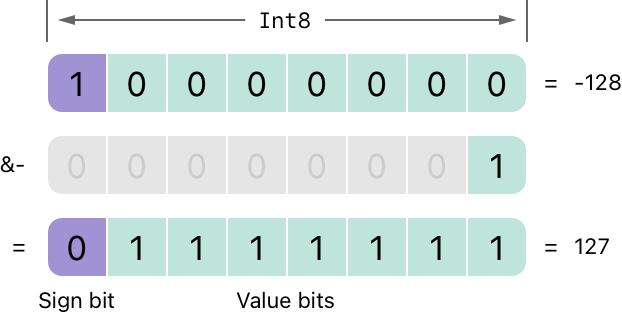
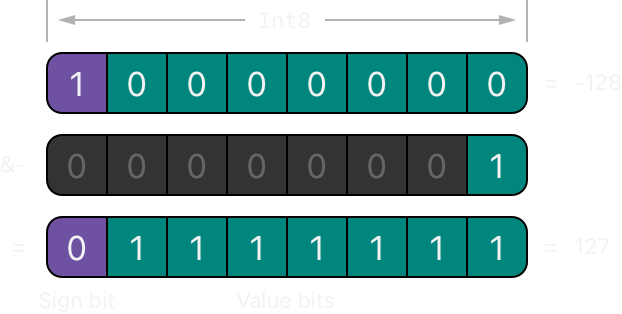
The minimum value that an Int8 can hold is -128,
or 10000000 in binary.
Subtracting 1 from this binary number with the overflow operator
gives a binary value of 01111111,
which toggles the sign bit and gives positive 127,
the maximum positive value that an Int8 can hold.
Int8 可以容纳的最小值是 -128 ,或二进制的 10000000 。使用溢出运算符从这个二进制数中减去 1 得到二进制值 01111111 ,这会切换符号位并得到正 127 ,这是 Int8 可以容纳的最大正值。
For both signed and unsigned integers, overflow in the positive direction wraps around from the maximum valid integer value back to the minimum, and overflow in the negative direction wraps around from the minimum value to the maximum.
对于有符号和无符号整数,正方向的溢出会从最大有效整数值绕回到最小值,而负方向的溢出会从最小值绕回到最大值。
Precedence and Associativity 优先级和结合性
Operator precedence gives some operators higher priority than others; these operators are applied first.
运算符 优先级 给予某些运算符比其他运算符更高的优先级;这些运算符会首先被应用。
Operator associativity defines how operators of the same precedence are grouped together --- either grouped from the left, or grouped from the right. Think of it as meaning “they associate with the expression to their left,” or “they associate with the expression to their right.”
运算符 结合性 定义了具有相同优先级的运算符如何组合在一起 --- 要么从左边组合,要么从右边组合。可以将其理解为"它们与左边的表达式相关联",或"它们与右边的表达式相关联"。
It's important to consider
each operator's precedence and associativity
when working out the order in which a compound expression will be calculated.
For example,
operator precedence explains why the following expression equals 17.
在计算复合表达式的顺序时,考虑每个运算符的优先级和结合性很重要。例如,运算符优先级解释了为什么下面的表达式等于 17 。
2 + 3 % 4 * 5
// this equals 17
If you read strictly from left to right, you might expect the expression to be calculated as follows:
如果你严格从左到右读,你可能会期望表达式按如下方式计算:
2plus3equals55remainder4equals11times5equals5
2加3等于55除以4余11乘以5等于5
However, the actual answer is 17, not 5.
Higher-precedence operators are evaluated before lower-precedence ones.
In Swift, as in C,
the remainder operator (%) and the multiplication operator (*)
have a higher precedence than the addition operator (+).
As a result, they're both evaluated before the addition is considered.
然而,实际答案是 17 ,而不是 5 。优先级更高的运算符在优先级较低的运算符之前被计算。在 Swift 中,就像在 C 语言中一样,余数运算符( % )和乘法运算符( * )的优先级高于加法运算符( +)。因此,它们都在考虑加法之前被计算。
However, remainder and multiplication have the same precedence as each other. To work out the exact evaluation order to use, you also need to consider their associativity. Remainder and multiplication both associate with the expression to their left. Think of this as adding implicit parentheses around these parts of the expression, starting from their left:
然而,余数和乘法具有 相同 的优先级。要确定使用的确切计算顺序,你还需要考虑它们的结合性。余数和乘法都与它们左边的表达式相关联。可以将其理解为在表达式的这些部分周围添加隐式括号,从左边开始:
2 + ((3 % 4) * 5)(3 % 4) is 3, so this is equivalent to:
(3 % 4) 等于 3,所以这等价于:
2 + (3 * 5)(3 * 5) is 15, so this is equivalent to:
(3 * 5) 等于 15,所以这等价于:
2 + 15This calculation yields the final answer of 17.
这个计算得出的最终答案是 17 。
For information about the operators provided by the Swift standard library, including a complete list of the operator precedence groups and associativity settings, see Operator Declarations.
有关 Swift 标准库提供的运算符的信息,包括运算符优先级组和结合性设置的完整列表,请参阅运算符声明。
Note · 注意
Swift's operator precedences and associativity rules are simpler and more predictable than those found in C and Objective-C. However, this means that they aren't exactly the same as in C-based languages. Be careful to ensure that operator interactions still behave in the way you intend when porting existing code to Swift.
Swift 的运算符优先级和结合性规则比 C 和 Objective-C 中的更简单和可预测。 然而,这意味着它们与基于 C 的语言并不完全相同。 在将现有代码移植到 Swift 时,请注意确保运算符交互仍然按照你预期的方式运行。
Operator Methods 运算符方法
Classes and structures can provide their own implementations of existing operators. This is known as overloading the existing operators.
类和结构体可以为现有运算符提供自定义的实现。这被称为 重载 现有运算符。
The example below shows how to implement
the arithmetic addition operator (+) for a custom structure.
The arithmetic addition operator is a binary operator
because it operates on two targets
and it's an infix operator because it appears between those two targets.
下面的示例展示了如何为自定义结构体实现算术加法运算符( + )。算术加法运算符是一个二元运算符,因为它操作两个目标,并且它是一个中缀运算符,因为它出现在这两个目标之间。
The example defines a Vector2D structure for
a two-dimensional position vector (x, y),
followed by a definition of an operator method
to add together instances of the Vector2D structure:
该示例定义了一个 Vector2D 结构体,用于表示二维位置向量 (x, y) ,然后定义了一个 运算符方法 来将 Vector2D 结构体的实例相加:
struct Vector2D {
    var x = 0.0, y = 0.0
}

extension Vector2D {
    static func + (left: Vector2D, right: Vector2D) -> Vector2D {
       return Vector2D(x: left.x + right.x, y: left.y + right.y)
    }
}
The operator method is defined as a type method on Vector2D,
with a method name that matches the operator to be overloaded (+).
Because addition isn't part of the essential behavior for a vector,
the type method is defined in an extension of Vector2D
rather than in the main structure declaration of Vector2D.
Because the arithmetic addition operator is a binary operator,
this operator method takes two input parameters of type Vector2D
and returns a single output value, also of type Vector2D.
运算符方法被定义为 Vector2D 的类型方法,方法名称与要重载的运算符( + )相匹配。 由于加法不是向量的基本行为,所以类型方法在 Vector2D 的扩展中定义,而不是在 Vector2D 的主结构声明中定义。 因为算术加法运算符是一个二元运算符,所以这个运算符方法接受两个类型为 Vector2D 的输入参数,并返回一个单一的输出值,也是 Vector2D 类型。
In this implementation, the input parameters are named left and right
to represent the Vector2D instances that will be on
the left side and right side of the + operator.
The method returns a new Vector2D instance,
whose x and y properties are
initialized with the sum of the x and y properties from
the two Vector2D instances that are added together.
在这个实现中,输入参数被命名为 left 和 right ,代表 + 运算符左侧和右侧的 Vector2D 实例。 该方法返回一个新的 Vector2D 实例,其 x 和 y 属性初始化为相加的两个 Vector2D 实例的 x 和 y 属性之和。
The type method
can be used as an infix operator between existing Vector2D instances:
这个类型方法可以作为现有 Vector2D 实例之间的中缀运算符使用:
let vector = Vector2D(x: 3.0, y: 1.0)
let anotherVector = Vector2D(x: 2.0, y: 4.0)
let combinedVector = vector + anotherVector
// combinedVector is a Vector2D instance with values of (5.0, 5.0)
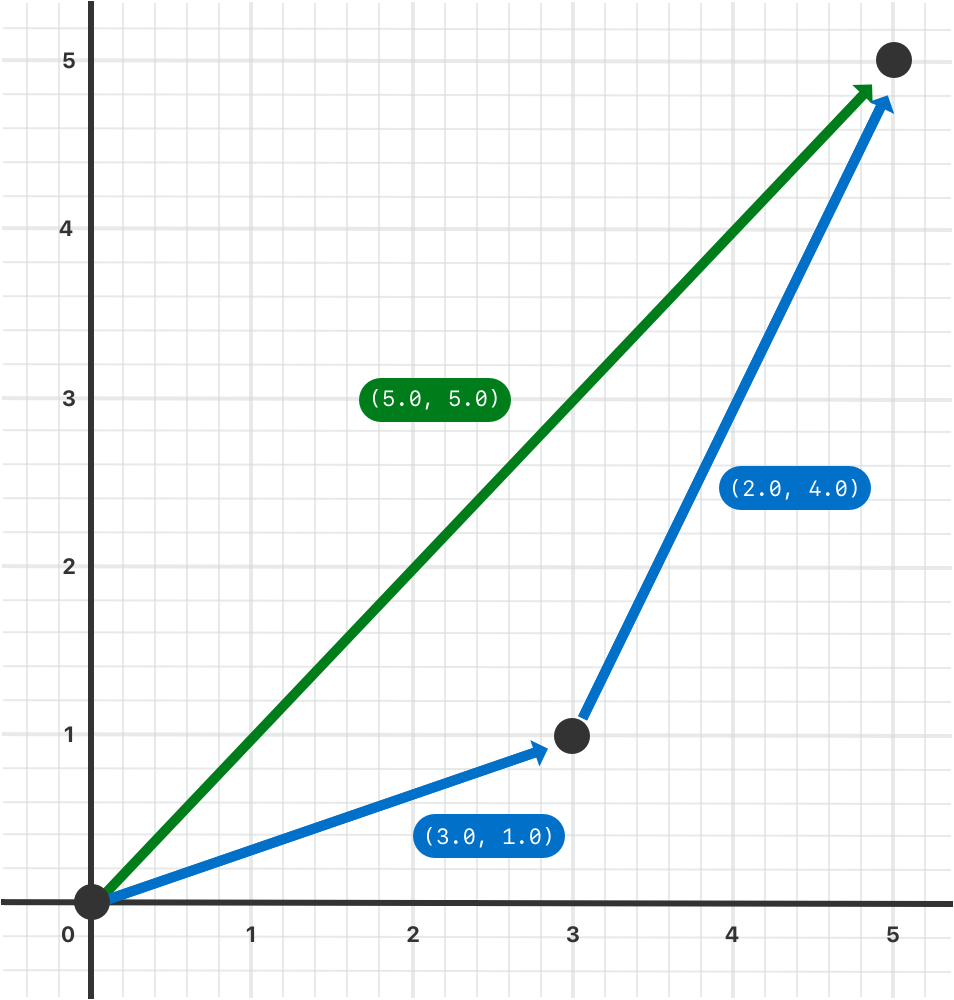
This example adds together the vectors (3.0, 1.0) and (2.0, 4.0)
to make the vector (5.0, 5.0), as illustrated below.
这个例子将向量 (3.0, 1.0) 和 (2.0, 4.0) 相加,得到向量 (5.0, 5.0) ,如下图所示。
Prefix and Postfix Operators 前缀和后缀运算符
The example shown above demonstrates a custom implementation of a binary infix operator.
Classes and structures can also provide implementations
of the standard unary operators.
Unary operators operate on a single target.
They're prefix if they precede their target (such as -a)
and postfix operators if they follow their target (such as b!).
上面的例子展示了自定义实现二元中缀运算符。 类和结构体还可以提供标准 一元运算符 的实现。 一元运算符操作单个目标。 如果它们在目标之前,则是 前缀 运算符(如 -a ),如果在目标之后,则是 后缀 运算符(如 b! )。
You implement a prefix or postfix unary operator by writing
the prefix or postfix modifier
before the func keyword when declaring the operator method:
通过在声明运算符方法时在 func 关键字之前写入 prefix 或 postfix 修饰符来实现前缀或后缀一元运算符:
extension Vector2D {
    static prefix func - (vector: Vector2D) -> Vector2D {
        return Vector2D(x: -vector.x, y: -vector.y)
    }
}
The example above implements the unary minus operator
(-a) for Vector2D instances.
The unary minus operator is a prefix operator,
and so this method has to be qualified with the prefix modifier.
上面的例子为 Vector2D 实例实现了一元减运算符( -a )。 一元减运算符是一个前缀运算符,因此这个方法必须用 prefix 修饰符限定。
For simple numeric values, the unary minus operator converts
positive numbers into their negative equivalent and vice versa.
The corresponding implementation for Vector2D instances
performs this operation on both the x and y properties:
对于简单的数值,一元减运算符将正数转换为其负数等价物,反之亦然。 Vector2D 实例的相应实现对 x 和 y 属性执行此操作:
let positive = Vector2D(x: 3.0, y: 4.0)
let negative = -positive
// negative is a Vector2D instance with values of (-3.0, -4.0)
let alsoPositive = -negative
// alsoPositive is a Vector2D instance with values of (3.0, 4.0)
Compound Assignment Operators 复合赋值运算符
Compound assignment operators combine assignment (=) with another operation.
For example, the addition assignment operator (+=)
combines addition and assignment into a single operation.
You mark a compound assignment operator's left input parameter type as inout,
because the parameter's value will be modified directly from within the operator method.
复合赋值运算符 将赋值( = )与另一个操作结合在一起。 例如,加法赋值运算符( += )将加法和赋值组合成一个操作。 你将复合赋值运算符的左输入参数类型标记为 inout ,因为参数的值将直接从运算符方法内部修改。
The example below implements
an addition assignment operator method for Vector2D instances:
下面的例子为 Vector2D 实例实现了一个加法赋值运算符方法:
extension Vector2D {
    static func += (left: inout Vector2D, right: Vector2D) {
        left = left + right
    }
}
Because an addition operator was defined earlier, you don't need to reimplement the addition process here. Instead, the addition assignment operator method takes advantage of the existing addition operator method, and uses it to set the left value to be the left value plus the right value:
因为之前定义了加法运算符,所以这里不需要重新实现加法过程。 相反,加法赋值运算符方法利用现有的加法运算符方法,并使用它将左值设置为左值加右值:
var original = Vector2D(x: 1.0, y: 2.0)
let vectorToAdd = Vector2D(x: 3.0, y: 4.0)
original += vectorToAdd
// original now has values of (4.0, 6.0)
Note · 注意
It isn't possible to overload the default
assignment operator (=).
Only the compound assignment operators can be overloaded.
Similarly, the ternary conditional operator
(a ? b : c) can't be overloaded.
不能重载默认赋值运算符( = )。 只有复合赋值运算符可以被重载。 同样,三元条件运算符( a ? b : c )也不能被重载。
Equivalence Operators 等价运算符
By default, custom classes and structures don't have an implementation of
the equivalence operators,
known as the equal to operator (==) and not equal to operator (!=).
You usually implement the == operator,
and use the Swift standard library's default implementation of the != operator
that negates the result of the == operator.
There are two ways to implement the == operator:
You can implement it yourself,
or for many types, you can ask Swift to synthesize
an implementation for you.
In both cases,
you add conformance to the Swift standard library's Equatable protocol.
默认情况下,自定义类和结构体没有 等价运算符 的实现,这些运算符包括 相等 运算符( == )和 不相等 运算符( != )。通常你需要实现 == 运算符,并使用 Swift 标准库的默认 != 运算符实现,它会对 == 运算符的结果进行取反。 有两种方法可以实现 == 运算符:你可以自己实现它,或者对于许多类型,你可以要求 Swift 为你合成一个实现。 在这两种情况下,你都需要添加对 Swift 标准库的 Equatable 协议的遵循。
You provide an implementation of the == operator
in the same way as you implement other infix operators:
你可以像实现其他中缀运算符一样提供 == 运算符的实现:
extension Vector2D: Equatable {
    static func == (left: Vector2D, right: Vector2D) -> Bool {
       return (left.x == right.x) && (left.y == right.y)
    }
}
The example above implements an == operator
to check whether two Vector2D instances have equivalent values.
In the context of Vector2D,
it makes sense to consider “equal” as meaning
“both instances have the same x values and y values”,
and so this is the logic used by the operator implementation.
上面的例子实现了一个 == 运算符来检查两个 Vector2D 实例是否具有相等的值。 在 Vector2D 的上下文中,将"相等"理解为"两个实例具有相同的 x 值和 y 值"是有意义的,因此这就是运算符实现所使用的逻辑。
You can now use this operator to check whether two Vector2D instances are equivalent:
现在你可以使用这个运算符来检查两个 Vector2D 实例是否相等:
let twoThree = Vector2D(x: 2.0, y: 3.0)
let anotherTwoThree = Vector2D(x: 2.0, y: 3.0)
if twoThree == anotherTwoThree {
    print("These two vectors are equivalent.")
}
// Prints "These two vectors are equivalent."
In many simple cases, you can ask Swift to provide synthesized implementations of the equivalence operators for you, as described in Adopting a Protocol Using a Synthesized Implementation.
在许多简单的情况下,你可以要求 Swift 为你提供等价运算符的合成实现,如 使用合成实现来遵循协议 中所述。
Custom Operators 自定义运算符
You can declare and implement your own custom operators in addition to the standard operators provided by Swift. For a list of characters that can be used to define custom operators, see Operators.
除了 Swift 提供的标准运算符外,你还可以声明和实现自己的 自定义运算符。有关可用于定义自定义运算符的字符列表,请参见 运算符。
New operators are declared at a global level using the operator keyword,
and are marked with the prefix, infix or postfix modifiers:
新运算符使用 operator 关键字在全局级别声明,并用 prefix、infix 或 postfix 修饰符标记:
prefix operator +++The example above defines a new prefix operator called +++.
This operator doesn't have an existing meaning in Swift,
and so it's given its own custom meaning below in the specific context of
working with Vector2D instances. For the purposes of this example,
+++ is treated as a new “prefix doubling” operator.
It doubles the x and y values of a Vector2D instance,
by adding the vector to itself with the addition assignment operator defined earlier.
To implement the +++ operator,
you add a type method called +++ to Vector2D as follows:
上面的例子定义了一个名为 +++ 的新前缀运算符。这个运算符在 Swift 中没有现有的含义,因此在下面特定的 Vector2D 实例工作环境中给予了它自己的自定义含义。出于本例的目的,+++ 被视为一个新的"前缀加倍"运算符。它通过使用先前定义的加法赋值运算符将向量加到自身上,从而将 Vector2D 实例的 x 和 y 值加倍。要实现 +++ 运算符,你需要向 Vector2D 添加一个名为 +++ 的类型方法,如下所示:
extension Vector2D {
    static prefix func +++ (vector: inout Vector2D) -> Vector2D {
        vector += vector
        return vector
    }
}

var toBeDoubled = Vector2D(x: 1.0, y: 4.0)
let afterDoubling = +++toBeDoubled
// toBeDoubled now has values of (2.0, 8.0)
// afterDoubling also has values of (2.0, 8.0)
Precedence for Custom Infix Operators 自定义中缀运算符的优先级
Custom infix operators each belong to a precedence group. A precedence group specifies an operator's precedence relative to other infix operators, as well as the operator's associativity. See Precedence and Associativity for an explanation of how these characteristics affect an infix operator's interaction with other infix operators.
每个自定义中缀运算符都属于一个优先级组。优先级组指定了一个运算符相对于其他中缀运算符的优先级,以及运算符的结合性。有关这些特性如何影响中缀运算符与其他中缀运算符交互的解释,请参见 优先级和结合性。
A custom infix operator that isn't explicitly placed into a precedence group is given a default precedence group with a precedence immediately higher than the precedence of the ternary conditional operator.
没有被明确放入优先级组的自定义中缀运算符会被赋予一个默认优先级组,其优先级紧高于三元条件运算符的优先级。
The following example defines a new custom infix operator called +-,
which belongs to the precedence group AdditionPrecedence:
下面的例子定义了一个名为 +- 的新自定义中缀运算符,它属于 AdditionPrecedence 优先级组:
infix operator +-: AdditionPrecedence
extension Vector2D {
    static func +- (left: Vector2D, right: Vector2D) -> Vector2D {
        return Vector2D(x: left.x + right.x, y: left.y - right.y)
    }
}
let firstVector = Vector2D(x: 1.0, y: 2.0)
let secondVector = Vector2D(x: 3.0, y: 4.0)
let plusMinusVector = firstVector +- secondVector
// plusMinusVector is a Vector2D instance with values of (4.0, -2.0)
This operator adds together the x values of two vectors,
and subtracts the y value of the second vector from the first.
Because it's in essence an “additive” operator,
it has been given the same precedence group
as additive infix operators such as + and -.
For information about the operators provided by the Swift standard library,
including a complete list of the operator precedence groups and associativity settings,
see Operator Declarations.
For more information about precedence groups and to see the syntax for
defining your own operators and precedence groups,
see Operator Declaration.
这个运算符将两个向量的 x 值相加,并从第一个向量的 y 值中减去第二个向量的 y 值。由于它本质上是一个"加法"运算符,因此它被赋予了与加法中缀运算符(如 + 和 -)相同的优先级组。有关 Swift 标准库提供的运算符的信息,包括运算符优先级组和结合性设置的完整列表,请参见 Operator Declarations。有关优先级组的更多信息以及定义自己的运算符和优先级组的语法,请参见 运算符声明。
Note · 注意
You don't specify a precedence when defining a prefix or postfix operator. However, if you apply both a prefix and a postfix operator to the same operand, the postfix operator is applied first.
在定义前缀或后缀运算符时,你不需要指定优先级。但是,如果你对同一个操作数同时应用前缀和后缀运算符,后缀运算符会先被应用。
Result Builders 结果构建器
A result builder is a type you define
that adds syntax for creating nested data,
like a list or tree,
in a natural, declarative way.
The code that uses the result builder
can include ordinary Swift syntax, like if and for,
to handle conditional or repeated pieces of data.
结果构建器 是你定义的一种类型,它为以自然、声明式的方式创建嵌套数据(如列表或树)添加语法。使用结果构建器的代码可以包含普通的 Swift 语法,如 if 和 for ,以处理条件或重复的数据片段。
The code below defines a few types for drawing on a single line using stars and text.
下面的代码定义了几种类型,用于使用星号和文本在单行上绘图。
protocol Drawable {
    func draw() -> String
}
struct Line: Drawable {
    var elements: [Drawable]
    func draw() -> String {
        return elements.map { $0.draw() }.joined(separator: "")
    }
}
struct Text: Drawable {
    var content: String
    init(_ content: String) { self.content = content }
    func draw() -> String { return content }
}
struct Space: Drawable {
    func draw() -> String { return " " }
}
struct Stars: Drawable {
    var length: Int
    func draw() -> String { return String(repeating: "*", count: length) }
}
struct AllCaps: Drawable {
    var content: Drawable
    func draw() -> String { return content.draw().uppercased() }
}
The Drawable protocol defines the requirement
for something that can be drawn, like a line or shape:
The type must implement a draw() method.
The Line structure represents a single-line drawing,
and it serves the top-level container for most drawings.
To draw a Line,
the structure calls draw() on each of the line's components,
and then concatenates the resulting strings into a single string.
The Text structure wraps a string to make it part of a drawing.
The AllCaps structure wraps and modifies another drawing,
converting any text in the drawing to uppercase.
Drawable 协议定义了可以被绘制的东西(如线条或形状)的要求:该类型必须实现一个 draw() 方法。Line 结构表示单行绘图,它作为大多数绘图的顶层容器。要绘制一个 Line ,该结构调用线条的每个组件的 draw() 方法,然后将结果字符串连接成一个单一的字符串。Text 结构包装一个字符串,使其成为绘图的一部分。AllCaps 结构包装并修改另一个绘图,将绘图中的任何文本转换为大写。
It's possible to make a drawing with these types by calling their initializers:
通过调用这些类型的初始化器,可以创建一个绘图:
let name: String? = "Ravi Patel"
let manualDrawing = Line(elements: [
     Stars(length: 3),
     Text("Hello"),
     Space(),
     AllCaps(content: Text((name ?? "World") + "!")),
     Stars(length: 2),
])
print(manualDrawing.draw())
// Prints "***Hello RAVI PATEL!**".
This code works, but it's a little awkward.
The deeply nested parentheses after AllCaps are hard to read.
The fallback logic to use "World" when name is nil
has to be done inline using the ?? operator,
which would be difficult with anything more complex.
If you needed to include switches or for loops
to build up part of the drawing, there's no way to do that.
A result builder lets you rewrite code like this
so that it looks like normal Swift code.
这段代码是可行的,但有点笨拙。AllCaps 之后的深度嵌套括号很难阅读。当 name 为 nil 时使用 "World" 的后备逻辑必须使用 ?? 运算符内联完成,如果有更复杂的内容,这将变得很困难。如果你需要包含 switch 或 for 循环来构建部分绘图,就无法做到这一点。结果构建器让你可以重写这样的代码,使其看起来像普通的 Swift 代码。
To define a result builder,
you write the @resultBuilder attribute on a type declaration.
For example, this code defines a result builder called DrawingBuilder,
which lets you use a declarative syntax to describe a drawing:
要定义一个结果构建器,你需要在类型声明上写 @resultBuilder 属性。例如,这段代码定义了一个名为 DrawingBuilder 的结果构建器,它让你可以使用声明式语法来描述一个绘图:
@resultBuilder
struct DrawingBuilder {
    static func buildBlock(_ components: Drawable...) -> Drawable {
        return Line(elements: components)
    }
    static func buildEither(first: Drawable) -> Drawable {
        return first
    }
    static func buildEither(second: Drawable) -> Drawable {
        return second
    }
}
The DrawingBuilder structure defines three methods
that implement parts of the result builder syntax.
The buildBlock(_:) method adds support for
writing a series of lines in a block of code.
It combines the components in that block into a Line.
The buildEither(first:) and buildEither(second:) methods
add support for if-else.
DrawingBuilder 结构定义了三个方法来实现结果构建器语法的部分功能。buildBlock(_:) 方法支持在代码块中编写一系列行。它将该块中的组件组合成一个 Line 。buildEither(first:) 和 buildEither(second:) 方法为 if-else 提供支持。
You can apply the @DrawingBuilder attribute to a function's parameter,
which turns a closure passed to the function
into the value that the result builder creates from that closure.
For example:
你可以将 @DrawingBuilder 属性应用于函数的参数,这会将传递给函数的闭包转换为结果构建器从该闭包创建的值。例如:
func draw(@DrawingBuilder content: () -> Drawable) -> Drawable {
    return content()
}
func caps(@DrawingBuilder content: () -> Drawable) -> Drawable {
    return AllCaps(content: content())
}

func makeGreeting(for name: String? = nil) -> Drawable {
    let greeting = draw {
        Stars(length: 3)
        Text("Hello")
        Space()
        caps {
            if let name = name {
                Text(name + "!")
            } else {
                Text("World!")
            }
        }
        Stars(length: 2)
    }
    return greeting
}
let genericGreeting = makeGreeting()
print(genericGreeting.draw())
// Prints "***Hello WORLD!**".

let personalGreeting = makeGreeting(for: "Ravi Patel")
print(personalGreeting.draw())
// Prints "***Hello RAVI PATEL!**".
The makeGreeting(for:) function takes a name parameter
and uses it to draw a personalized greeting.
The draw(_:) and caps(_:) functions
both take a single closure as their argument,
which is marked with the @DrawingBuilder attribute.
When you call those functions,
you use the special syntax that DrawingBuilder defines.
Swift transforms that declarative description of a drawing
into a series of calls to the methods on DrawingBuilder
to build up the value that's passed as the function argument.
For example,
Swift transforms the call to caps(_:) in that example
into code like the following:
makeGreeting(for:) 函数接受一个 name 参数并使用它来绘制个性化的问候语。draw(_:) 和 caps(_:) 函数都接受一个标记为 @DrawingBuilder 属性的单个闭包作为参数。当你调用这些函数时,你使用 DrawingBuilder 定义的特殊语法。Swift 将绘图的声明性描述转换为对 DrawingBuilder 方法的一系列调用,以构建作为函数参数传递的值。例如,Swift 将示例中对 caps(_:) 的调用转换为类似以下的代码:
let capsDrawing = caps {
    let partialDrawing: Drawable
    if let name = name {
        let text = Text(name + "!")
        partialDrawing = DrawingBuilder.buildEither(first: text)
    } else {
        let text = Text("World!")
        partialDrawing = DrawingBuilder.buildEither(second: text)
    }
    return partialDrawing
}
Swift transforms the if-else block into
calls to the buildEither(first:) and buildEither(second:) methods.
Although you don't call these methods in your own code,
showing the result of the transformation
makes it easier to see how Swift transforms your code
when you use the DrawingBuilder syntax.
Swift 将 if-else 块转换为对 buildEither(first:) 和 buildEither(second:) 方法的调用。尽管你在自己的代码中不会调用这些方法,但展示转换的结果可以更容易地看到 Swift 在你使用 DrawingBuilder 语法时如何转换你的代码。
To add support for writing for loops in the special drawing syntax,
add a buildArray(_:) method.
要为在特殊绘图语法中编写 for 循环添加支持,请添加一个 buildArray(_:) 方法。
extension DrawingBuilder {
    static func buildArray(_ components: [Drawable]) -> Drawable {
        return Line(elements: components)
    }
}
let manyStars = draw {
    Text("Stars:")
    for length in 1...3 {
        Space()
        Stars(length: length)
    }
}
In the code above, the for loop creates an array of drawings,
and the buildArray(_:) method turns that array into a Line.
在上面的代码中,for 循环创建了一个绘图数组,buildArray(_:) 方法将该数组转换为一个 Line 。
For a complete list of how Swift transforms builder syntax into calls to the builder type's methods, see resultBuilder.
有关 Swift 如何将构建器语法转换为对构建器类型方法的调用的完整列表,请参阅 resultBuilder。