Strings and Characters字符串和字符
Store and manipulate text.
存储和操作文本
A string is a series of characters,
such as "hello, world" or "albatross".
Swift strings are represented by the String type.
The contents of a String can be accessed in various ways,
including as a collection of Character values.
字符串 是一系列字符的集合,例如 "hello, world","albatross"。Swift 的字符串通过 String 类型来表示。而 String 内容的访问方式有多种,例如以 Character 值的集合。
Swift's String and Character types provide
a fast, Unicode-compliant way to work with text in your code.
The syntax for string creation and manipulation is lightweight and readable,
with a string literal syntax that's similar to C.
String concatenation is as simple as
combining two strings with the + operator,
and string mutability is managed by choosing between a constant or a variable,
just like any other value in Swift.
You can also use strings to insert
constants, variables, literals, and expressions into longer strings,
in a process known as string interpolation.
This makes it easy to create custom string values for display, storage, and printing.
Swift 的 String 和 Character 类型提供了一种快速且兼容 Unicode 的方式来处理代码中的文本内容。创建和操作字符串的语法与 C 语言中字符串操作相似,轻量并且易读。通过 + 符号就可以非常简单的实现两个字符串的拼接操作。与 Swift 中其他值一样,能否更改字符串的值,取决于其被定义为常量还是变量。你可以在已有字符串中插入常量、变量、字面量和表达式从而形成更长的字符串,这一过程也被称为字符串插值。在显示、存储和打印创建自定义字符串值时,字符串插值操作尤其有用。
Despite this simplicity of syntax,
Swift's String type is a fast, modern string implementation.
Every string is composed of encoding-independent Unicode characters,
and provides support for accessing those characters in various Unicode representations.
尽管语法简易,但 Swift 中的 String 类型的实现却很快速和现代化。每一个字符串都是由编码无关的 Unicode 字符组成,并支持以多种 Unicode 表示形式访问字符。
Note · 注意
Swift's String type is bridged with Foundation's NSString class.
Foundation also extends String to expose methods defined by NSString.
This means, if you import Foundation,
you can access those NSString methods on String without casting.
For more information about using String with Foundation and Cocoa,
see Bridging Between String and NSString.
Swift 的 String 类型与 Foundation 的 NSString 类进行了桥接。
Foundation 还对 String 进行了扩展,使其可以访问 NSString 中定义的方法。
这意味着如果你导入了 Foundation,无需进行任何类型转换就可以在 String 上调用那些 NSString 的方法。
更多关于在 Foundation 和 Cocoa 中使用 String 的信息,请查看 Bridging Between String and NSString。
String Literals 字符串字面量
You can include predefined String values within your code as string literals.
A string literal is a sequence of characters
surrounded by double quotation marks (").
你可以在代码里使用一段预定义的 String 值作为字符串字面量。字符串字面量是由一对双引号(")包裹着的字符序列。
Use a string literal as an initial value for a constant or variable:
使用字符串文字作为常量或变量的初始值:
let someString = "Some string literal value"Note that Swift infers a type of String for the someString constant
because it's initialized with a string literal value.
注意,Swift 之所以推断 someString 常量为 String 类型,是因为它使用了字面量方式进行初始化。
Multiline String Literals 多行字符串字面量
If you need a string that spans several lines, use a multiline string literal --- a sequence of characters surrounded by three double quotation marks:
如果你需要一个多行字符串,那就使用多行字符串字面量 — 由一对三个双引号包裹着的具有固定顺序的文本字符集:
let quotation = """
The White Rabbit put on his spectacles.  "Where shall I begin,
please your Majesty?" he asked.

"Begin at the beginning," the King said gravely, "and go on
till you come to the end; then stop."
"""
A multiline string literal includes all of the lines between
its opening and closing quotation marks.
The string begins on the first line after the opening quotation marks (""")
and ends on the line before the closing quotation marks,
which means that neither of the strings below
start or end with a line break:
一个多行字符串字面量包含了所有的在开启和关闭引号(""")中的行。这个字符从开启引号(""")之后的第一行开始,到关闭引号(""")之前为止。这就意味着字符串开启引号之后(""")或者结束引号(""")之前都没有换行符号。(译者:下面两个字符串其实是一样的,虽然第二个使用了多行字符串的形式)
let singleLineString = "These are the same."
let multilineString = """
These are the same.
"""
When your source code includes a line break
inside of a multiline string literal,
that line break also appears in the string's value.
If you want to use line breaks
to make your source code easier to read,
but you don't want the line breaks to be part of the string's value,
write a backslash (\) at the end of those lines:
如果你的代码中,多行字符串字面量包含换行符的话,则多行字符串字面量中也会包含换行符。如果你想换行,以便加强代码的可读性,但是你又不想在你的多行字符串字面量中出现换行符的话,你可以用在行尾写一个反斜杠(\)作为续行符。
let softWrappedQuotation = """
The White Rabbit put on his spectacles.  "Where shall I begin, \
please your Majesty?" he asked.

"Begin at the beginning," the King said gravely, "and go on \
till you come to the end; then stop."
"""
To make a multiline string literal that begins or ends with a line feed, write a blank line as the first or last line. For example:
为了让一个多行字符串字面量开始和结束于换行符,请将换行写在第一行和最后一行,例如:
let lineBreaks = """

This string starts with a line break.
It also ends with a line break.

"""
A multiline string can be indented to match the surrounding code.
The whitespace before the closing quotation marks (""")
tells Swift what whitespace to ignore before all of the other lines.
However, if you write whitespace at the beginning of a line
in addition to what's before the closing quotation marks,
that whitespace is included.
一个多行字符串字面量能够缩进来匹配周围的代码。关闭引号(""")之前的空白字符串告诉 Swift 编译器其他各行多少空白字符串需要忽略。然而,如果你在某行的前面写的空白字符串超出了关闭引号(""")之前的空白字符串,则超出部分将被包含在多行字符串字面量中。
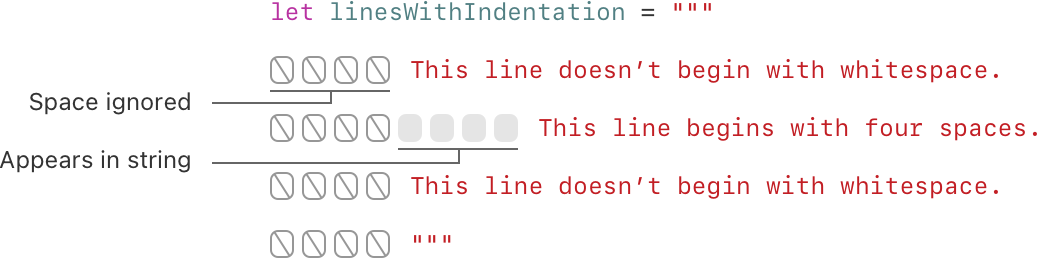
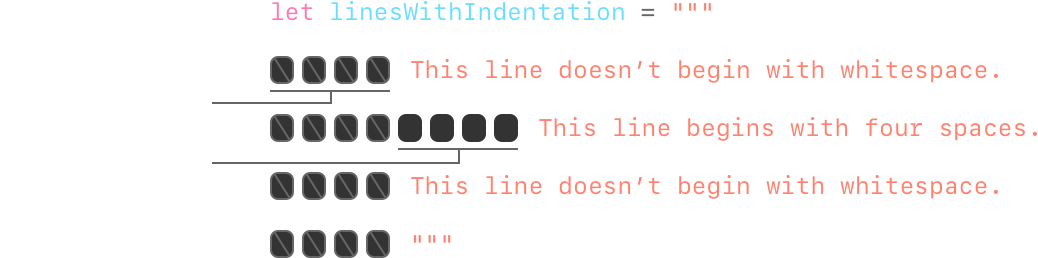
In the example above, even though the entire multiline string literal is indented, the first and last lines in the string don't begin with any whitespace. The middle line has more indentation than the closing quotation marks, so it starts with that extra four-space indentation.
在上面的例子中,尽管整个多行字符串字面量都是缩进的(源代码缩进),第一行和最后一行没有以空白字符串开始(实际的变量值)。中间一行的缩进用空白字符串(源代码缩进)比关闭引号(""")之前的空白字符串多,所以,它的行首将有 4 个空格。
Special Characters in String Literals 字符串字面量的特殊字符
String literals can include the following special characters:
字符串字面量可以包含以下特殊字符:
- The escaped special characters
\0(null character),\\(backslash),\t(horizontal tab),\n(line feed),\r(carriage return),\"(double quotation mark) and\'(single quotation mark) - An arbitrary Unicode scalar value, written as
\u{n}, where n is a 1--8 digit hexadecimal number (Unicode is discussed in Unicode below)
- 转义的特殊字符
\0(空字符)、\\(反斜线)、\t(水平制表符)、\n(换行符)、\r(回车符)、\"(双引号)和\'(单引号) - 任意的 Unicode 标量值,写作
\u{n},其中 n 为一到八位的十六进制数(下文 Unicode 中会讨论 Unicode)
The code below shows four examples of these special characters.
The wiseWords constant contains two escaped double quotation marks.
The dollarSign, blackHeart, and sparklingHeart constants
demonstrate the Unicode scalar format:
下面的代码为各种特殊字符的使用示例。 wiseWords 常量包含了两个双引号。 dollarSign、blackHeart 和 sparklingHeart 常量演示了三种不同格式的 Unicode 标量:
let wiseWords = "\"Imagination is more important than knowledge\" - Einstein"
// "Imagination is more important than knowledge" - Einstein
let dollarSign = "\u{24}"        // $,  Unicode scalar U+0024
let blackHeart = "\u{2665}"      // ♥,  Unicode scalar U+2665
let sparklingHeart = "\u{1F496}" // 💖, Unicode scalar U+1F496
Because multiline string literals use three double quotation marks instead of just one,
you can include a double quotation mark (") inside of a multiline string literal
without escaping it.
To include the text """ in a multiline string,
escape at least one of the quotation marks.
For example:
由于多行字符串字面量使用了三个双引号,而不是一个,所以你可以在多行字符串字面量里直接使用双引号(")而不必加上转义符(\)。要在多行字符串字面量中使用 """ 的话,就需要使用至少一个转义符(\):
let threeDoubleQuotationMarks = """
Escaping the first quotation mark \"""
Escaping all three quotation marks \"\"\"
"""
Extended String Delimiters 扩展字符串分隔符
You can place a string literal within extended delimiters
to include special characters in a string
without invoking their effect.
You place your string within quotation marks (")
and surround that with number signs (#).
For example, printing the string literal #"Line 1\nLine 2"#
prints the line feed escape sequence (\n)
rather than printing the string across two lines.
你可以将字符串字面值置于扩展分隔符内,以便在字符串中包含特殊字符而不触发其转义效果。你将字符串置于双引号(")内,并在其周围加上井号(#)。例如,打印字符串字面值 #"Line 1\nLine 2"# 会打印出换行符转义序列(\n),而不是将字符串打印在两行上。
If you need the special effects of a character in a string literal,
match the number of number signs within the string
following the escape character (\).
For example, if your string is #"Line 1\nLine 2"#
and you want to break the line,
you can use #"Line 1\#nLine 2"# instead.
Similarly, ###"Line1\###nLine2"### also breaks the line.
在字符串字面值中,如果你需要某个字符的特殊效果,需使字符串中紧跟转义字符(\)后的井号(#)数量相匹配。例如,如果你的字符串是 #"Line 1\nLine 2"# 并且你想要换行,可以使用 #"Line 1\#nLine 2"# 替代。同样,###"Line1\###nLine2"### 也能实现换行效果。
String literals created using extended delimiters can also be multiline string literals.
You can use extended delimiters to include the text """ in a multiline string,
overriding the default behavior that ends the literal. For example:
扩展分隔符创建的字符串文字也可以是多行字符串文字。你可以使用扩展分隔符在多行字符串中包含文本 """,覆盖原有的结束文字的默认行为。例如:
let threeMoreDoubleQuotationMarks = #"""
Here are three more double quotes: """
"""#
Initializing an Empty String 初始化空字符串
To create an empty String value as the starting point
for building a longer string,
either assign an empty string literal to a variable
or initialize a new String instance with initializer syntax:
要创建一个空字符串 String 作为初始值,可以将空的字符串字面量赋值给变量,也可以初始化一个新的 String 实例:
var emptyString = ""               // empty string literal
var anotherEmptyString = String()  // initializer syntax
// these two strings are both empty, and are equivalent to each other
Find out whether a String value is empty
by checking its Boolean isEmpty property:
通过检查 String 值的布尔型 isEmpty 属性,来确定它是否为空:
if emptyString.isEmpty {
    print("Nothing to see here")
}
// Prints "Nothing to see here".
String Mutability 字符串可变性
You indicate whether a particular String can be modified (or mutated)
by assigning it to a variable (in which case it can be modified),
or to a constant (in which case it can't be modified):
你可以通过将一个特定的 String 赋值给变量(这种情况下可以被修改)或常量(这种情况下不能被修改),来指定它是否可以被修改(或者说可变):
var variableString = "Horse"
variableString += " and carriage"
// variableString is now "Horse and carriage"

let constantString = "Highlander"
constantString += " and another Highlander"
// this reports a compile-time error - a constant string cannot be modified
Note · 注意
This approach is different from string mutation in Objective-C and Cocoa,
where you choose between two classes (NSString and NSMutableString)
to indicate whether a string can be mutated.
这种方式与 Objective-C 和 Cocoa 中的字符串可变性不同,在那里你需要在两个类(NSString 和 NSMutableString)之间进行选择,来指定字符串是否可以被修改。
Strings Are Value Types 字符串是值类型
Swift's String type is a value type.
If you create a new String value,
that String value is copied when it's passed to a function or method,
or when it's assigned to a constant or variable.
In each case, a new copy of the existing String value is created,
and the new copy is passed or assigned, not the original version.
Value types are described in Structures and Enumerations Are Value Types.
在 Swift 中 String 类型是值类型。如果你创建了一个新的字符串,那么当其进行常量、变量赋值操作,或在函数/方法中传递时,会进行值拷贝。在前述任一情况下,都会对已有字符串值创建新副本,并对该新副本而非原始字符串进行传递或赋值操作。值类型在结构体和枚举是值类型中进行了详细描述。
Swift's copy-by-default String behavior ensures that
when a function or method passes you a String value,
it's clear that you own that exact String value,
regardless of where it came from.
You can be confident that the string you are passed won't be modified
unless you modify it yourself.
Swift 默认拷贝 String 的行为保证了在函数/方法向你传递的 String 所属权属于你,无论该值来自于哪里。你可以确信传递的 String 不会被修改,除非你自己去修改它。
Behind the scenes, Swift's compiler optimizes string usage so that actual copying takes place only when absolutely necessary. This means you always get great performance when working with strings as value types.
在实际编译时,Swift 编译器会优化字符串的使用,使实际的复制只发生在绝对必要的情况下,这意味着你将字符串作为值类型的同时可以获得极高的性能。
Working with Characters 使用字符
You can access the individual Character values for a String
by iterating over the string with a for-in loop:
你可以使用 for-in 循环遍历字符串,来获取 String 中的每一个 Character 值:
for character in "Dog!🐶" {
    print(character)
}
// D
// o
// g
// !
// 🐶
The for-in loop is described in For-In Loops.
for-in 循环在 For-In 循环中进行了详细描述。
Alternatively, you can create a stand-alone Character constant or variable
from a single-character string literal by providing a Character type annotation:
另外, 当你有一个只包含一个字符的字符串字面量时,通过明确给出 Character 这种类型的标注,就能够将其转化为一个独立存在的 Character 类型的常量或者变量。
let exclamationMark: Character = "!"String values can be constructed by passing an array of Character values
as an argument to its initializer:
String 值可以通过把一个 Character 值数组作为实参传递给它的构造器来创建:
let catCharacters: [Character] = ["C", "a", "t", "!", "🐱"]
let catString = String(catCharacters)
print(catString)
// Prints "Cat!🐱".
Concatenating Strings and Characters 连接字符串和字符
String values can be added together (or concatenated)
with the addition operator (+) to create a new String value:
String 值可以通过加法运算符(+)相加在一起(或者说连接),创建一个新的 String 值:
let string1 = "hello"
let string2 = " there"
var welcome = string1 + string2
// welcome now equals "hello there"
You can also append a String value to an existing String variable
with the addition assignment operator (+=):
你也可以通过加法赋值运算符(+=)将一个 String 值添加到一个已经存在的 String 变量上:
var instruction = "look over"
instruction += string2
// instruction now equals "look over there"
You can append a Character value to a String variable
with the String type's append() method:
你可以用 String 类型的 append() 方法将一个 Character 值附加到一个 String 变量的尾部:
let exclamationMark: Character = "!"
welcome.append(exclamationMark)
// welcome now equals "hello there!"
Note · 注意
You can't append a String or Character to an existing Character variable,
because a Character value must contain a single character only.
你不能将一个 String 或者 Character 添加到一个已经存在的 Character 变量上,因为 Character 值只能包含一个字符。
If you're using multiline string literals to build up the lines of a longer string, you want every line in the string to end with a line break, including the last line. For example:
如果你需要使用多行字符串字面量来拼接字符串,并且你需要字符串每一行都以换行符结尾,包括最后一行, 示例如下:
let badStart = """
    one
    two
    """
let end = """
    three
    """
print(badStart + end)
// Prints two lines:
// one
// twothree

let goodStart = """
    one
    two

    """
print(goodStart + end)
// Prints three lines:
// one
// two
// three
In the code above,
concatenating badStart with end
produces a two-line string,
which isn't the desired result.
Because the last line of badStart
doesn't end with a line break,
that line gets combined with the first line of end.
In contrast,
both lines of goodStart end with a line break,
so when it's combined with end
the result has three lines,
as expected.
上面的代码,把 badStart 和 end 拼接起来的字符串非我们想要的结果。因为 badStart 最后一行没有换行符,它与 end 的第一行结合到了一起。相反的,goodStart 的每一行都以换行符结尾,所以它与 end 拼接的字符串总共有三行,正如我们期望的那样。
String Interpolation 字符串插值
String interpolation is a way to construct a new String value
from a mix of constants, variables, literals, and expressions
by including their values inside a string literal.
You can use string interpolation
in both single-line and multiline string literals.
Each item that you insert into the string literal is wrapped in
a pair of parentheses, prefixed by a backslash (\):
字符串插值是一种构建新 String 值的方式,它可以把常量、变量、字面量和表达式的值包含在字符串字面量中,从而将它们组合起来。单行和多行字符串字面量都可以使用字符串插值。你插入到字符串字面量中的每一项都包裹在一对以反斜线(\)为前缀的圆括号中:
let multiplier = 3
let message = "\(multiplier) times 2.5 is \(Double(multiplier) * 2.5)"
// message is "3 times 2.5 is 7.5"
In the example above,
the value of multiplier is inserted into a string literal as \(multiplier).
This placeholder is replaced with the actual value of multiplier
when the string interpolation is evaluated to create an actual string.
在上面的例子中,multiplier 的值以 \(multiplier) 的形式被插入到一个字符串常量中。当创建字符串执行插值计算时此占位符会被替换为 multiplier 实际的值。
The value of multiplier is also part of a larger expression later in the string.
This expression calculates the value of Double(multiplier) * 2.5
and inserts the result (7.5) into the string.
In this case, the expression is written as \(Double(multiplier) * 2.5)
when it's included inside the string literal.
multiplier 的值也作为字符串中后面表达式的一部分。该表达式计算 Double(multiplier) * 2.5 的值并将结果(7.5)插入到字符串中。在这个例子中,表达式写为 \(Double(multiplier) * 2.5) 并包含在字符串字面量中。
You can use extended string delimiters to create strings containing characters that would otherwise be treated as a string interpolation. For example:
你可以使用扩展字符串分隔符创建字符串,来包含不想作为字符串插值处理的字符。例如:
print(#"Write an interpolated string in Swift using \(multiplier)."#)
// Prints "Write an interpolated string in Swift using \(multiplier)."
To use string interpolation inside a string that uses extended delimiters, match the number of number signs after the backslash to the number of number signs at the beginning and end of the string. For example:
如果要在使用扩展字符串分隔符的字符串中使用字符串插值,需要在反斜杠后面添加与开头和结尾数量相同扩展字符串分隔符。例如:
print(#"6 times 7 is \#(6 * 7)."#)
// Prints "6 times 7 is 42."
Note · 注意
The expressions you write inside parentheses within an interpolated string
can't contain an unescaped backslash (\), a carriage return, or a line feed.
However, they can contain other string literals.
插值字符串中写在括号中的表达式不能包含非转义反斜杠(\),并且不能包含回车或换行符。不过,插值字符串可以包含其他字面量。
Unicode
Unicode is an international standard for
encoding, representing, and processing text in different writing systems.
It enables you to represent almost any character from any language in a standardized form,
and to read and write those characters to and from an external source
such as a text file or web page.
Swift's String and Character types are fully Unicode-compliant,
as described in this section.
Unicode 是一个用于在不同书写系统中对文本进行编码、表示和处理的国际标准。它使你可以用标准格式表示来自任意语言几乎所有的字符,并能够对文本文件或网页这样的外部资源中的字符进行读写操作。Swift 的 String 和 Character 类型是完全兼容 Unicode 标准的。
Unicode Scalar Values Unicode 标量
Behind the scenes,
Swift's native String type is built from Unicode scalar values.
A Unicode scalar value is a unique 21-bit number for a character or modifier,
such as U+0061 for LATIN SMALL LETTER A ("a"),
or U+1F425 for FRONT-FACING BABY CHICK ("🐥").
Swift 原生的 String 类型在底层是基于 Unicode 标量建立的。Unicode 标量是对应字符或者修饰符的唯一的 21 位数字,例如 U+0061 表示 LATIN SMALL LETTER A("a"),U+1F425 表示 FRONT-FACING BABY CHICK("🐥")。
Note that not all 21-bit Unicode scalar values are assigned to a character ---
some scalars are reserved for future assignment or for use in UTF-16 encoding.
Scalar values that have been assigned to a character typically also have a name,
such as LATIN SMALL LETTER A and FRONT-FACING BABY CHICK in the examples above.
请注意,并非所有 21 位 Unicode 标量值都分配给字符,某些标量被保留用于将来分配或用于 UTF-16 编码。已分配的标量值通常也有一个名称,例如上面示例中的 LATIN SMALL LETTER A 和 FRONT-FACING BABY CHICK。
Extended Grapheme Clusters 可扩展的字形群集
Every instance of Swift's Character type represents
a single extended grapheme cluster.
An extended grapheme cluster is a sequence of one or more Unicode scalars
that (when combined) produce a single human-readable character.
每一个 Swift 的 Character 类型代表一个 可扩展的字形群。而一个可扩展的字形群构成了人类可读的单个字符,它由一个或多个(当组合时) Unicode 标量的序列组成。
Here's an example.
The letter é can be represented as the single Unicode scalar é
(LATIN SMALL LETTER E WITH ACUTE, or U+00E9).
However, the same letter can also be represented as a pair of scalars ---
a standard letter e (LATIN SMALL LETTER E, or U+0065),
followed by the COMBINING ACUTE ACCENT scalar (U+0301).
The COMBINING ACUTE ACCENT scalar is graphically applied to the scalar that precedes it,
turning an e into an é when it's rendered by
a Unicode-aware text-rendering system.
举个例子,字母 é 可以用单一的 Unicode 标量 é(LATIN SMALL LETTER E WITH ACUTE,或者 U+00E9)来表示。然而,同一个字母也可以用一对标量来表示——一个标准的字母 e(LATIN SMALL LETTER E,或者 U+0065),后面跟着 COMBINING ACUTE ACCENT 标量(U+0301)。COMBINING ACUTE ACCENT 标量会在图形上作用于它前面的标量,当支持 Unicode 的文本渲染系统渲染时,就会把 e 变成 é。
In both cases, the letter é is represented as a single Swift Character value
that represents an extended grapheme cluster.
In the first case, the cluster contains a single scalar;
in the second case, it's a cluster of two scalars:
在这两种情况中,字母 é 代表了一个单一的 Swift 的 Character 值,同时代表了一个可扩展的字形群。在第一种情况,这个字形群包含一个单一标量;而在第二种情况,它是包含两个标量的字形群:
let eAcute: Character = "\u{E9}"                         // é
let combinedEAcute: Character = "\u{65}\u{301}"          // e followed by ́
// eAcute is é, combinedEAcute is é
Extended grapheme clusters are a flexible way to represent
many complex script characters as a single Character value.
For example, Hangul syllables from the Korean alphabet
can be represented as either a precomposed or decomposed sequence.
Both of these representations qualify as a single Character value in Swift:
可扩展的字形集是一个将许多复杂的脚本字符表示为单个字符值的灵活方式。例如,来自朝鲜语字母表的韩语音节能表示为组合或分解的有序排列。在 Swift 都会表示为同一个单一的 Character 值:
let precomposed: Character = "\u{D55C}"                  // 한
let decomposed: Character = "\u{1112}\u{1161}\u{11AB}"   // ᄒ, ᅡ, ᆫ
// precomposed is 한, decomposed is 한
Extended grapheme clusters enable
scalars for enclosing marks (such as COMBINING ENCLOSING CIRCLE, or U+20DD)
to enclose other Unicode scalars as part of a single Character value:
可拓展的字符群集可以使包围记号(例如 COMBINING ENCLOSING CIRCLE 或者 U+20DD)的标量包围其他 Unicode 标量,作为一个单一的 Character 值:
let enclosedEAcute: Character = "\u{E9}\u{20DD}"
// enclosedEAcute is é⃝
Unicode scalars for regional indicator symbols
can be combined in pairs to make a single Character value,
such as this combination of REGIONAL INDICATOR SYMBOL LETTER U (U+1F1FA)
and REGIONAL INDICATOR SYMBOL LETTER S (U+1F1F8):
地域性指示符号的 Unicode 标量可以组合成一个单一的 Character 值,例如 REGIONAL INDICATOR SYMBOL LETTER U(U+1F1FA)和 REGIONAL INDICATOR SYMBOL LETTER S(U+1F1F8):
let regionalIndicatorForUS: Character = "\u{1F1FA}\u{1F1F8}"
// regionalIndicatorForUS is 🇺🇸
Counting Characters 计算字符数量
To retrieve a count of the Character values in a string,
use the count property of the string:
如果想要获得一个字符串中 Character 值的数量,可以使用 count 属性:
let unusualMenagerie = "Koala 🐨, Snail 🐌, Penguin 🐧, Dromedary 🐪"
print("unusualMenagerie has \(unusualMenagerie.count) characters")
// Prints "unusualMenagerie has 40 characters".
Note that Swift's use of extended grapheme clusters for Character values
means that string concatenation and modification may not always affect
a string's character count.
注意在 Swift 中,使用可拓展的字符群集作为 Character 值来连接或改变字符串时,并不一定会更改字符串的字符数量。
For example, if you initialize a new string with the four-character word cafe,
and then append a COMBINING ACUTE ACCENT (U+0301) to the end of the string,
the resulting string will still have a character count of 4,
with a fourth character of é, not e:
例如,如果你用四个字符的单词 cafe 初始化一个新的字符串,然后在字符串末尾添加一个 COMBINING ACUTE ACCENT(U+0301),最终这个字符串的字符数量仍然是 4,第四个字符是 é 而不是 e:
var word = "cafe"
print("the number of characters in \(word) is \(word.count)")
// Prints "the number of characters in cafe is 4".

word += "\u{301}"    // COMBINING ACUTE ACCENT, U+0301

print("the number of characters in \(word) is \(word.count)")
// Prints "the number of characters in café is 4".
Note · 注意
Extended grapheme clusters can be composed of multiple Unicode scalars.
This means that different characters ---
and different representations of the same character ---
can require different amounts of memory to store.
Because of this, characters in Swift don't each take up
the same amount of memory within a string's representation.
As a result, the number of characters in a string can't be calculated
without iterating through the string to determine
its extended grapheme cluster boundaries.
If you are working with particularly long string values,
be aware that the count property
must iterate over the Unicode scalars in the entire string
in order to determine the characters for that string.
The count of the characters returned by the count property
isn't always the same as the length property of
an NSString that contains the same characters.
The length of an NSString is based on
the number of 16-bit code units within the string's UTF-16 representation
and not the number of Unicode extended grapheme clusters within the string.
可扩展的字形群可以由多个 Unicode 标量组成。这意味着不同的字符以及相同字符的不同表示方式可能需要不同数量的内存空间来存储。所以 Swift 中的字符在一个字符串中并不一定占用相同的内存空间数量。因此在没有获取字符串的可扩展的字符群的范围时候,就不能计算出字符串的字符数量。如果你正在处理一个长字符串,需要注意 count 属性必须遍历全部的 Unicode 标量,来确定字符串的字符数量。
另外需要注意的是通过 count 属性返回的字符数量并不总是与包含相同字符的 NSString 的 length 属性相同。NSString 的 length 属性是利用 UTF-16 表示的十六位代码单元数字,而不是 Unicode 扩展字形簇。
Accessing and Modifying a String 访问和修改字符串
You access and modify a string through its methods and properties, or by using subscript syntax.
你可以通过字符串的属性和方法来访问和修改它,当然也可以用下标语法完成。
String Indices 字符串索引
Each String value has an associated index type,
String.Index,
which corresponds to the position of each Character in the string.
每一个 String 值都有一个关联的索引(index)类型,String.Index,它对应着字符串中的每一个 Character 的位置。
As mentioned above,
different characters can require different amounts of memory to store,
so in order to determine which Character is at a particular position,
you must iterate over each Unicode scalar from the start or end of that String.
For this reason, Swift strings can't be indexed by integer values.
前面提到,不同的字符可能会占用不同数量的内存空间,所以要知道 Character 的确定位置,就必须从 String 开头遍历每一个 Unicode 标量直到结尾。因此,Swift 的字符串不能用整数(integer)做索引。
Use the startIndex property to access
the position of the first Character of a String.
The endIndex property is the position after the last character in a String.
As a result,
the endIndex property isn't a valid argument to a string's subscript.
If a String is empty, startIndex and endIndex are equal.
使用 startIndex 属性可以获取一个 String 的第一个 Character 的索引。使用 endIndex 属性可以获取最后一个 Character 的后一个位置的索引。因此,endIndex 属性不能作为一个字符串的有效下标。如果 String 是空串,startIndex 和 endIndex 是相等的。
You access the indices before and after a given index
using the index(before:) and index(after:) methods of String.
To access an index farther away from the given index,
you can use the index(_:offsetBy:) method
instead of calling one of these methods multiple times.
通过调用 String 的 index(before:) 或 index(after:) 方法,可以立即得到前面或后面的一个索引。你还可以通过调用 index(_:offsetBy:) 方法来获取对应偏移量的索引,这种方式可以避免多次调用 index(before:) 或 index(after:) 方法。
You can use subscript syntax to access
the Character at a particular String index.
你可以使用下标语法来访问 String 特定索引的 Character。
let greeting = "Guten Tag!"
greeting[greeting.startIndex]
// G
greeting[greeting.index(before: greeting.endIndex)]
// !
greeting[greeting.index(after: greeting.startIndex)]
// u
let index = greeting.index(greeting.startIndex, offsetBy: 7)
greeting[index]
// a
Attempting to access an index outside of a string's range
or a Character at an index outside of a string's range
will trigger a runtime error.
试图获取越界索引对应的 Character,将引发一个运行时错误。
greeting[greeting.endIndex] // Error
greeting.index(after: greeting.endIndex) // Error
Use the indices property to access all of the
indices of individual characters in a string.
使用 indices 属性会创建一个包含全部索引的范围(Range),用来在一个字符串中访问单个字符。
for index in greeting.indices {
    print("\(greeting[index]) ", terminator: "")
}
// Prints "G u t e n   T a g ! ".
Note · 注意
You can use the startIndex and endIndex properties
and the index(before:), index(after:), and index(_:offsetBy:) methods
on any type that conforms to the Collection protocol.
This includes String, as shown here,
as well as collection types such as Array, Dictionary, and Set.
你可以在任意一个确认的并遵循 Collection 协议的类型里面使用 startIndex 和 endIndex 属性或者 index(before:) 、index(after:) 和 index(_:offsetBy:) 方法,如上文所示是使用在 String 中,你也可以使用在 Array、Dictionary 和 Set 中。
Inserting and Removing 插入和删除
To insert a single character into a string at a specified index,
use the insert(_:at:) method,
and to insert the contents of another string at a specified index,
use the insert(contentsOf:at:) method.
调用 insert(_:at:) 方法可以在一个字符串的指定索引插入一个字符,调用 insert(contentsOf:at:) 方法可以在一个字符串的指定索引插入一段字符串。
var welcome = "hello"
welcome.insert("!", at: welcome.endIndex)
// welcome now equals "hello!"

welcome.insert(contentsOf: " there", at: welcome.index(before: welcome.endIndex))
// welcome now equals "hello there!"
To remove a single character from a string at a specified index,
use the remove(at:) method,
and to remove a substring at a specified range,
use the removeSubrange(_:) method:
调用 remove(at:) 方法可以在一个字符串的指定索引删除一个字符,调用 removeSubrange(_:) 方法可以在一个字符串的指定索引删除一个子字符串。
welcome.remove(at: welcome.index(before: welcome.endIndex))
// welcome now equals "hello there"

let range = welcome.index(welcome.endIndex, offsetBy: -6)..<welcome.endIndex
welcome.removeSubrange(range)
// welcome now equals "hello"
Note · 注意
You can use the insert(_:at:), insert(contentsOf:at:),
remove(at:), and removeSubrange(_:) methods
on any type that conforms to the RangeReplaceableCollection protocol.
This includes String, as shown here,
as well as collection types such as Array, Dictionary, and Set.
你可以在任意遵循 RangeReplaceableCollection 协议的类型上使用 insert(_:at:)、insert(contentsOf:at:)、remove(at:) 和 removeSubrange(_:) 方法。这包括这里所示的 String,以及 Array、Dictionary 和 Set 等集合类型。
Substrings 子字符串
When you get a substring from a string ---
for example, using a subscript or a method like prefix(_:) ---
the result is an instance
of Substring,
not another string.
Substrings in Swift have most of the same methods as strings,
which means you can work with substrings
the same way you work with strings.
However, unlike strings,
you use substrings for only a short amount of time
while performing actions on a string.
When you're ready to store the result for a longer time,
you convert the substring to an instance of String.
For example:
当你从字符串中获取一个子字符串 —— 例如,使用下标或者 prefix(_:) 之类的方法 —— 就可以得到一个 Substring 的实例,而非另外一个 String。
Swift 里的 Substring 绝大部分函数都跟 String 一样,意味着你可以使用同样的方式去操作 Substring 和 String。然而,跟 String 不同的是,你只有在短时间内需要操作字符串时,才会使用 Substring。当你需要长时间保存结果时,就把 Substring 转化为 String, 示例如下:
let greeting = "Hello, world!"
let index = greeting.firstIndex(of: ",") ?? greeting.endIndex
let beginning = greeting[..<index]
// beginning is "Hello"

// Convert the result to a String for long-term storage.
let newString = String(beginning)
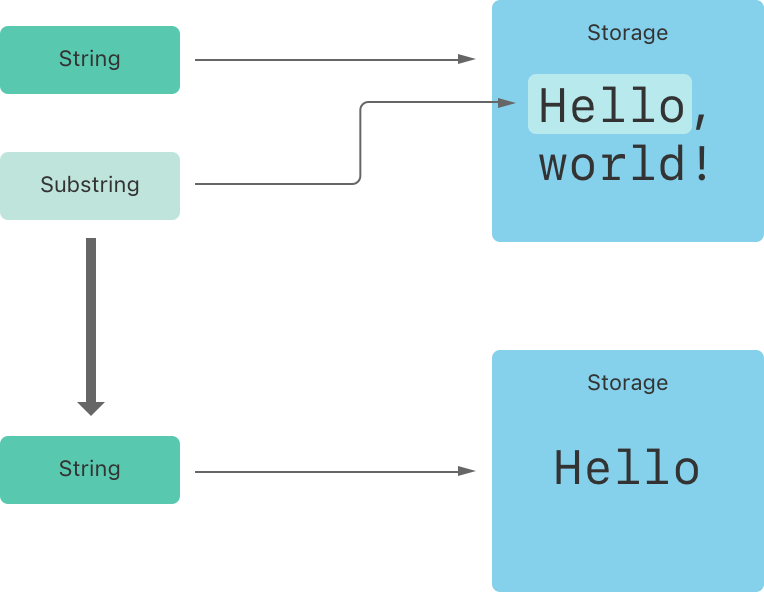
Like strings, each substring has a region of memory where the characters that make up the substring are stored. The difference between strings and substrings is that, as a performance optimization, a substring can reuse part of the memory that's used to store the original string, or part of the memory that's used to store another substring. (Strings have a similar optimization, but if two strings share memory, they're equal.) This performance optimization means you don't have to pay the performance cost of copying memory until you modify either the string or substring. As mentioned above, substrings aren't suitable for long-term storage --- because they reuse the storage of the original string, the entire original string must be kept in memory as long as any of its substrings are being used.
就像 String,每一个 Substring 都会在内存里保存字符集。而 String 和 Substring 的区别在于性能优化上,Substring 可以重用原 String 的内存空间,或者另一个 Substring 的内存空间(String 也有同样的优化,但如果两个 String 共享内存的话,它们就会相等)。这一优化意味着你在修改 String 和 Substring 之前都不需要消耗性能去复制内存。就像前面说的那样,Substring 不适合长期存储 —— 因为它重用了原 String 的内存空间,原 String 的内存空间必须保留直到它的 Substring 不再被使用为止。
In the example above,
greeting is a string,
which means it has a region of memory
where the characters that make up the string are stored.
Because
beginning is a substring of greeting,
it reuses the memory that greeting uses.
In contrast,
newString is a string ---
when it's created from the substring,
it has its own storage.
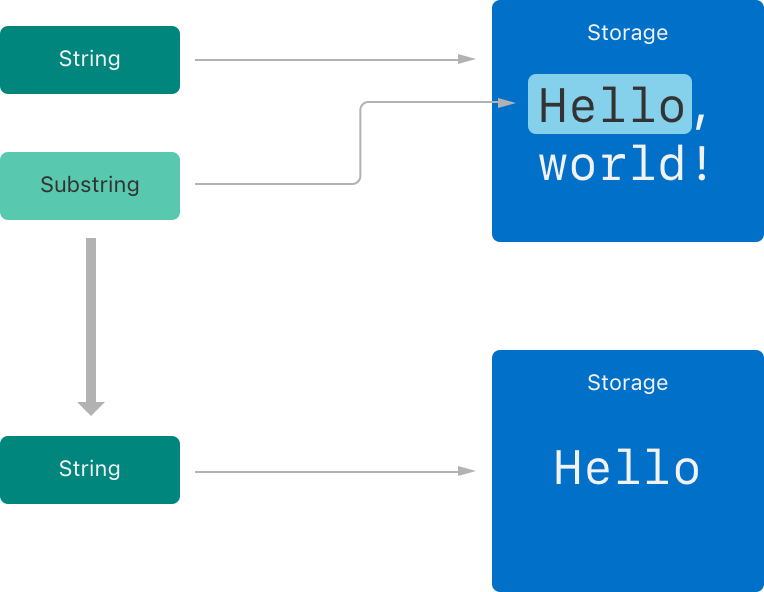
The figure below shows these relationships:
上面的例子,greeting 是一个 String,意味着它在内存里有一片空间保存字符集。而由于 beginning 是 greeting 的 Substring,它重用了 greeting 的内存空间。相反,newString 是一个 String —— 它是使用 Substring 创建的,拥有一片自己的内存空间。下面的图展示了他们之间的关系:
Note · 注意
Both String and Substring conform to the
StringProtocol protocol,
which means it's often convenient for string-manipulation functions
to accept a StringProtocol value.
You can call such functions with either a String or Substring value.
String 和 Substring 都遵循
StringProtocol协议, 这意味着操作字符串的函数使用 StringProtocol 会更加方便。你可以传入 String 或 Substring 去调用函数。
Comparing Strings 比较字符串
Swift provides three ways to compare textual values: string and character equality, prefix equality, and suffix equality.
Swift 提供了三种方式来比较文本值:字符串字符相等、前缀相等和后缀相等。
String and Character Equality 字符串和字符相等
String and character equality is checked with the “equal to” operator (==)
and the “not equal to” operator (!=),
as described in Comparison Operators:
字符串/字符可以用等于操作符(==)和不等于操作符(!=),详细描述在 比较运算符:
let quotation = "We're a lot alike, you and I."
let sameQuotation = "We're a lot alike, you and I."
if quotation == sameQuotation {
    print("These two strings are considered equal")
}
// Prints "These two strings are considered equal".
Two String values (or two Character values) are considered equal if
their extended grapheme clusters are canonically equivalent.
Extended grapheme clusters are canonically equivalent if they have
the same linguistic meaning and appearance,
even if they're composed from different Unicode scalars behind the scenes.
如果两个 String 值(或两个 Character 值)的扩展字形簇在规范上等价,那么它们就被认为是相等的。扩展字形簇在规范上等价是指它们具有相同的语言意义和外观,即便它们在底层是由不同的 Unicode 标量组成的。
For example, LATIN SMALL LETTER E WITH ACUTE (U+00E9)
is canonically equivalent to LATIN SMALL LETTER E (U+0065)
followed by COMBINING ACUTE ACCENT (U+0301).
Both of these extended grapheme clusters are valid ways to represent the character é,
and so they're considered to be canonically equivalent:
例如,LATIN SMALL LETTER E WITH ACUTE(U+00E9)就是标准相等于 LATIN SMALL LETTER E(U+0065)后面加上 COMBINING ACUTE ACCENT(U+0301)。这两个字符群集都是表示字符 é 的有效方式,所以它们被认为是标准相等的:
// "Voulez-vous un café?" using LATIN SMALL LETTER E WITH ACUTE
let eAcuteQuestion = "Voulez-vous un caf\u{E9}?"

// "Voulez-vous un café?" using LATIN SMALL LETTER E and COMBINING ACUTE ACCENT
let combinedEAcuteQuestion = "Voulez-vous un caf\u{65}\u{301}?"

if eAcuteQuestion == combinedEAcuteQuestion {
    print("These two strings are considered equal")
}
// Prints "These two strings are considered equal".
Conversely, LATIN CAPITAL LETTER A (U+0041, or "A"),
as used in English, is not equivalent to
CYRILLIC CAPITAL LETTER A (U+0410, or "А"),
as used in Russian.
The characters are visually similar,
but don't have the same linguistic meaning:
相反,英语中使用的 LATIN CAPITAL LETTER A(U+0041,或者 "A")不等价于俄语中使用的 CYRILLIC CAPITAL LETTER A(U+0410,或者 "А")。这两个字符在视觉上相似,但语言意义却不同:
let latinCapitalLetterA: Character = "\u{41}"

let cyrillicCapitalLetterA: Character = "\u{0410}"

if latinCapitalLetterA != cyrillicCapitalLetterA {
    print("These two characters aren't equivalent.")
}
// Prints "These two characters aren't equivalent."
Note · 注意
String and character comparisons in Swift aren't locale-sensitive.
在 Swift 中,字符串和字符并不区分地域(not locale-sensitive)。
Prefix and Suffix Equality 前缀和后缀相等
To check whether a string has a particular string prefix or suffix,
call the string's hasPrefix(_:) and hasSuffix(_:) methods,
both of which take a single argument of type String and return a Boolean value.
通过调用字符串的 hasPrefix(_:) 或 hasSuffix(_:) 方法来检查字符串是否拥有特定前缀或后缀,两个方法均接收一个 String 类型的实参,并返回一个布尔值。
The examples below consider an array of strings representing the scene locations from the first two acts of Shakespeare's Romeo and Juliet:
下面的例子以一个字符串数组表示莎士比亚话剧《罗密欧与朱丽叶》中前两场的场景位置:
let romeoAndJuliet = [
    "Act 1 Scene 1: Verona, A public place",
    "Act 1 Scene 2: Capulet's mansion",
    "Act 1 Scene 3: A room in Capulet's mansion",
    "Act 1 Scene 4: A street outside Capulet's mansion",
    "Act 1 Scene 5: The Great Hall in Capulet's mansion",
    "Act 2 Scene 1: Outside Capulet's mansion",
    "Act 2 Scene 2: Capulet's orchard",
    "Act 2 Scene 3: Outside Friar Lawrence's cell",
    "Act 2 Scene 4: A street in Verona",
    "Act 2 Scene 5: Capulet's mansion",
    "Act 2 Scene 6: Friar Lawrence's cell"
]
You can use the hasPrefix(_:) method with the romeoAndJuliet array
to count the number of scenes in Act 1 of the play:
你可以对 romeoAndJuliet 数组使用 hasPrefix(_:) 方法来计算话剧中第一幕的场景数:
var act1SceneCount = 0
for scene in romeoAndJuliet {
    if scene.hasPrefix("Act 1 ") {
        act1SceneCount += 1
    }
}
print("There are \(act1SceneCount) scenes in Act 1")
// Prints "There are 5 scenes in Act 1".
Similarly, use the hasSuffix(_:) method to count the number of scenes
that take place in or around Capulet's mansion and Friar Lawrence's cell:
相似地,你可以用 hasSuffix(_:) 方法来计算发生在不同地方的场景数:
var mansionCount = 0
var cellCount = 0
for scene in romeoAndJuliet {
    if scene.hasSuffix("Capulet's mansion") {
        mansionCount += 1
    } else if scene.hasSuffix("Friar Lawrence's cell") {
        cellCount += 1
    }
}
print("\(mansionCount) mansion scenes; \(cellCount) cell scenes")
// Prints "6 mansion scenes; 2 cell scenes".
Note · 注意
The hasPrefix(_:) and hasSuffix(_:) methods
perform a character-by-character canonical equivalence comparison between
the extended grapheme clusters in each string,
as described in String and Character Equality.
hasPrefix(_:) 和 hasSuffix(_:) 方法会在每个字符串的扩展字形簇之间逐字符进行规范等价比较,详见 字符串和字符相等。
Unicode Representations of Strings 字符串的 Unicode 表示形式
When a Unicode string is written to a text file or some other storage, the Unicode scalars in that string are encoded in one of several Unicode-defined encoding forms. Each form encodes the string in small chunks known as code units. These include the UTF-8 encoding form (which encodes a string as 8-bit code units), the UTF-16 encoding form (which encodes a string as 16-bit code units), and the UTF-32 encoding form (which encodes a string as 32-bit code units).
当一个 Unicode 字符串被写进文本文件或者其他储存时,字符串中的 Unicode 标量会用 Unicode 定义的几种编码格式(encoding forms)编码。每一个字符串中的小块编码都被称为代码单元(code units)。这些包括 UTF-8 编码格式(编码字符串为 8 位的代码单元),UTF-16 编码格式(编码字符串为 16 位的代码单元),以及 UTF-32 编码格式(编码字符串为 32 位的代码单元)。
Swift provides several different ways to access Unicode representations of strings.
You can iterate over the string with a for-in statement,
to access its individual Character values as Unicode extended grapheme clusters.
This process is described in Working with Characters.
Swift 提供了几种不同的方式来访问字符串的 Unicode 表示形式。你可以利用 for-in 语句遍历字符串,以 Unicode 扩展字形簇的形式访问每一个 Character 值。该过程在 使用字符 中进行了描述。
Alternatively, access a String value
in one of three other Unicode-compliant representations:
另外,也能够以其他三种 Unicode 兼容的表示形式之一来访问 String 值:
- A collection of UTF-8 code units (accessed with the string's
utf8property) - A collection of UTF-16 code units (accessed with the string's
utf16property) - A collection of 21-bit Unicode scalar values,
equivalent to the string's UTF-32 encoding form
(accessed with the string's
unicodeScalarsproperty)
- UTF-8 代码单元集合(利用字符串的
utf8属性进行访问) - UTF-16 代码单元集合(利用字符串的
utf16属性进行访问) - 21 位的 Unicode 标量值集合,也就是字符串的 UTF-32 编码格式(利用字符串的
unicodeScalars属性进行访问)
Each example below shows a different representation of the following string,
which is made up of the characters D, o, g,
‼ (DOUBLE EXCLAMATION MARK, or Unicode scalar U+203C),
and the 🐶 character (DOG FACE, or Unicode scalar U+1F436):
下面由 D,o,g,‼(DOUBLE EXCLAMATION MARK, Unicode 标量 U+203C)和 🐶(DOG FACE,Unicode 标量为 U+1F436)组成的字符串中的每一个字符代表着一种不同的表示:
let dogString = "Dog‼🐶"UTF-8 Representation UTF-8 表示
You can access a UTF-8 representation of a String
by iterating over its utf8 property.
This property is of type String.UTF8View,
which is a collection of unsigned 8-bit (UInt8) values,
one for each byte in the string's UTF-8 representation:
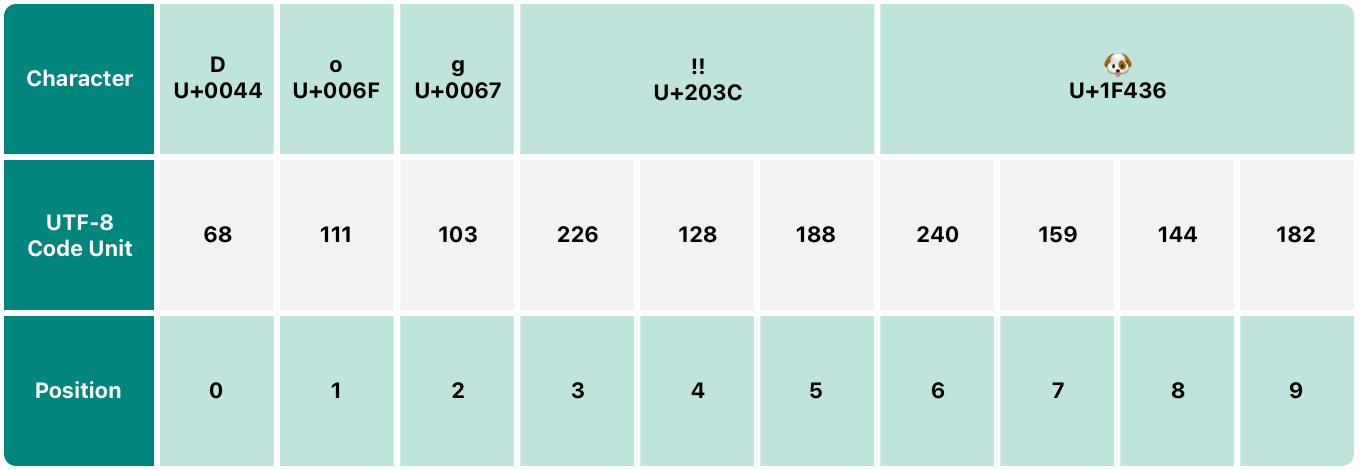
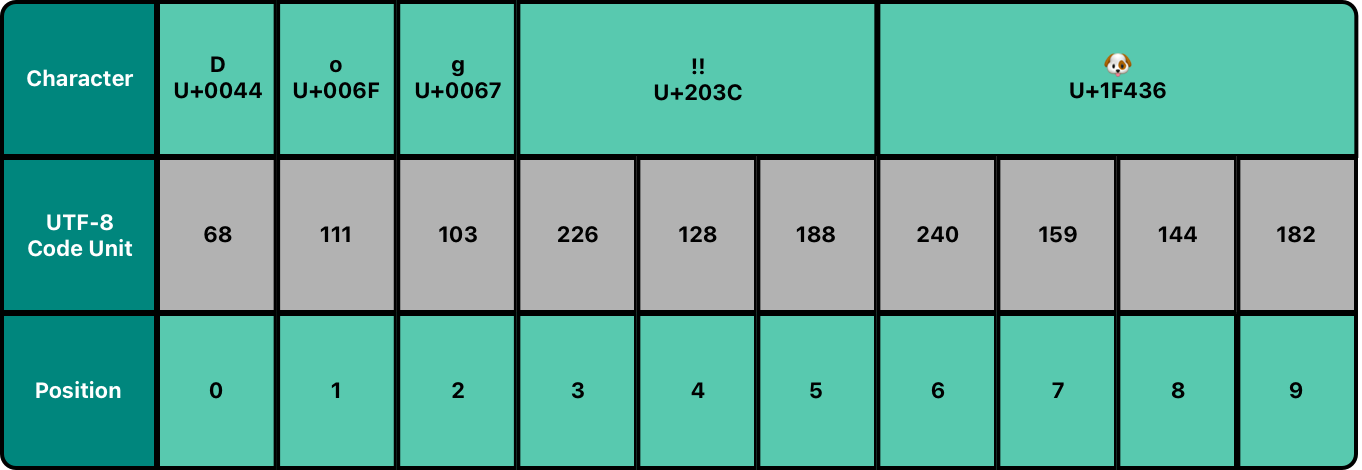
你可以通过遍历 String 的 utf8 属性来访问它的 UTF-8 表示。其为 String.UTF8View 类型的属性,UTF8View 是无符号 8 位(UInt8)值的集合,每一个 UInt8 值都是一个字符的 UTF-8 表示:
for codeUnit in dogString.utf8 {
    print("\(codeUnit) ", terminator: "")
}
print("")
// Prints "68 111 103 226 128 188 240 159 144 182 ".
In the example above, the first three decimal codeUnit values
(68, 111, 103)
represent the characters D, o, and g,
whose UTF-8 representation is the same as their ASCII representation.
The next three decimal codeUnit values
(226, 128, 188)
are a three-byte UTF-8 representation of the DOUBLE EXCLAMATION MARK character.
The last four codeUnit values (240, 159, 144, 182)
are a four-byte UTF-8 representation of the DOG FACE character.
上面的例子中,前三个 10 进制 codeUnit 值(68、111、103)代表了字符 D、o 和 g,它们的 UTF-8 表示与 ASCII 表示相同。接下来的三个 10 进制 codeUnit 值(226、128、188)是 DOUBLE EXCLAMATION MARK 的3字节 UTF-8 表示。最后的四个 codeUnit 值(240、159、144、182)是 DOG FACE 的4字节 UTF-8 表示。
UTF-16 Representation UTF-16 表示
You can access a UTF-16 representation of a String
by iterating over its utf16 property.
This property is of type String.UTF16View,
which is a collection of unsigned 16-bit (UInt16) values,
one for each 16-bit code unit in the string's UTF-16 representation:
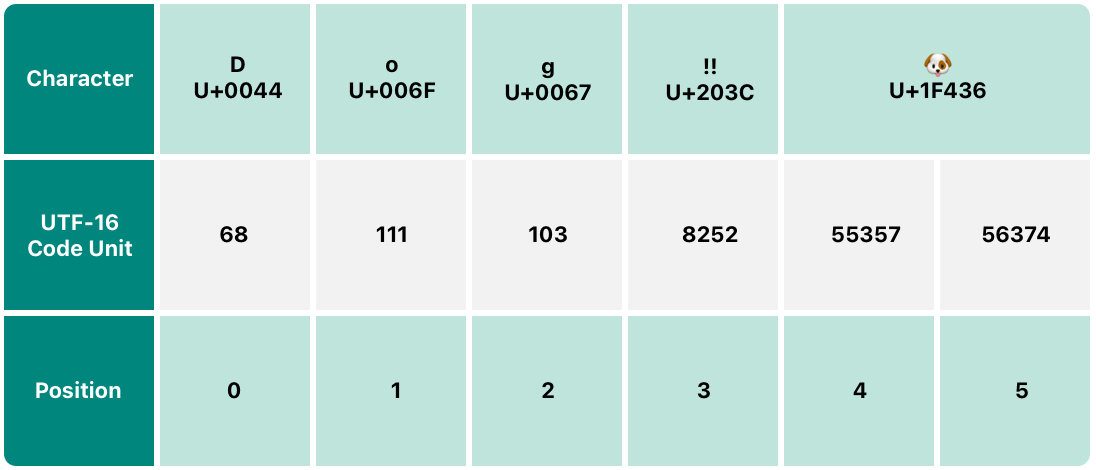
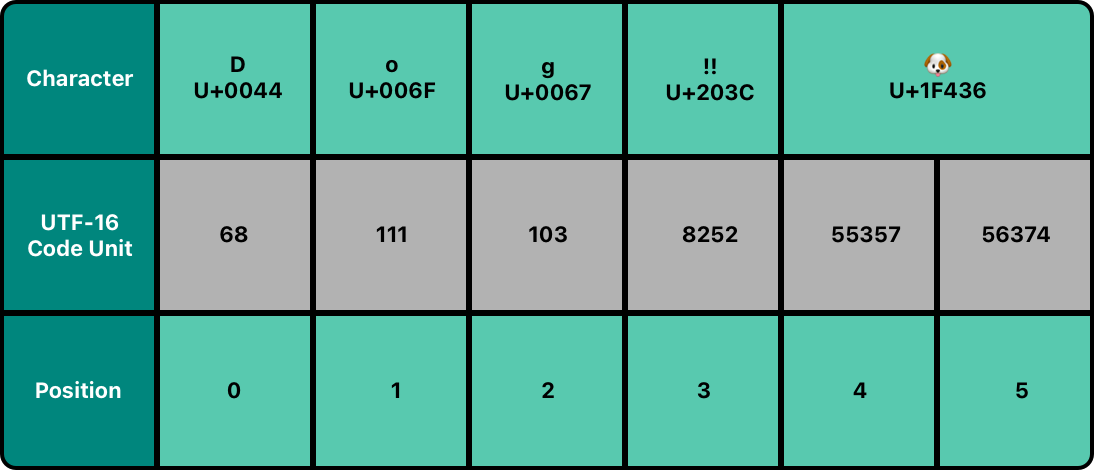
你可以通过遍历 String 的 utf16 属性来访问它的 UTF-16 表示。其为 String.UTF16View 类型的属性,UTF16View 是无符号16位(UInt16)值的集合,每一个 UInt16 都是一个字符的 UTF-16 表示:
for codeUnit in dogString.utf16 {
    print("\(codeUnit) ", terminator: "")
}
print("")
// Prints "68 111 103 8252 55357 56374 ".
Again, the first three codeUnit values
(68, 111, 103)
represent the characters D, o, and g,
whose UTF-16 code units have the same values as in the string's UTF-8 representation
(because these Unicode scalars represent ASCII characters).
同样,前三个 codeUnit 值(68、111、103)代表了字符 D、o 和 g,它们的 UTF-16 代码单元和 UTF-8 完全相同(因为这些 Unicode 标量表示 ASCII 字符)。
The fourth codeUnit value (8252) is a decimal equivalent of
the hexadecimal value 203C,
which represents the Unicode scalar U+203C
for the DOUBLE EXCLAMATION MARK character.
This character can be represented as a single code unit in UTF-16.
第四个 codeUnit 值(8252)是一个等于十六进制 203C 的的十进制值。这个代表了 DOUBLE EXCLAMATION MARK 字符的 Unicode 标量值 U+203C。这个字符在 UTF-16 中可以用一个代码单元表示。
The fifth and sixth codeUnit values (55357 and 56374)
are a UTF-16 surrogate pair representation of the DOG FACE character.
These values are a high-surrogate value of U+D83D (decimal value 55357)
and a low-surrogate value of U+DC36 (decimal value 56374).
第五和第六个 codeUnit 值(55357 和 56374)是 DOG FACE 字符的 UTF-16 表示。第一个值为 U+D83D(十进制值为 55357),第二个值为 U+DC36(十进制值为 56374)。
Unicode Scalar Representation Unicode 标量表示
You can access a Unicode scalar representation of a String value
by iterating over its unicodeScalars property.
This property is of type UnicodeScalarView,
which is a collection of values of type UnicodeScalar.
你可以通过遍历 String 值的 unicodeScalars 属性来访问它的 Unicode 标量表示。其为 UnicodeScalarView 类型的属性,UnicodeScalarView 是 UnicodeScalar 类型的值的集合。
Each UnicodeScalar has a value property that returns
the scalar's 21-bit value, represented within a UInt32 value:
每一个 UnicodeScalar 拥有一个 value 属性,可以返回对应的 21 位数值,用 UInt32 来表示:
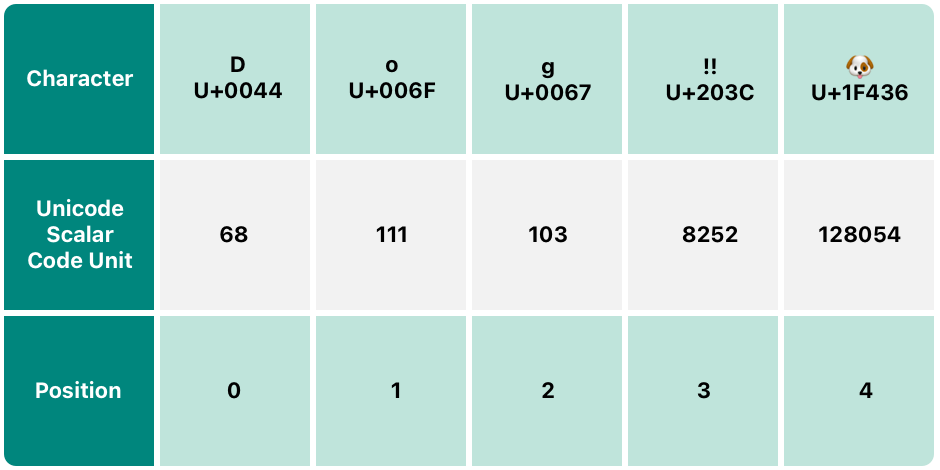
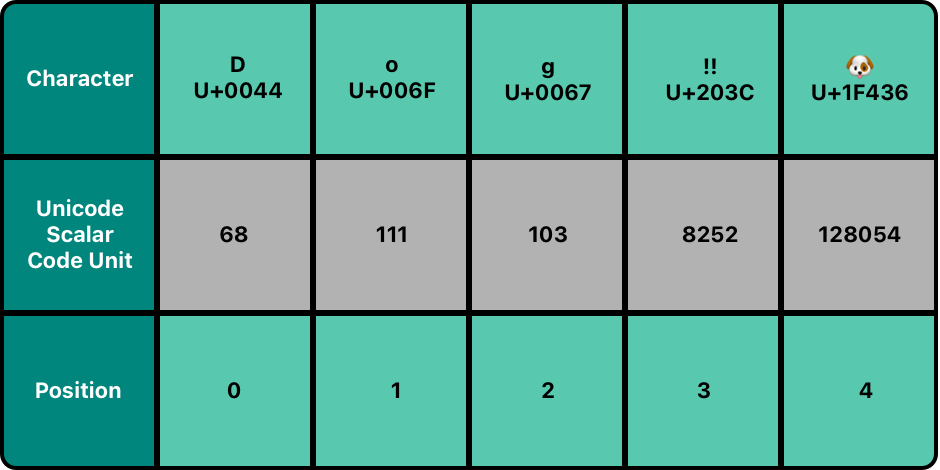
for scalar in dogString.unicodeScalars {
    print("\(scalar.value) ", terminator: "")
}
print("")
// Prints "68 111 103 8252 128054 ".
The value properties for the first three UnicodeScalar values
(68, 111, 103)
once again represent the characters D, o, and g.
前三个 UnicodeScalar 值(68、111、103)的 value 属性仍然代表字符 D、o 和 g。
The fourth codeUnit value (8252) is again a decimal equivalent of
the hexadecimal value 203C,
which represents the Unicode scalar U+203C
for the DOUBLE EXCLAMATION MARK character.
第四个 codeUnit 值(8252)仍然是一个等于十六进制 203C 的十进制值。这个代表了 DOUBLE EXCLAMATION MARK 字符的 Unicode 标量 U+203C。
The value property of the fifth and final UnicodeScalar, 128054,
is a decimal equivalent of the hexadecimal value 1F436,
which represents the Unicode scalar U+1F436 for the DOG FACE character.
第五个 UnicodeScalar 值的 value 属性,128054,是一个十六进制 1F436 的十进制表示。其等同于 DOG FACE 的 Unicode 标量 U+1F436。
As an alternative to querying their value properties,
each UnicodeScalar value can also be used to construct a new String value,
such as with string interpolation:
作为查询它们的 value 属性的一种替代方法,每个 UnicodeScalar 值也可以用来构建一个新的 String 值,比如在字符串插值中使用:
for scalar in dogString.unicodeScalars {
    print("\(scalar) ")
}
// D
// o
// g
// ‼
// 🐶