Control Flow控制流
Structure code with branches, loops, and early exits.
使用分支、循环和提前退出来搭建代码的流程结构。
Swift provides a variety of control flow statements.
These include while loops to perform a task multiple times;
if, guard, and switch statements
to execute different branches of code based on certain conditions;
and statements such as break and continue
to transfer the flow of execution to another point in your code.
Swift provides a for-in loop that makes it easy to iterate over
arrays, dictionaries, ranges, strings, and other sequences.
Swift also provides defer statements,
which wrap code to be executed when leaving the current scope.
Swift 提供了多种流程控制结构,包括可以多次执行任务的 while 循环,基于特定条件选择执行不同代码分支的
if, guard, 和 switch 语句,还有控制流程跳转到其他代码位置的 break 和 continue
语句。
Swift 提供了 for-in 循环,用来更简单地遍历数组(Array),字典(Dictionary),区间(Range),字符串(String)和其他序列类型。
Swift 还提供了 defer 语句,用来包含离开当前代码块时要执行的代码。
Swift's switch statement is considerably more powerful
than its counterpart in many C-like languages.
Cases can match many different patterns,
including interval matches, tuples, and casts to a specific type.
Matched values in a switch case can be bound to temporary constants or variables
for use within the case's body,
and complex matching conditions can be expressed with a where clause for each case.
Swift 的 switch 语句比许多类 C 语言要更加强大。
它的 case 可以匹配多种不同的模式,包括区间匹配、元组以及类型转换。
switch 语句的 case 中匹配的值可以声明为临时常量或变量以便在 case 作用域内使用,也可以配合 where 来描述更复杂的匹配条件。
For-In Loops For-In 循环
You use the for-in loop to iterate over a sequence,
such as items in an array, ranges of numbers, or characters in a string.
你可以使用 for-in 循环来遍历一个集合中的所有元素,例如数组中的元素、范围内的数字或者字符串中的字符。
This example uses a for-in loop to iterate over the items in an array:
以下例子使用 for-in 遍历一个数组所有元素:
let names = ["Anna", "Alex", "Brian", "Jack"]
for name in names {
    print("Hello, \(name)!")
}
// Hello, Anna!
// Hello, Alex!
// Hello, Brian!
// Hello, Jack!
You can also iterate over a dictionary to access its key-value pairs.
Each item in the dictionary is returned as a (key, value) tuple
when the dictionary is iterated,
and you can decompose the (key, value) tuple's members as explicitly named constants
for use within the body of the for-in loop.
In the code example below, the dictionary's keys are decomposed into a constant called animalName,
and the dictionary's values are decomposed into a constant called legCount.
你也可以通过遍历一个字典来访问它的键值对。遍历字典时,字典的每项元素会以 (key, value) 元组的形式返回,你可以在 for-in 循环中使用显式命名后的常量来解构 (key, value) 元组。下面的例子中,字典的键会声明为 animalName,
常量,字典的值会声明为 legCount 常量:
let numberOfLegs = ["spider": 8, "ant": 6, "cat": 4]
for (animalName, legCount) in numberOfLegs {
    print("\(animalName)s have \(legCount) legs")
}
// cats have 4 legs
// ants have 6 legs
// spiders have 8 legs
The contents of a Dictionary are inherently unordered,
and iterating over them doesn't guarantee the order
in which they will be retrieved.
In particular,
the order you insert items into a Dictionary
doesn't define the order they're iterated.
For more about arrays and dictionaries, see Collection Types.
Dictionary 的内容本质上是无序的,遍历时无法保证取出元素的顺序。特别是,将元素插入 Dictionary 的顺序并不决定它们被遍历的顺序。关于数组和字典的更多内容,参见 集合类型。
You can also use for-in loops with numeric ranges.
This example prints the first few entries in a five-times table:
for-in 循环还可以使用数字范围。下面的例子用来输出乘法表的一部分内容:
for index in 1...5 {
    print("\(index) times 5 is \(index * 5)")
}
// 1 times 5 is 5
// 2 times 5 is 10
// 3 times 5 is 15
// 4 times 5 is 20
// 5 times 5 is 25
The sequence being iterated over is
a range of numbers from 1 to 5, inclusive,
as indicated by the use of the closed range operator (...).
The value of index is set to the first number in the range (1),
and the statements inside the loop are executed.
In this case, the loop contains only one statement,
which prints an entry from the five-times table for the current value of index.
After the statement is executed,
the value of index is updated to contain the second value in the range (2),
and the print(_:separator:terminator:) function is called again.
This process continues until the end of the range is reached.
例子中用来进行遍历的元素是由闭区间操作符(...)表示的从 1 到 5 的数字区间(包括 1 和 5 在内)。index 被赋值为闭区间中的第一个数字(1),然后循环中的语句被执行一次。在本例中,这个循环只包含一个语句,用来输出当前 index 值所对应的乘 5 乘法表的结果。该语句执行后,index 的值被更新为闭区间中的第二个数字(2),之后 print(_:separator:terminator:) 函数会再执行一次。整个过程会进行到闭区间结尾为止。
In the example above, index is a constant whose value is automatically set
at the start of each iteration of the loop.
As such, index doesn't have to be declared before it's used.
It's implicitly declared simply by its inclusion in the loop declaration,
without the need for a let declaration keyword.
上面的例子中,index 是一个每次循环遍历开始时被自动赋值的常量。这种情况下,index 在使用前不需要声明,只需要将它包含在循环的声明中,就可以对其进行隐式声明,而无需使用 let 关键字声明。
If you don't need each value from a sequence, you can ignore the values by using an underscore in place of a variable name.
如果你不需要区间序列内每一项的值,你可以使用下划线(_)替代变量名来忽略这个值:
let base = 3
let power = 10
var answer = 1
for _ in 1...power {
    answer *= base
}
print("\(base) to the power of \(power) is \(answer)")
// Prints "3 to the power of 10 is 59049".
The example above calculates the value of one number to the power of another
(in this case, 3 to the power of 10).
It multiplies a starting value of 1
(that is, 3 to the power of 0)
by 3, ten times,
using a closed range that starts with 1 and ends with 10.
For this calculation, the individual counter values each time through the loop are unnecessary ---
the code simply executes the loop the correct number of times.
The underscore character (_)
used in place of a loop variable
causes the individual values to be ignored
and doesn't provide access to the current value during each iteration of the loop.
这个例子计算 base 这个数的 power 次幂(本例中,计算 3 的 10 次幂),从 1(也就是 3 的 0 次幂)开始做 3 的乘法,使用 1 到 10 的闭区间循环来进行 10 次。这个计算并不需要知道每一次循环中计数器具体的值,只需要执行了正确的循环次数即可。下划线符号 _ 来替代循环中的变量能够忽略当前值,并且不提供循环遍历时对值的访问。
In some situations, you might not want to use closed ranges,
which include both endpoints.
Consider drawing the tick marks for every minute on a watch face.
You want to draw 60 tick marks, starting with the 0 minute.
Use the half-open range operator (..<) to include the
lower bound but not the upper bound.
For more about ranges, see Range Operators.
在某些情况下,你可能不想使用包括两个端点的闭区间。想象一下,你在一个手表上绘制分钟的刻度线。总共 60 个刻度,从 0 分开始。使用半开区间运算符(..<)来表示一个左闭右开的区间。有关区间的更多信息,请参阅 区间运算符。
let minutes = 60
for tickMark in 0..<minutes {
    // render the tick mark each minute (60 times)
}
Some users might want fewer tick marks in their UI.
They could prefer one mark every 5 minutes instead.
Use the stride(from:to:by:) function to skip the unwanted marks.
一些用户在其 UI 中可能需要较少的刻度。他们可能更喜欢每 5 分钟标记一个刻度。使用 stride(from:to:by:) 函数跳过不需要的标记。
let minuteInterval = 5
for tickMark in stride(from: 0, to: minutes, by: minuteInterval) {
    // render the tick mark every 5 minutes (0, 5, 10, 15 ... 45, 50, 55)
}
Closed ranges are also available, by using stride(from:through:by:) instead:
可以在闭区间使用 stride(from:through:by:) 起到同样作用:
let hours = 12
let hourInterval = 3
for tickMark in stride(from: 3, through: hours, by: hourInterval) {
    // render the tick mark every 3 hours (3, 6, 9, 12)
}
The examples above use a for-in loop to iterate
ranges, arrays, dictionaries, and strings.
However, you can use this syntax to iterate any collection,
including your own classes and collection types,
as long as those types conform to the Sequence protocol.
以上示例使用 for-in 循环来遍历范围、数组、字典和字符串。你可以用它来遍历任何的集合,包括实现了 Sequence 协议的自定义类或集合类型。
While Loops While 循环
A while loop performs a set of statements until a condition becomes false.
These kinds of loops are best used when
the number of iterations isn't known before the first iteration begins.
Swift provides two kinds of while loops:
while 循环会一直运行一段语句直到条件变成 false。这类循环最适合用在迭代次数在第一次迭代开始前无法确定的情况下。Swift 提供两种 while 循环形式:
whileevaluates its condition at the start of each pass through the loop.repeat-whileevaluates its condition at the end of each pass through the loop.
while循环,每次在循环开始时评估条件是否符合;repeat-while循环,每次在循环结束时评估条件是否符合。
While While 循环
A while loop starts by evaluating a single condition.
If the condition is true,
a set of statements is repeated until the condition becomes false.
while 循环从计算一个条件开始。如果条件为 true,会重复运行一段语句,直到条件变为 false。
Here's the general form of a while loop:
下面是 while 循环的一般格式:
while <#condition#> {
   <#statements#>
}
This example plays a simple game of Snakes and Ladders (also known as Chutes and Ladders):
下面的例子来玩一个叫做蛇和梯子(也叫做滑道和梯子)的小游戏:
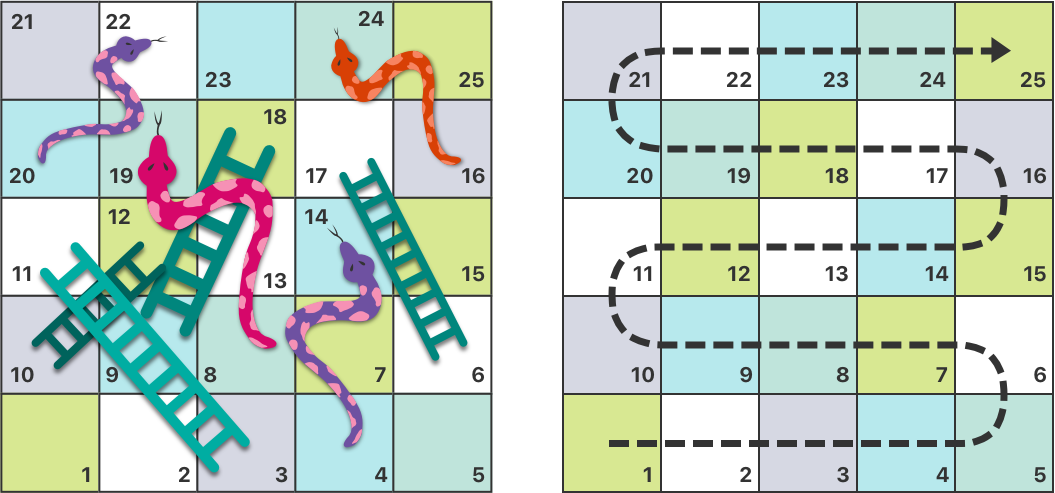
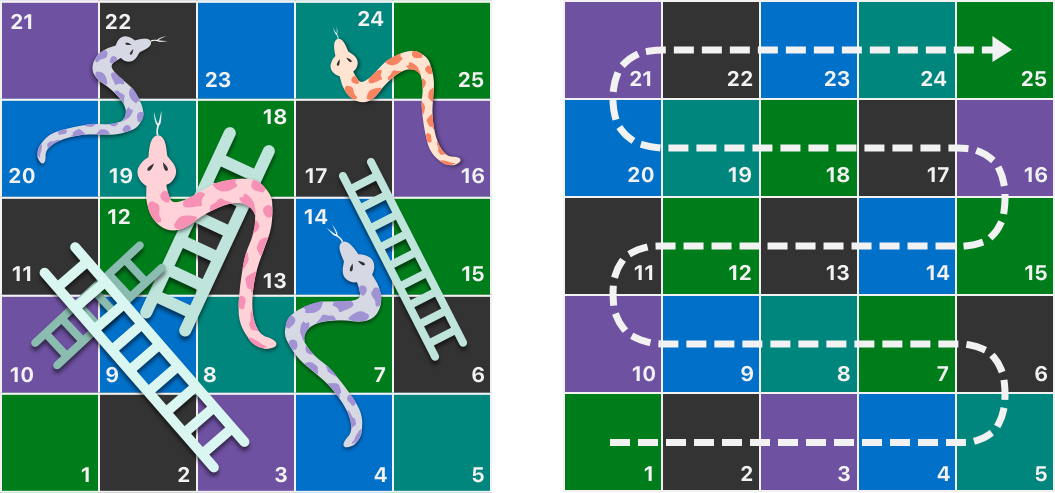
The rules of the game are as follows:
游戏的规则如下:
- The board has 25 squares, and the aim is to land on or beyond square 25.
- The player's starting square is “square zero”, which is just off the bottom-left corner of the board.
- Each turn, you roll a six-sided dice and move by that number of squares, following the horizontal path indicated by the dotted arrow above.
- If your turn ends at the bottom of a ladder, you move up that ladder.
- If your turn ends at the head of a snake, you move down that snake.
- 游戏盘面包括 25 个方格,游戏目标是达到或者超过第 25 个方格;
- 玩家的起始方块是“方块零”,就在棋盘的左下角。
- 每一轮,你通过掷一个六面体骰子来确定你移动方块的步数,移动的路线由上图中横向的虚线所示;
- 如果在某轮结束,你移动到了梯子的底部,可以顺着梯子爬上去;
- 如果在某轮结束,你移动到了蛇的头部,你会顺着蛇的身体滑下去。
The game board is represented by an array of Int values.
Its size is based on a constant called finalSquare,
which is used to initialize the array
and also to check for a win condition later in the example.
Because the players start off the board, on "square zero",
the board is initialized with 26 zero Int values, not 25.
游戏盘面可以使用一个 Int 数组来表达。
数组的长度由一个 finalSquare 常量储存,
用来初始化数组和检测最终胜利条件。
游戏盘面由 26 个 Int 0 值初始化,而不是 25 个(由 0 到 25,一共 26 个):
let finalSquare = 25
var board = [Int](repeating: 0, count: finalSquare + 1)
Some squares are then set to have more specific values for the snakes and ladders. Squares with a ladder base have a positive number to move you up the board, whereas squares with a snake head have a negative number to move you back down the board.
一些方格被设置成特定的值来表示有蛇或者梯子。梯子底部的方格是一个正值,使你可以向上移动,蛇头处的方格是一个负值,会让你向下移动:
board[03] = +08; board[06] = +11; board[09] = +09; board[10] = +02
board[14] = -10; board[19] = -11; board[22] = -02; board[24] = -08
Square 3 contains the bottom of a ladder that moves you up to square 11.
To represent this, board[03] is equal to +08,
which is equivalent to an integer value of 8
(the difference between 3 and 11).
To align the values and statements,
the unary plus operator (+i) is explicitly used with
the unary minus operator (-i)
and numbers lower than 10 are padded with zeros.
(Neither stylistic technique is strictly necessary,
but they lead to neater code.)
3 号方格是梯子的底部,会让你向上移动到 11 号方格,我们使用 board[03] 等于 +08(来表示 11 和 3 之间的差值)。为了对齐语句,这里使用了一元正运算符(+i)和一元负运算符(-i),并且小于 10 的数字都使用 0 补齐(这些语法的技巧不是必要的,只是为了让代码看起来更加整洁)。
var square = 0
var diceRoll = 0
while square < finalSquare {
    // roll the dice
    diceRoll += 1
    if diceRoll == 7 { diceRoll = 1 }
    // move by the rolled amount
    square += diceRoll
    if square < board.count {
        // if we're still on the board, move up or down for a snake or a ladder
        square += board[square]
    }
}
print("Game over!")
The example above uses a very simple approach to dice rolling.
Instead of generating a random number,
it starts with a diceRoll value of 0.
Each time through the while loop,
diceRoll is incremented by one
and is then checked to see whether it has become too large.
Whenever this return value equals 7,
the dice roll has become too large and is reset to a value of 1.
The result is a sequence of diceRoll values that's always
1, 2, 3, 4, 5, 6, 1, 2 and so on.
本例中使用了最简单的方法来模拟掷骰子。diceRoll 的值并不是一个随机数,而是以 0 为初始值,之后每一次 while 循环,diceRoll 的值增加 1 ,然后检测是否超出了最大值。当 diceRoll 的值等于 7 时,就超过了骰子的最大值,会被重置为 1。所以 diceRoll 的取值顺序会一直是 1,2,3,4,5,6,1,2 等。
After rolling the dice, the player moves forward by diceRoll squares.
It's possible that the dice roll may have moved the player beyond square 25,
in which case the game is over.
To cope with this scenario,
the code checks that square is less than the board array's count property.
If square is valid, the value stored in board[square] is added
to the current square value
to move the player up or down any ladders or snakes.
掷完骰子后,玩家向前移动 diceRoll 个方格,如果玩家移动超过了第 25 个方格,这个时候游戏将会结束,为了应对这种情况,代码会首先判断 square 的值是否小于 board 的 count 属性,只有小于才会在 board[square] 上增加 square,来向前或向后移动(遇到了梯子或者蛇)。
Note · 注意
If this check isn't performed,
board[square] might try to access a value outside the bounds of the board array,
which would trigger a runtime error.
如果没有这个检测(square < board.count),board[square] 可能会越界访问 board 数组,导致运行时错误。
The current while loop execution then ends,
and the loop's condition is checked to see if the loop should be executed again.
If the player has moved on or beyond square number 25,
the loop's condition evaluates to false and the game ends.
当本轮 while 循环运行完毕,会再检测循环条件是否需要再运行一次循环。如果玩家移动到或者超过第 25 个方格,循环条件结果为 false,此时游戏结束。
A while loop is appropriate in this case,
because the length of the game isn't clear at the start of the while loop.
Instead, the loop is executed until a particular condition is satisfied.
while 循环比较适合本例中的这种情况,因为在 while 循环开始时,我们并不知道游戏要跑多久,只有在达成指定条件时循环才会结束。
Repeat-While Repeat-While 循环
The other variation of the while loop,
known as the repeat-while loop,
performs a single pass through the loop block first,
before considering the loop's condition.
It then continues to repeat the loop until the condition is false.
while 循环的另外一种形式是 repeat-while,它和 while 的区别是在判断循环条件之前,先执行一次循环的代码块。然后重复循环直到条件为 false。
Note · 注意
The repeat-while loop in Swift is analogous to
a do-while loop in other languages.
Swift 语言的 repeat-while 循环和其他语言中的 do-while 循环是类似的。
Here's the general form of a repeat-while loop:
下面是 repeat-while 循环的一般格式:
repeat {
   <#statements#>
} while <#condition#>
Here's the Snakes and Ladders example again,
written as a repeat-while loop rather than a while loop.
The values of finalSquare, board, square, and diceRoll
are initialized in exactly the same way as with a while loop.
还是蛇和梯子的游戏,使用 repeat-while 循环来替代 while 循环。finalSquare、board、square 和 diceRoll 的值初始化同 while 循环时一样:
let finalSquare = 25
var board = [Int](repeating: 0, count: finalSquare + 1)
board[03] = +08; board[06] = +11; board[09] = +09; board[10] = +02
board[14] = -10; board[19] = -11; board[22] = -02; board[24] = -08
var square = 0
var diceRoll = 0
In this version of the game, the first action in the loop is to check for a ladder or a snake. No ladder on the board takes the player straight to square 25, and so it isn't possible to win the game by moving up a ladder. Therefore, it's safe to check for a snake or a ladder as the first action in the loop.
在 repeat-while 循环版本中,循环中的第一个操作就是前进或后退方块上的步数。因为没有梯子会让玩家直接上到第 25 个方格,所以玩家不会通过梯子直接赢得游戏。因此在循环开始时就执行方块上的步数是安全的。
At the start of the game, the player is on “square zero”.
board[0] always equals 0 and has no effect.
游戏开始时,玩家在第 0 号方格上,board[0] 一直等于 0, 不会有什么影响:
repeat {
    // move up or down for a snake or ladder
    square += board[square]
    // roll the dice
    diceRoll += 1
    if diceRoll == 7 { diceRoll = 1 }
    // move by the rolled amount
    square += diceRoll
} while square < finalSquare
print("Game over!")
After the code checks for snakes and ladders,
the dice is rolled and the player is moved forward by diceRoll squares.
The current loop execution then ends.
执行方块上的步数之后,开始掷骰子,然后玩家向前移动 diceRoll 个方格,本轮循环结束。
The loop's condition (while square < finalSquare) is the same as before,
but this time it's not evaluated until the end of the first run through the loop.
The structure of the repeat-while loop is better suited to this game
than the while loop in the previous example.
In the repeat-while loop above,
square += board[square] is always executed immediately after
the loop's while condition confirms that square is still on the board.
This behavior removes the need for the array bounds check
seen in the while loop version of the game described earlier.
循环条件(while square < finalSquare)和 while 方式相同,但是只会在循环结束后进行计算。在前面的例子中,repeat-while 循环比 while 循环更适合这个游戏。repeat-while 方式会在条件判断 square 没有超出后直接运行 square += board[square],比起前面 while 循环的版本,这种方式可以省去数组越界的检查。
Conditional Statements 条件语句
It's often useful to execute different pieces of code based on certain conditions. You might want to run an extra piece of code when an error occurs, or to display a message when a value becomes too high or too low. To do this, you make parts of your code conditional.
根据特定的条件执行特定的代码通常是十分有用的。当错误发生时,你可能想运行额外的代码;或者,当值太大或太小时,向用户显示一条消息。要实现这些功能,你就需要使用条件语句。
Swift provides two ways to add conditional branches to your code:
the if statement and the switch statement.
Typically, you use the if statement
to evaluate simple conditions with only a few possible outcomes.
The switch statement is better suited to
more complex conditions with multiple possible permutations
and is useful in situations where pattern matching can help select
an appropriate code branch to execute.
Swift 提供两种类型的条件语句:if 语句和 switch 语句。通常,使用 if 语句来评估只有少数几种可能性的简单条件。而 switch 语句更适用于有多种排列可能的更复杂的条件。并且 switch 在需要用到模式匹配(pattern-matching)的情况下会更有用。
If If 语句
In its simplest form,
the if statement has a single if condition.
It executes a set of statements only if that condition is true.
if 语句最简单的形式就是只包含一个条件,只有该条件为 true 时,才执行相关代码:
var temperatureInFahrenheit = 30
if temperatureInFahrenheit <= 32 {
    print("It's very cold. Consider wearing a scarf.")
}
// Prints "It's very cold. Consider wearing a scarf."
The example above checks whether the temperature
is less than or equal to 32 degrees Fahrenheit
(the freezing point of water).
If it is, a message is printed.
Otherwise, no message is printed,
and code execution continues after the if statement's closing brace.
上面的例子会判断温度是否小于等于 32 华氏度(水的冰点)。如果是,则打印一条消息;否则,不打印任何消息,继续执行 if 块后面的代码。
The if statement can provide an alternative set of statements,
known as an else clause,
for situations when the if condition is false.
These statements are indicated by the else keyword.
当然,if 语句允许二选一执行,叫做 else 从句。也就是当条件为 false 时,执行 else 语句:
temperatureInFahrenheit = 40
if temperatureInFahrenheit <= 32 {
    print("It's very cold. Consider wearing a scarf.")
} else {
    print("It's not that cold. Wear a T-shirt.")
}
// Prints "It's not that cold. Wear a T-shirt."
One of these two branches is always executed.
Because the temperature has increased to 40 degrees Fahrenheit,
it's no longer cold enough to advise wearing a scarf
and so the else branch is triggered instead.
显然,这两条分支中总有一条会被执行。由于温度已升至 40 华氏度,不算太冷,没必要再围围巾。因此,else 分支就被触发了。
You can chain multiple if statements together
to consider additional clauses.
你可以把多个 if 语句链接在一起,来实现更多分支:
temperatureInFahrenheit = 90
if temperatureInFahrenheit <= 32 {
    print("It's very cold. Consider wearing a scarf.")
} else if temperatureInFahrenheit >= 86 {
    print("It's really warm. Don't forget to wear sunscreen.")
} else {
    print("It's not that cold. Wear a T-shirt.")
}
// Prints "It's really warm. Don't forget to wear sunscreen."
Here, an additional if statement was added to respond to particularly warm temperatures.
The final else clause remains,
and it prints a response for any temperatures that aren't too warm or too cold.
在上面的例子中,额外的 if 语句用于判断是不是特别热。而最后的 else 语句被保留了下来,用于打印既不冷也不热时的消息。
The final else clause is optional, however,
and can be excluded if the set of conditions doesn't need to be complete.
实际上,当不需要完整判断情况的时候,最后的 else 语句是可选的:
temperatureInFahrenheit = 72
if temperatureInFahrenheit <= 32 {
    print("It's very cold. Consider wearing a scarf.")
} else if temperatureInFahrenheit >= 86 {
    print("It's really warm. Don't forget to wear sunscreen.")
}
Because the temperature isn't cold enough to trigger the if condition
or warm enough to trigger the else if condition,
no message is printed.
在这个例子中,由于既不冷也不热,所以不会触发 if 或 else if 分支,也就不会打印任何消息。
Swift provides a shorthand spelling of if
that you can use when setting values.
For example,
consider the following code:
Swift 用 if 提供了一种在赋值时可用的简便写法。例如,请考虑以下代码:
let temperatureInCelsius = 25
let weatherAdvice: String

if temperatureInCelsius <= 0 {
    weatherAdvice = "It's very cold. Consider wearing a scarf."
} else if temperatureInCelsius >= 30 {
    weatherAdvice = "It's really warm. Don't forget to wear sunscreen."
} else {
    weatherAdvice = "It's not that cold. Wear a T-shirt."
}

print(weatherAdvice)
// Prints "It's not that cold. Wear a T-shirt."
Here, each of the branches sets a value for the weatherAdvice constant,
which is printed after the if statement.
上面的代码中,每个分支都为 weatherAdvice 设置一个值,该值打印在 if 语句之后。
Using the alternate syntax,
known as an if expression,
you can write this code more concisely:
使用下面的语法(称为 if 表达式),你可以更简洁地编写这段代码:
let weatherAdvice = if temperatureInCelsius <= 0 {
    "It's very cold. Consider wearing a scarf."
} else if temperatureInCelsius >= 30 {
    "It's really warm. Don't forget to wear sunscreen."
} else {
    "It's not that cold. Wear a T-shirt."
}

print(weatherAdvice)
// Prints "It's not that cold. Wear a T-shirt."
In this if expression version,
each branch contains a single value.
If a branch's condition is true,
then that branch's value is used as the value for the whole if expression
in the assignment of weatherAdvice.
Every if branch has a corresponding else if branch or else branch,
ensuring that one of the branches always matches
and that the if expression always produces a value,
regardless of which conditions are true.
在此 if 表达式版本中,每个分支都包含一个值。如果分支的条件为 true,则该分支的值将用作 weatherAdvice 赋值中整个 if 表达式的值。每个 if 分支都有对应的 else if 分支或 else 分支,确保其中一个分支始终匹配,并且无论哪些条件为真, if 表达式始终生成一个值。
Because the syntax for the assignment starts outside the if expression,
there's no need to repeat weatherAdvice = inside each branch.
Instead,
each branch of the if expression
produces one of the three possible values for weatherAdvice,
and the assignment uses that value.
由于赋值的语法从 if 表达式外部开始,因此无需在每个分支内重复 weatherAdvice =。取而代之的是,每个 if 表达式分支会产出 weatherAdvice 的三个可能值之一,并使用该值为其赋值。
All of the branches of an if expression
need to contain values of the same type.
Because Swift checks the type of each branch separately,
values like nil that can be used with more than one type
prevent Swift from determining the if expression's type automatically.
Instead, you need to specify the type explicitly ---
for example:
if 表达式的所有分支都需要包含相同类型的值。由于 Swift 会单独检查每个分支返回值的类型,所以像 nil 这样可以被用于多个类型的值阻碍了 Swift 自动推断 if 表达式的类型。因此,在这种情况下你需要明确指定类型 —— 例如:
let freezeWarning: String? = if temperatureInCelsius <= 0 {
    "It's below freezing. Watch for ice!"
} else {
    nil
}
In the code above,
one branch of the if expression has a string value
and the other branch has a nil value.
The nil value could be used as a value for any optional type,
so you have to explicitly write that freezeWarning is an optional string,
as described in Type Annotations.
在上面的代码中,if 表达式的一个分支有一个字符串值,另一个分支有一个 nil 值。nil 值可以用作任何可选类型的值,因此你必须明确声明 freezeWarning 是一个可选字符串,如类型注解中所述。
An alternate way to provide this type information
is to provide an explicit type for nil,
instead of providing an explicit type for freezeWarning:
提供类型信息的另一种方法是为 nil 提供显式类型,而不是为 freezeWarning 提供显式类型:
let freezeWarning = if temperatureInCelsius <= 0 {
    "It's below freezing. Watch for ice!"
} else {
    nil as String?
}
An if expression can respond to unexpected failures by throwing an error
or calling a function like fatalError(_:file:line:) that never returns.
For example:
if 表达式可以通过抛出错误,或调用像 fatalError(_:file:line:) 这样永不返回的函数,来应对意外的失败。例如:
let weatherAdvice = if temperatureInCelsius > 100 {
    throw TemperatureError.boiling
} else {
    "It's a reasonable temperature."
}
In this example,
the if expression checks whether the forecast temperature
is hotter than 100° C --- the boiling point of water.
A temperature this hot causes the if expression to throw a .boiling error
instead of returning a textual summary.
Even though this if expression can throw an error,
you don't write try before it.
For information about working with errors, see Error Handling.
在此示例中,if 表达式会检查预报温度是否高于 100° C —— 水的沸点。高于沸点的温度会导致 if 表达式抛出 .boiling 错误,而不是返回文本摘要。即使这个 if 表达式可能会抛出错误,你也不要在它之前使用 try。有关处理错误的信息,请参阅 错误处理。
In addition to using if expressions
on the right-hand side of an assignment,
as shown in the examples above,
you can also use them as the value that a function or closure returns.
除了在赋值的右侧使用 if 表达式(如上面的示例所示)之外,你还可以将它们用作函数或闭包的返回值。
Switch Switch 语句
A switch statement considers a value
and compares it against several possible matching patterns.
It then executes an appropriate block of code,
based on the first pattern that matches successfully.
A switch statement provides an alternative to the if statement
for responding to multiple potential states.
switch 语句会尝试把某个值与若干个模式(pattern)进行匹配。根据第一个匹配成功的模式,switch 语句会执行对应的代码。当有可能的情况较多时,通常用 switch 语句替换 if 语句。
In its simplest form, a switch statement compares a value against
one or more values of the same type.
switch 语句最简单的形式就是把某个值与一个或若干个相同类型的值作比较:
switch <#some value to consider#> {
case <#value 1#>:
    <#respond to value 1#>
case <#value 2#>,
    <#value 3#>:
    <#respond to value 2 or 3#>
default:
    <#otherwise, do something else#>
}
Every switch statement consists of multiple possible cases,
each of which begins with the case keyword.
In addition to comparing against specific values,
Swift provides several ways for each case to specify
more complex matching patterns.
These options are described later in this chapter.
switch 语句由多个 情况 构成,每个情况由 case 关键字开始。除了与特定值进行比较之外,Swift 还提供了几种方法来进行更复杂的匹配模式。本章稍后将介绍这些方法。
Like the body of an if statement, each case is a separate branch of code execution.
The switch statement determines which branch should be selected.
This procedure is known as switching on the value that's being considered.
与 if 语句类似,每一个 case 都是代码执行的一条分支。switch 语句会决定哪一条分支应该被执行,这个流程被称作根据给定的值路由(switching)。
Every switch statement must be exhaustive.
That is, every possible value of the type being considered
must be matched by one of the switch cases.
If it's not appropriate to provide a case for every possible value,
you can define a default case to cover any values that aren't addressed explicitly.
This default case is indicated by the default keyword,
and must always appear last.
switch 语句必须是完备的。这就是说,每一个可能的值都必须至少有一个 case 分支与之对应。在某些不可能涵盖所有可能值的情况下,你可以定义一个默认分支来覆盖所有其他未明确列出的值。这个默认分支由 default 关键字来标明,并且必须始终出现在最后。
This example uses a switch statement to consider
a single lowercase character called someCharacter:
下面的例子使用 switch 语句来匹配一个名为 someCharacter 的小写字符:
let someCharacter: Character = "z"
switch someCharacter {
case "a":
    print("The first letter of the Latin alphabet")
case "z":
    print("The last letter of the Latin alphabet")
default:
    print("Some other character")
}
// Prints "The last letter of the Latin alphabet".
The switch statement's first case matches
the first letter of the English alphabet, a,
and its second case matches the last letter, z.
Because the switch must have a case for every possible character,
not just every alphabetic character,
this switch statement uses a default case
to match all characters other than a and z.
This provision ensures that the switch statement is exhaustive.
在这个例子中,第一个 case 分支用于匹配第一个英文字母 a,第二个 case 分支用于匹配最后一个字母 z。因为 switch 语句必须有一个 case 分支用于覆盖所有可能的字符,而不仅仅是所有的英文字母,所以 switch 语句使用 default 分支来匹配除了 a 和 z 外的所有值,这个分支保证了 switch 语句的完备性。
Like if statements,
switch statements also have an expression form:
和 if 语句一样,switch 语句也具有表达式形式:
let anotherCharacter: Character = "a"
let message = switch anotherCharacter {
case "a":
    "The first letter of the Latin alphabet"
case "z":
    "The last letter of the Latin alphabet"
default:
    "Some other character"
}

print(message)
// Prints "The first letter of the Latin alphabet".
In this example,
each case in the switch expression
contains the value for message
to be used when that case matches anotherCharacter.
Because switch is always exhaustive,
there is always a value to assign.
在此示例中,switch 表达式中的每个 case 都包含与 anotherCharacter 匹配成功时 message 的值。由于 switch 始终是完备的,因此始终会分配一个值。
As with if expressions,
you can throw an error
or call a function like fatalError(_:file:line:) that never returns
instead of providing a value for a given case.
You can use switch expressions
on the right-hand side of an assignment,
as shown in the example above,
and as the value that a function or closure returns.
与 if 表达式一样,你可以抛出错误或调用像 fatalError(_:file:line:) 这样永不返回的函数,而不为某个 case 提供值。你可以像上例那样在赋值语句的右侧使用 switch 表达式,也可以把它用作函数或闭包的返回值。
No Implicit Fallthrough 没有隐式贯穿
In contrast with switch statements in C and Objective-C,
switch statements in Swift don't
fall through the bottom of each case and into the next one by default.
Instead, the entire switch statement finishes its execution
as soon as the first matching switch case is completed,
without requiring an explicit break statement.
This makes the switch statement safer and easier to use than the one in C
and avoids executing more than one switch case by mistake.
与 C 和 Objective-C 中的 switch 语句不同,在 Swift 中,当匹配的 case 分支中的代码执行完毕后,程序会终止 switch 语句,而不会继续执行下一个 case 分支。这也就是说,不需要在 case 分支中显式地使用 break 语句。这使得 switch 语句更安全、更易用,也避免了漏写 break 语句导致多个 case 被执行的错误。
Note · 注意
Although break isn't required in Swift,
you can use a break statement to match and ignore a particular case
or to break out of a matched case before that case has completed its execution.
For details, see Break in a Switch Statement.
虽然在 Swift 中 break 不是必须的,但你依然可以在 case 分支中的代码执行完毕前使用 break 跳出,详情请参见Switch 语句中的 break(Break in a Switch Statement)。
The body of each case must contain at least one executable statement. It isn't valid to write the following code, because the first case is empty:
每一个 case 分支都必须包含至少一条语句。像下面这样书写代码是不合法的,因为第一个 case 分支是空的:
let anotherCharacter: Character = "a"
switch anotherCharacter {
case "a": // Invalid, the case has an empty body
case "A":
    print("The letter A")
default:
    print("Not the letter A")
}
// This will report a compile-time error.
Unlike a switch statement in C,
this switch statement doesn't match both "a" and "A".
Rather, it reports a compile-time error that case "a":
doesn't contain any executable statements.
This approach avoids accidental fallthrough from one case to another
and makes for safer code that's clearer in its intent.
和 C 语言里的 switch 语句不同,在 Swift 中,switch 语句不会一起匹配 "a" 和 "A"。相反的,上面的代码会引起编译期错误:case "a": 不包含任何可执行语句 ——这就避免了意外地从一个 case 分支贯穿到另外一个,使得代码更安全、也更直观。
To make a switch with a single case that
matches both "a" and "A",
combine the two values into a compound case,
separating the values with commas.
为了让一个 switch 的单个 case 同时匹配 "a" 和 "A",可以将这两个值组合成一个复合 case,并用逗号分隔。
let anotherCharacter: Character = "a"
switch anotherCharacter {
case "a", "A":
    print("The letter A")
default:
    print("Not the letter A")
}
// Prints "The letter A".
For readability, a compound case can also be written over multiple lines. For more information about compound cases, see Compound Cases.
为了可读性,复合匹配可以写成多行形式,详情请参考 复合型 Cases(Compound Cases)。
Note · 注意
To explicitly fall through at the end of a particular switch case,
use the fallthrough keyword,
as described in Fallthrough.
如果想要在某个 switch case 的末尾显式贯穿,请使用 fallthrough 关键字,详情请参考 贯穿(Fallthrough)。
Interval Matching 区间匹配
Values in switch cases can be checked for their inclusion in an interval.
This example uses number intervals
to provide a natural-language count for numbers of any size:
switch 中 case 分支的模式也可以是一个值的区间。下面的例子展示了如何使用区间匹配来输出任意数量所对应的自然语言计数表达:
let approximateCount = 62
let countedThings = "moons orbiting Saturn"
let naturalCount: String
switch approximateCount {
case 0:
    naturalCount = "no"
case 1..<5:
    naturalCount = "a few"
case 5..<12:
    naturalCount = "several"
case 12..<100:
    naturalCount = "dozens of"
case 100..<1000:
    naturalCount = "hundreds of"
default:
    naturalCount = "many"
}
print("There are \(naturalCount) \(countedThings).")
// Prints "There are dozens of moons orbiting Saturn."
In the above example, approximateCount is evaluated in a switch statement.
Each case compares that value to a number or interval.
Because the value of approximateCount falls between 12 and 100,
naturalCount is assigned the value "dozens of",
and execution is transferred out of the switch statement.
在上面的例子中,approximateCount 在一个 switch 语句中被评估。每一个 case 都把这个值与一个数字或区间进行比较。因为 approximateCount 落在了 12 到 100 的区间,所以 naturalCount 被赋值为 "dozens of" 值,然后执行流程就被转移到了 switch 语句之外。
Tuples 元组
You can use tuples to test multiple values in the same switch statement.
Each element of the tuple can be tested against a different value or interval of values.
Alternatively, use the underscore character (_),
also known as the wildcard pattern,
to match any possible value.
我们可以使用元组在同一个 switch 语句中测试多个值。可以针对不同的值或值区间来测试元组的每个元素。另外,使用下划线(_)通配符来匹配所有可能的值。
The example below takes an (x, y) point,
expressed as a simple tuple of type (Int, Int),
and categorizes it on the graph that follows the example.
下面的例子展示了如何使用一个 (Int, Int) 类型的元组来给下图中的点 (x, y) 进行分类:
let somePoint = (1, 1)
switch somePoint {
case (0, 0):
    print("\(somePoint) is at the origin")
case (_, 0):
    print("\(somePoint) is on the x-axis")
case (0, _):
    print("\(somePoint) is on the y-axis")
case (-2...2, -2...2):
    print("\(somePoint) is inside the box")
default:
    print("\(somePoint) is outside of the box")
}
// Prints "(1, 1) is inside the box".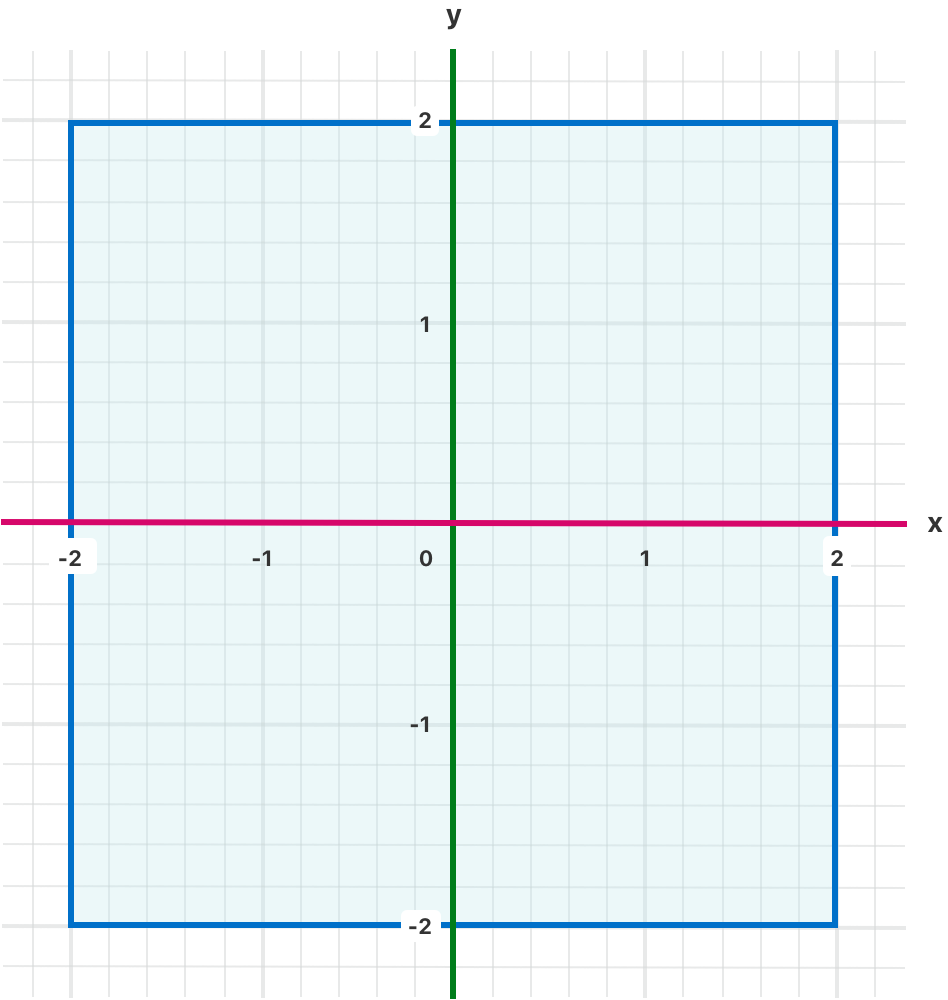
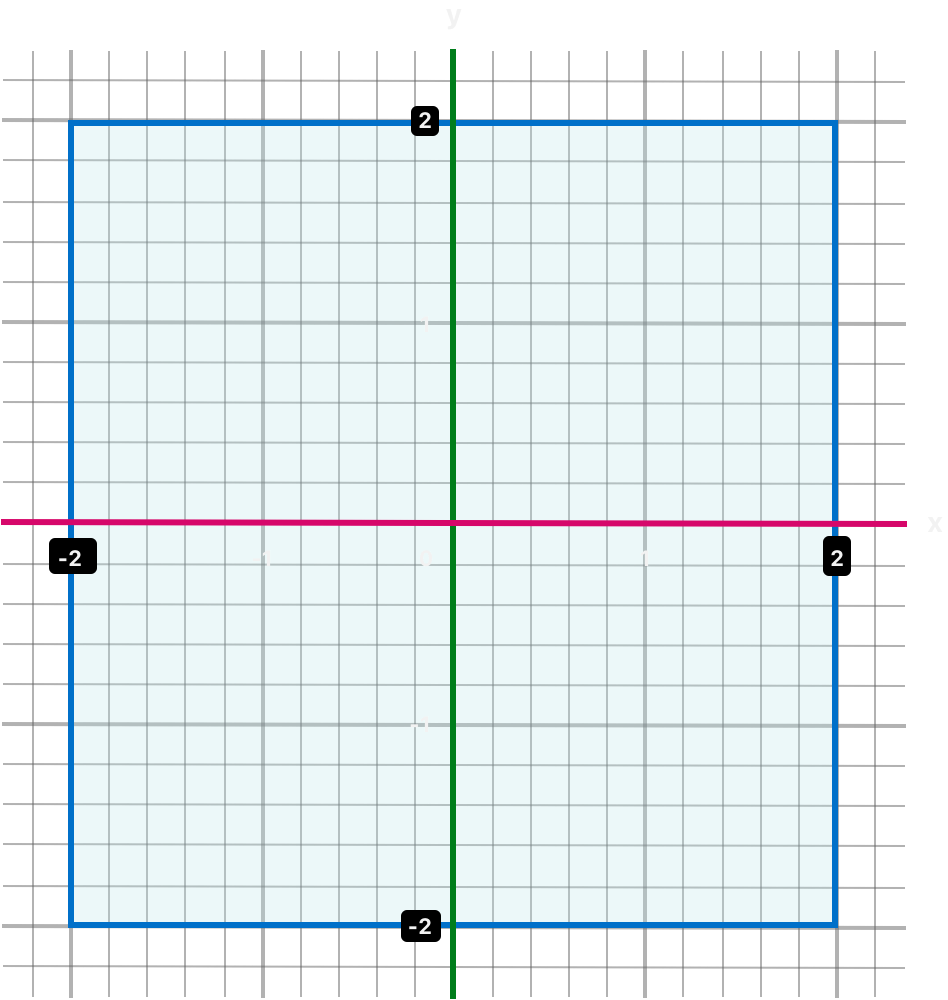
The switch statement determines whether the point is
at the origin (0, 0),
on the red x-axis,
on the green y-axis,
inside the blue 4-by-4 box centered on the origin,
or outside of the box.
在上面的例子中,switch 语句会判断某个点是否是原点 (0, 0),是否在红色的 x 轴上,是否在绿色的 y 轴上,是否在一个以原点为中心的4x4的蓝色矩形里,或者在这个矩形外面。
Unlike C, Swift allows multiple switch cases to consider the same value or values.
In fact, the point (0, 0) could match all four of the cases in this example.
However, if multiple matches are possible,
the first matching case is always used.
The point (0, 0) would match case (0, 0) first,
and so all other matching cases would be ignored.
和 C 语言不同,Swift 允许多个 switch case 匹配同一个值。实际上,在这个例子中,点 (0, 0) 可以匹配全部四个 case。但是,如果存在多个匹配,那么总是使用第一个匹配的 case。点 (0, 0) 会首先匹配 case (0, 0),因此其余能够匹配的 case 都会被忽略。
Value Bindings 值绑定(Value Bindings)
A switch case can name the value or values it matches to temporary constants or variables,
for use in the body of the case.
This behavior is known as value binding,
because the values are bound to temporary constants or variables within the case's body.
switch 的 case 分支允许将匹配的值声明为临时常量或变量,并且在 case 分支体内使用。因为值被绑定在 case 分支体作用域内的临时常量或变量上,所以这种行为被称为值绑定(value binding)。
The example below takes an (x, y) point,
expressed as a tuple of type (Int, Int),
and categorizes it on the graph that follows:
下面的例子展示了如何使用一个 (Int, Int) 类型的元组来给下图中的点 (x, y) 进行分类:
let anotherPoint = (2, 0)
switch anotherPoint {
case (let x, 0):
    print("on the x-axis with an x value of \(x)")
case (0, let y):
    print("on the y-axis with a y value of \(y)")
case let (x, y):
    print("somewhere else at (\(x), \(y))")
}
// Prints "on the x-axis with an x value of 2".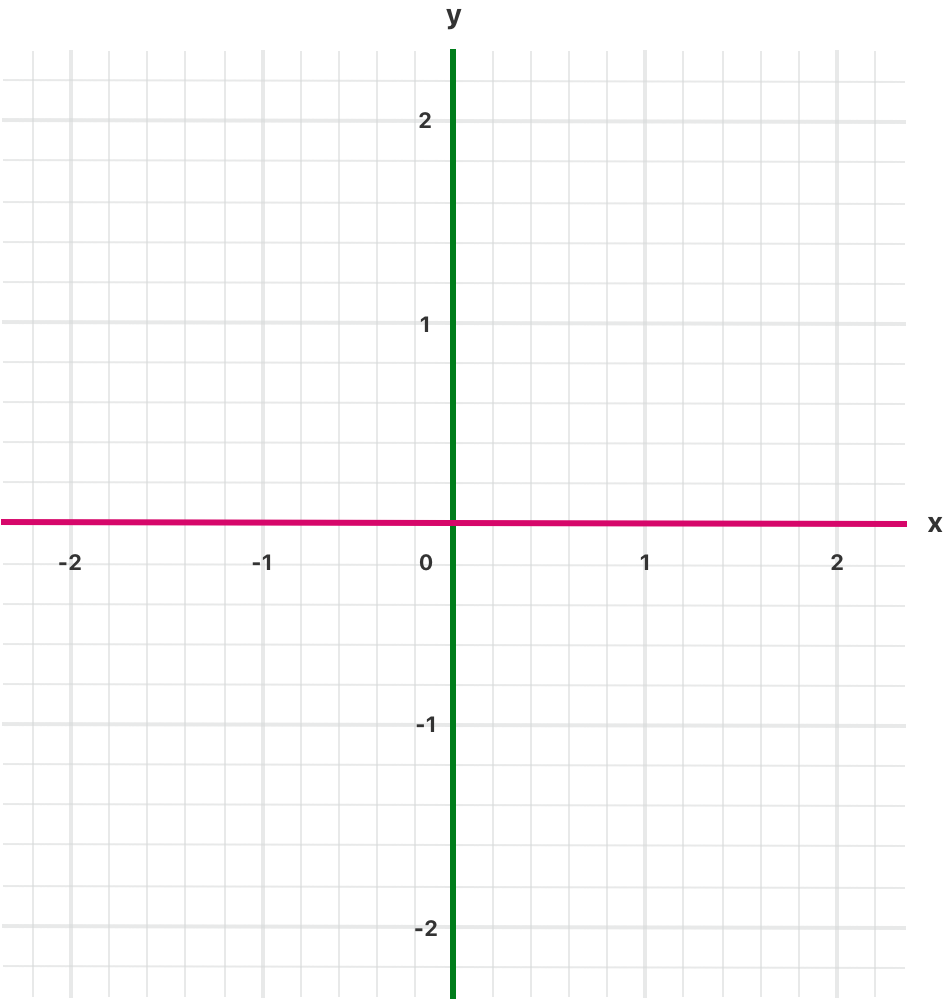
The switch statement determines whether the point is
on the red x-axis,
on the green y-axis,
or elsewhere (on neither axis).
在上面的例子中,switch 语句会判断某个点是否在红色的 x 轴上,是否在绿色的 y 轴上,或者不在坐标轴上。
The three switch cases declare placeholder constants x and y,
which temporarily take on one or both tuple values from anotherPoint.
The first case, case (let x, 0),
matches any point with a y value of 0
and assigns the point's x value to the temporary constant x.
Similarly, the second case, case (0, let y),
matches any point with an x value of 0
and assigns the point's y value to the temporary constant y.
这三个 switch case 都声明了占位符常量 x 和 y,用于临时获取 anotherPoint 元组中的一个或两个值。第一个 case case (let x, 0) 匹配任何 y 值为 0 的点,并把该点的 x 值赋给临时常量 x。类似地,第二个 case case (0, let y) 匹配任何 x 值为 0 的点,并把该点的 y 值赋给临时常量 y。
After the temporary constants are declared, they can be used within the case's code block. Here, they're used to print the categorization of the point.
一旦声明了这些临时的常量,它们就可以在其对应的 case 分支里使用。在这个例子中,它们用于打印给定点的分类。
This switch statement doesn't have a default case.
The final case, case let (x, y),
declares a tuple of two placeholder constants that can match any value.
Because anotherPoint is always a tuple of two values,
this case matches all possible remaining values,
and a default case isn't needed to make the switch statement exhaustive.
这个 switch 语句不包含 default 分支。最后一个 case case let (x, y) 声明了一个包含两个占位符常量的元组,它可以匹配任意值。由于 anotherPoint 总是一个包含两个值的元组,这个 case 会匹配所有剩余的可能值,因此不需要 default 分支就能让 switch 语句完备。
Where Where 子句
A switch case can use a where clause to check for additional conditions.
switch case 可以使用 where 子句来判断额外的条件。
The example below categorizes an (x, y) point on the following graph:
下面的例子把下图中的点 (x, y) 进行了分类:
let yetAnotherPoint = (1, -1)
switch yetAnotherPoint {
case let (x, y) where x == y:
    print("(\(x), \(y)) is on the line x == y")
case let (x, y) where x == -y:
    print("(\(x), \(y)) is on the line x == -y")
case let (x, y):
    print("(\(x), \(y)) is just some arbitrary point")
}
// Prints "(1, -1) is on the line x == -y".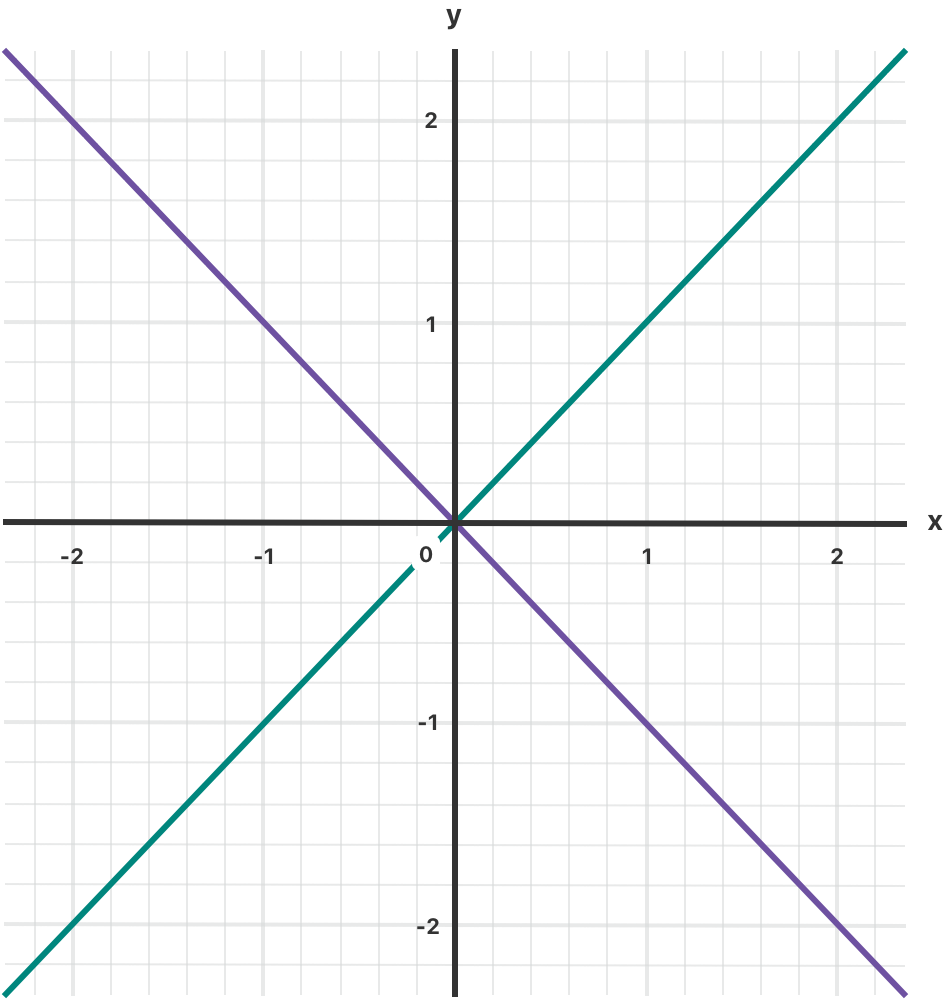
The switch statement determines whether the point is
on the green diagonal line where x == y,
on the purple diagonal line where x == -y,
or neither.
在上面的例子中,switch 语句会判断某个点是否在绿色的对角线 x == y 上,是否在紫色的对角线 x == -y 上,或者不在对角线上。
The three switch cases declare placeholder constants x and y,
which temporarily take on the two tuple values from yetAnotherPoint.
These constants are used as part of a where clause,
to create a dynamic filter.
The switch case matches the current value of point
only if the where clause's condition evaluates to true for that value.
这三个 switch case 声明了占位符常量 x 和 y,用于临时获取 yetAnotherPoint 元组的两个值。这两个常量被用作 where 子句的一部分,从而创建一个动态的过滤器。只有当 where 子句的条件对 point 的当前值求值为 true 时,switch case 才会匹配该值。
As in the previous example, the final case matches all possible remaining values,
and so a default case isn't needed to make the switch statement exhaustive.
和值绑定中的例子一样,由于最后一个 case 分支匹配了余下所有可能的值,switch 语句就已经完备了,因此不需要再书写 default 分支。
Compound Cases 复合型 Cases(Compound Cases)
Multiple switch cases that share the same body
can be combined by writing several patterns after case,
with a comma between each of the patterns.
If any of the patterns match, then the case is considered to match.
The patterns can be written over multiple lines if the list is long.
For example:
共享同一主体的多个 switch case 可以通过在 case 后编写多个模式来组合,每个模式之间用逗号隔开。当 case 后面的任意一种模式匹配的时候,这条分支就会被匹配。并且,如果匹配列表过长,还可以分行书写:
let someCharacter: Character = "e"
switch someCharacter {
case "a", "e", "i", "o", "u":
    print("\(someCharacter) is a vowel")
case "b", "c", "d", "f", "g", "h", "j", "k", "l", "m",
    "n", "p", "q", "r", "s", "t", "v", "w", "x", "y", "z":
    print("\(someCharacter) is a consonant")
default:
    print("\(someCharacter) isn't a vowel or a consonant")
}
// Prints "e is a vowel".
The switch statement's first case matches
all five lowercase vowels in the English language.
Similarly, its second case matches all lowercase English consonants.
Finally, the default case matches any other character.
这个 switch 语句中的第一个 case 匹配了英语中的五个小写元音字母。类似的,第二个 case 匹配了英语中所有的小写辅音字母。最终,default 分支匹配了其它所有字符。
Compound cases can also include value bindings. All of the patterns of a compound case have to include the same set of value bindings, and each binding has to get a value of the same type from all of the patterns in the compound case. This ensures that, no matter which part of the compound case matched, the code in the body of the case can always access a value for the bindings and that the value always has the same type.
复合匹配同样可以包含值绑定。复合匹配里所有的匹配模式,都必须包含相同的值绑定。并且每一个绑定都必须获取到相同类型的值。这保证了,无论复合匹配中的哪个模式发生了匹配,分支体内的代码,都能获取到绑定的值,并且绑定的值都有一样的类型。
let stillAnotherPoint = (9, 0)
switch stillAnotherPoint {
case (let distance, 0), (0, let distance):
    print("On an axis, \(distance) from the origin")
default:
    print("Not on an axis")
}
// Prints "On an axis, 9 from the origin".
The case above has two patterns:
(let distance, 0) matches points on the x-axis
and (0, let distance) matches points on the y-axis.
Both patterns include a binding for distance
and distance is an integer in both patterns ---
which means that the code in the body of the case
can always access a value for distance.
上面的 case 有两个模式:(let distance, 0) 匹配了在 x 轴上的值,(0, let distance) 匹配了在 y 轴上的值。两个模式都绑定了 distance,并且 distance 在两种模式下,都是整型——这意味着分支体内的代码,只要 case 匹配,都可以获取到 distance 值。
Patterns 模式
In the previous examples, each switch case includes a pattern
that indicates what values match that case.
You can also use a pattern as the condition for an if statement.
Here's what that looks like:
在前面的示例中,每个 switch case 都包含一个模式,指示哪些值与该 case 匹配。你还可以将模式用作 if 语句的条件。代码如下所示:
let somePoint = (12, 100)
if case (let x, 100) = somePoint {
    print("Found a point on the y=100 line, at \(x)")
}
// Prints "Found a point on the y=100 line, at 12".
In this code,
the condition for the if statement starts with case,
indicating that the condition is a pattern instead of a Boolean value.
If the pattern matches,
then the condition for the if is considered to be true,
and so the code in the body of the if statement runs.
The patterns you can write after if case
are the same as the patterns you can write in a switch case.
在此代码中,if 语句的条件以 case 开头,表示条件是一个模式而不是布尔值。如果模式匹配,则 if 的条件被视为真,因此 if 语句体中的代码会运行。你可以在 if case 之后编写的模式与你可以在 switch case 中编写的模式相同。
In a for-in loop,
you can give names to parts of the value using a value binding pattern,
even without writing case in your code:
在 for-in 循环中,你可以使用值绑定模式为值的各部分命名,即使不在代码中编写 case:
let points = [(10, 0), (30, -30), (-20, 0)]

for (x, y) in points {
    if y == 0 {
        print("Found a point on the x-axis at \(x)")
    }
}
// Prints "Found a point on the x-axis at 10".
// Prints "Found a point on the x-axis at -20".
The for-in loop above iterates over an array of tuples,
binding the first and second elements of the tuples
to the x and y constants.
The statements inside the loop can use those constants,
such as the if statement that checks whether the point lies on the x-axis.
A more concise way to write this code
is to combine the value bindings and condition
using a for-case-in loop.
The code below has the same behavior as the for-in loop above:
上面的 for-in 循环遍历元组数组,将元组的第一个和第二个元素绑定到 x 和 y 常量。循环内的语句可以使用这些常量,例如检查点是否位于 x 轴上的 if 语句。一种更简洁的编写方式是使用 for-case-in 循环将值绑定和条件组合在一起。下面的代码与上面的 for-in 循环具有相同的行为:
for case (let x, 0) in points {
    print("Found a point on the x-axis at \(x)")
}
// Prints "Found a point on the x-axis at 10".
// Prints "Found a point on the x-axis at -20".
In this code,
the condition is integrated into the for-case-in loop
as part of the pattern.
The statements in the for-case-in loop run only for points on the x-axis.
This code produces the same result as the for-in loop above,
but is a more compact way to iterate
over only certain elements in a collection.
在此代码中,条件作为模式的一部分集成到 for-case-in 循环中。for-case-in 循环中的语句仅针对 x 轴上的点运行。此代码产生与上面 for-in 循环相同的结果,但是是一种更紧凑的方式来仅迭代集合中的某些元素。
A for-case-in loop can also include a where clause,
to check for an additional condition.
The statements inside the loop run
only when where clause matches the current element.
For example:
for-case-in 循环还可以包含 where 子句来检查附加条件。循环内的语句仅在 where 子句与当前元素匹配时才运行。例如:
for case let (x, y) in points where x == y || x == -y  {
    print("Found (\(x), \(y)) along a line through the origin")
}
// Prints "Found (30, -30) along a line through the origin".
This code binds the first and second elements of the tuple
to x and y as constants,
and then checks their values in the where clause.
If the where clause is true,
then the code in the body of the for loop runs;
otherwise, iteration continues with the next element.
此代码将元组的第一个和第二个元素绑定到 x 和 y 作为常量,然后在 where 子句中检查它们的值。如果 where 子句为 true,则 for 循环体中的代码运行;否则,继续迭代下一个元素。
Because patterns can bind values,
if-case statements and for-case-in loops
are useful for working with enumerations that have associated values,
as described in Associated Values.
因为模式可以绑定值,所以 if-case 语句和 for-case-in 循环对于处理具有关联值的枚举非常有用,如 关联值 中所述。
Control Transfer Statements 控制转移语句
Control transfer statements change the order in which your code is executed, by transferring control from one piece of code to another. Swift has five control transfer statements:
控制转移语句改变你代码的执行顺序,通过它可以实现代码的跳转。Swift 有五种控制转移语句:
continuebreakfallthroughreturnthrow
The continue, break, and fallthrough statements are described below.
The return statement is described in Functions,
and the throw statement is described in Propagating Errors Using Throwing Functions.
我们将会在下面讨论 continue , break 和 fallthrough 语句。
return 语句将会在 函数 章节讨论,
throw 语句会在 用throwing函数传递错误 章节讨论。
Continue Continue 语句
The continue statement tells a loop to stop what it's doing
and start again at the beginning of the next iteration through the loop.
It says “I am done with the current loop iteration”
without leaving the loop altogether.
continue 语句告诉一个循环体立刻停止本次循环,重新开始下次循环。就好像在说“本次循环我已经执行完了”,但是并不会离开整个循环体。
The following example removes all vowels and spaces from a lowercase string to create a cryptic puzzle phrase:
下面的例子把一个小写字符串中的元音字母和空格字符移除,生成了一个含义模糊的短句:
let puzzleInput = "great minds think alike"
var puzzleOutput = ""
let charactersToRemove: [Character] = ["a", "e", "i", "o", "u", " "]
for character in puzzleInput {
    if charactersToRemove.contains(character) {
        continue
    }
    puzzleOutput.append(character)
}
print(puzzleOutput)
// Prints "grtmndsthnklk".
The code above calls the continue keyword whenever it matches a vowel or a space,
causing the current iteration of the loop to end immediately
and to jump straight to the start of the next iteration.
在上面的代码中,只要匹配到元音字母或者空格字符,就调用 continue 语句,使本次循环结束,重新开始下次循环。这种行为使 switch 匹配到元音字母和空格字符时不做处理,而不是让每一个匹配到的字符都被打印。
Break Break 语句
The break statement ends execution of an entire control flow statement immediately.
The break statement can be used inside a switch or loop statement
when you want to terminate the execution of the switch or loop statement
earlier than would otherwise be the case.
break 语句会立刻结束整个控制流的执行。break 可以在 switch 或循环语句中使用,用来提前结束 switch 或循环语句。
Break in a Loop Statement 循环语句中的 break
When used inside a loop statement,
break ends the loop's execution immediately
and transfers control to the code after the loop's closing brace (}).
No further code from the current iteration of the loop is executed,
and no further iterations of the loop are started.
当在一个循环体中使用 break 时,会立刻中断该循环体的执行,然后跳转到表示循环体结束的大括号(})后的第一行代码。不会再有本次循环的代码被执行,也不会再有下次的循环产生。
Break in a Switch Statement Switch 语句中的 break(Break in a Switch Statement)
When used inside a switch statement,
break causes the switch statement to end its execution immediately
and to transfer control to the code after
the switch statement's closing brace (}).
当在一个 switch 语句中使用 break 时,会立即中断该 switch 语句的执行,并且跳转到表示 switch 语句结束的大括号(})后的第一行代码。
This behavior can be used to match and ignore one or more cases in a switch statement.
Because Swift's switch statement is exhaustive
and doesn't allow empty cases,
it's sometimes necessary to deliberately match and ignore a case
in order to make your intentions explicit.
You do this by writing the break statement as the entire body of the case you want to ignore.
When that case is matched by the switch statement,
the break statement inside the case ends the switch statement's execution immediately.
这种特性可以被用来匹配和忽略一个或多个分支。因为 Swift 的 switch 语句必须是完备的而且不允许有为空的分支,有时为了使你的意图更明显,需要特意匹配或者忽略某个分支。那么当你想忽略某个分支时,可以在该分支内写上 break 语句。当那个分支被匹配到时,分支内的 break 语句立即结束 switch 代码块。
Note · 注意
A switch case that contains only a comment is reported as a compile-time error.
Comments aren't statements and don't cause a switch case to be ignored.
Always use a break statement to ignore a switch case.
当一个 case 分支仅仅包含注释时,会被报编译时错误。注释不是代码语句而且也不能让 switch 分支达到被忽略的效果。你应该使用 break 来忽略某个分支。
The following example switches on a Character value
and determines whether it represents a number symbol in one of four languages.
For brevity, multiple values are covered in a single switch case.
下面的例子通过 switch 来判断一个 Character 是否表示下面四种语言之一的数字符号。为了简洁,多个值被包含在了同一个分支中。
let numberSymbol: Character = "三"  // Chinese symbol for the number 3
var possibleIntegerValue: Int?
switch numberSymbol {
case "1", "١", "一", "๑":
    possibleIntegerValue = 1
case "2", "٢", "二", "๒":
    possibleIntegerValue = 2
case "3", "٣", "三", "๓":
    possibleIntegerValue = 3
case "4", "٤", "四", "๔":
    possibleIntegerValue = 4
default:
    break
}
if let integerValue = possibleIntegerValue {
    print("The integer value of \(numberSymbol) is \(integerValue).")
} else {
    print("An integer value couldn't be found for \(numberSymbol).")
}
// Prints "The integer value of 三 is 3."
This example checks numberSymbol to determine whether it's
a Latin, Arabic, Chinese, or Thai symbol for
the numbers 1 to 4.
If a match is found,
one of the switch statement's cases sets
an optional Int? variable called possibleIntegerValue
to an appropriate integer value.
这个例子检查 numberSymbol 是否是拉丁语,阿拉伯语,中文或者泰语中的 1 到 4 之一。如果被匹配到,该 switch 语句的 case 分支给 Int? 类型变量 possibleIntegerValue 设置为对应的整数值。
After the switch statement completes its execution,
the example uses optional binding to determine whether a value was found.
The possibleIntegerValue variable has an implicit initial value of nil
by virtue of being an optional type,
and so the optional binding will succeed only
if possibleIntegerValue was set to an actual value
by one of the switch statement's first four cases.
当 switch 代码块执行完后,接下来的代码通过使用可选绑定来判断 possibleIntegerValue 是否曾经被设置过值。因为是可选类型的缘故,possibleIntegerValue 有一个隐式的初始值 nil,所以仅仅当 possibleIntegerValue 曾被 switch 语句的前四个分支中的某个设置过一个值时,可选的绑定才会被判定为成功。
Because it's not practical to list every possible Character value in the example above,
a default case handles any characters that aren't matched.
This default case doesn't need to perform any action,
and so it's written with a single break statement as its body.
As soon as the default case is matched,
the break statement ends the switch statement's execution,
and code execution continues from the if let statement.
在上面的例子中,把所有可能的 Character 值都列出来是不现实的,所以使用 default 分支来处理所有没有匹配到的字符。由于这个 default 分支不需要执行任何操作,所以它的分支体只写了一条 break 语句。一旦匹配到 default 分支,break 语句就会结束 switch 语句的执行,代码继续从 if let 语句开始执行。
Fallthrough 贯穿(Fallthrough)
In Swift, switch statements don't fall through the bottom of each case and into the next one.
That is, the entire switch statement completes its execution as soon as the first matching case is completed.
By contrast, C requires you to insert an explicit break statement
at the end of every switch case to prevent fallthrough.
Avoiding default fallthrough means that Swift switch statements are
much more concise and predictable than their counterparts in C,
and thus they avoid executing multiple switch cases by mistake.
在 Swift 中,switch 语句不会从上一个 case 分支跳转到下一个 case 分支中。这意味着只要第一个匹配到的 case 分支完成了它需要执行的语句,整个 switch 代码块完成了它的执行。相比之下,C 语言要求你显式地插入 break 语句到每个 case 分支的末尾来阻止自动落入到下一个 case 分支中。Swift 的这种避免默认落入到下一个分支中的特性意味着它的 switch 功能要比 C 语言的更加清晰和可预测,可以避免无意识地执行多个 case 分支从而引发的错误。
If you need C-style fallthrough behavior,
you can opt in to this behavior on a case-by-case basis with the fallthrough keyword.
The example below uses fallthrough to create a textual description of a number.
如果你确实需要 C 风格的贯穿的特性,你可以在每个需要该特性的 case 分支中使用 fallthrough 关键字。下面的例子使用 fallthrough 来创建一个数字的描述语句。
let integerToDescribe = 5
var description = "The number \(integerToDescribe) is"
switch integerToDescribe {
case 2, 3, 5, 7, 11, 13, 17, 19:
    description += " a prime number, and also"
    fallthrough
default:
    description += " an integer."
}
print(description)
// Prints "The number 5 is a prime number, and also an integer."
This example declares a new String variable called description
and assigns it an initial value.
The function then considers the value of integerToDescribe using a switch statement.
If the value of integerToDescribe is one of the prime numbers in the list,
the function appends text to the end of description,
to note that the number is prime.
It then uses the fallthrough keyword to “fall into” the default case as well.
The default case adds some extra text to the end of the description,
and the switch statement is complete.
这个例子定义了一个 String 类型的变量 description 并且给它设置了一个初始值。函数使用 switch 语句来判断 integerToDescribe 变量的值。当 integerToDescribe 的值属于列表中的质数之一时,该函数在 description 后添加一段文字,来表明这个数字是一个质数。然后它使用 fallthrough 关键字来“贯穿”到 default 分支中。default 分支在 description 的最后添加一段额外的文字,至此 switch 代码块执行完了。
Unless the value of integerToDescribe is in the list of known prime numbers,
it isn't matched by the first switch case at all.
Because there are no other specific cases,
integerToDescribe is matched by the default case.
除非 integerToDescribe 的值属于已知质数列表,否则它根本不会匹配到第一个 switch case。由于没有其他特定的 case,integerToDescribe 会匹配到 default 分支。
After the switch statement has finished executing,
the number's description is printed using the print(_:separator:terminator:) function.
In this example,
the number 5 is correctly identified as a prime number.
当 switch 语句执行完后,使用 print(_:separator:terminator:) 函数打印该数字的描述。在这个例子中,数字 5 被准确的识别为了一个质数。
Note · 注意
The fallthrough keyword doesn't check the case conditions
for the switch case that it causes execution to fall into.
The fallthrough keyword simply causes code execution to move
directly to the statements inside the next case (or default case) block,
as in C's standard switch statement behavior.
The fallthrough
fallthrough 关键字不会检查它下一个将会落入执行的 case 中的匹配条件。fallthrough 简单地使代码继续连接到下一个 case (或 default)中的代码,这和 C 语言标准中的 switch 语句特性是一样的。
Labeled Statements 带标签的语句
In Swift, you can nest loops and conditional statements
inside other loops and conditional statements
to create complex control flow structures.
However, loops and conditional statements can both use the break statement
to end their execution prematurely.
Therefore, it's sometimes useful to be explicit about
which loop or conditional statement you want a break statement to terminate.
Similarly, if you have multiple nested loops,
it can be useful to be explicit about which loop the continue statement
should affect.
在 Swift 中,你可以在循环体和条件语句中嵌套循环体和条件语句来创造复杂的控制流结构。并且,循环体和条件语句都可以使用 break 语句来提前结束整个代码块。因此,显式地指明 break 语句想要终止的是哪个循环体或者条件语句,会很有用。类似地,如果你有许多嵌套的循环体,显式指明 continue 语句想要影响哪一个循环体也会非常有用。
To achieve these aims,
you can mark a loop statement or conditional statement with a statement label.
With a conditional statement,
you can use a statement label with the break statement
to end the execution of the labeled statement.
With a loop statement,
you can use a statement label with the break or continue statement
to end or continue the execution of the labeled statement.
为了实现这个目的,你可以使用*语句标签(statement label)*来标记一个循环体或者条件语句,对于一个条件语句,你可以使用 break 加标签的方式,来结束这个被标记的语句。对于一个循环语句,你可以使用 break 或者 continue 加标签,来结束或者继续这条被标记语句的执行。
A labeled statement is indicated by placing
a label on the same line as the statement's introducer keyword, followed by a colon.
Here's an example of this syntax for a while loop,
although the principle is the same for all loops and switch statements:
声明一个带标签的语句是通过在该语句的关键字的同一行前面放置一个标签,作为这个语句的前导关键字(introducer keyword),并且该标签后面跟随一个冒号。下面是一个针对 while 循环体的标签语法,同样的规则适用于所有的循环体和 switch 语句。
<#label name#>: while <#condition#> {
   <#statements#>
}
The following example uses the break and continue statements
with a labeled while loop for an adapted version of the Snakes and Ladders game
that you saw earlier in this chapter.
This time around, the game has an extra rule:
下面的例子是前面章节中蛇和梯子游戏的适配版本,在此版本中,我们在一个带有标签的 while 循环体中使用 break 和 continue 语句。这次,游戏增加了一条额外的规则:
- To win, you must land exactly on square 25.
- 为了获胜,你必须刚好落在第 25 个方块中。
If a particular dice roll would take you beyond square 25, you must roll again until you roll the exact number needed to land on square 25.
如果某次掷骰子使你的移动超出第 25 个方块,你必须重新掷骰子,直到你掷出的骰子数刚好使你能落在第 25 个方块中。
The game board is the same as before.
游戏的棋盘和之前一样:
The values of finalSquare, board, square, and diceRoll
are initialized in the same way as before:
finalSquare、board、square 和 diceRoll 值使用和之前一样的方式初始化:
let finalSquare = 25
var board = [Int](repeating: 0, count: finalSquare + 1)
board[03] = +08; board[06] = +11; board[09] = +09; board[10] = +02
board[14] = -10; board[19] = -11; board[22] = -02; board[24] = -08
var square = 0
var diceRoll = 0
This version of the game uses a while loop and a switch statement
to implement the game's logic.
The while loop has a statement label called gameLoop
to indicate that it's the main game loop for the Snakes and Ladders game.
这个版本的游戏使用 while 循环和 switch 语句来实现游戏的逻辑。while 循环有一个标签名 gameLoop,来表明它是游戏的主循环。
The while loop's condition is while square != finalSquare,
to reflect that you must land exactly on square 25.
该 while 循环体的条件判断语句是 while square != finalSquare,这表明你必须刚好落在方格25中。
gameLoop: while square != finalSquare {
    diceRoll += 1
    if diceRoll == 7 { diceRoll = 1 }
    switch square + diceRoll {
    case finalSquare:
        // diceRoll will move us to the final square, so the game is over
        break gameLoop
    case let newSquare where newSquare > finalSquare:
        // diceRoll will move us beyond the final square, so roll again
        continue gameLoop
    default:
        // this is a valid move, so find out its effect
        square += diceRoll
        square += board[square]
    }
}
print("Game over!")
The dice is rolled at the start of each loop.
Rather than moving the player immediately,
the loop uses a switch statement to consider the result of the move
and to determine whether the move is allowed:
每次循环迭代开始时掷骰子。与之前玩家掷完骰子就立即移动不同,这里使用了 switch 语句来考虑每次移动可能产生的结果,从而决定玩家本次是否能够移动。
- If the dice roll will move the player onto the final square,
the game is over.
The
break gameLoopstatement transfers control to the first line of code outside of thewhileloop, which ends the game. - If the dice roll will move the player beyond the final square,
the move is invalid and the player needs to roll again.
The
continue gameLoopstatement ends the currentwhileloop iteration and begins the next iteration of the loop. - In all other cases, the dice roll is a valid move.
The player moves forward by
diceRollsquares, and the game logic checks for any snakes and ladders. The loop then ends, and control returns to thewhilecondition to decide whether another turn is required.
- 如果骰子数刚好使玩家移动到最终的方格里,游戏结束。
break gameLoop语句跳转控制去执行while循环体后的第一行代码。 - 如果骰子数将会使玩家的移动超出最后的方格,那么这种移动是不合法的,玩家需要重新掷骰子。
continue gameLoop语句结束本次while循环,开始下一次循环。 - 在剩余的所有情况中,骰子数产生的都是有效的移动。玩家向前移动
diceRoll个方格,然后游戏逻辑再处理玩家当前是否处于蛇头或者梯子的底部。接着本次循环结束,控制跳转到while循环体的条件判断语句处,再决定是否需要继续执行下次循环。
Note · 注意
If the break statement above didn't use the gameLoop label,
it would break out of the switch statement, not the while statement.
Using the gameLoop label makes it clear which control statement should be terminated.
It isn't strictly necessary to use the gameLoop label
when calling continue gameLoop to jump to the next iteration of the loop.
There's only one loop in the game,
and therefore no ambiguity as to which loop the continue statement will affect.
However, there's no harm in using the gameLoop label with the continue statement.
Doing so is consistent with the label's use alongside the break statement
and helps make the game's logic clearer to read and understand.
如果上述的 break 语句没有使用 gameLoop 标签,那么它将会中断 switch 语句而不是 while 循环。使用 gameLoop 标签清晰的表明了 break 想要中断的是哪个控制语句。
同时请注意,当调用 continue gameLoop 去跳转到下一次循环迭代时,这里使用 gameLoop 标签并不是严格必须的。因为在这个游戏中,只有一个循环体,所以 continue 语句会影响到哪个循环体是没有歧义的。然而,continue 语句使用 gameLoop 标签也是没有危害的。这样做符合标签的使用规则,同时参照旁边的 break gameLoop,能够使游戏的逻辑更加清晰和易于理解。
Early Exit 提前退出
A guard statement, like an if statement,
executes statements depending on the Boolean value of an expression.
You use a guard statement to require that a condition must be true
in order for the code after the guard statement to be executed.
Unlike an if statement,
a guard statement always has an else clause ---
the code inside the else clause is executed if the condition isn't true.
像 if 语句一样,guard 语句的执行取决于一个表达式的布尔值。guard 来要求条件必须为真时才会执行 guard 语句后的代码。不同于 if 语句,guard 语句总是有一个 else 从句,如果条件不为真则执行 else 从句中的代码。
func greet(person: [String: String]) {
    guard let name = person["name"] else {
        return
    }

    print("Hello \(name)!")

    guard let location = person["location"] else {
        print("I hope the weather is nice near you.")
        return
    }

    print("I hope the weather is nice in \(location).")
}

greet(person: ["name": "John"])
// Prints "Hello John!"
// Prints "I hope the weather is nice near you."
greet(person: ["name": "Jane", "location": "Cupertino"])
// Prints "Hello Jane!"
// Prints "I hope the weather is nice in Cupertino."
If the guard statement's condition is met,
code execution continues after the guard statement's closing brace.
Any variables or constants that were assigned values
using an optional binding as part of the condition
are available for the rest of the code block
that the guard statement appears in.
如果 guard 语句的条件被满足,则继续执行 guard 语句大括号后的代码。使用可选绑定作为条件的一部分来进行赋值的任何变量或常量都可用于 guard 语句出现后余下的代码块。
If that condition isn't met,
the code inside the else branch is executed.
That branch must transfer control to exit the code block
in which the guard statement appears.
It can do this with a control transfer statement
such as return, break, continue, or throw,
or it can call a function or method
that doesn't return, such as fatalError(_:file:line:).
如果条件不被满足,在 else 分支上的代码就会被执行。这个分支必须转移控制以退出 guard 语句所在的代码块。它可以用控制转移语句如 return、break、continue 或者 throw 做这件事,或者调用一个不返回的方法或函数,例如 fatalError(_:file:line:)。
Using a guard statement for requirements
improves the readability of your code,
compared to doing the same check with an if statement.
It lets you write the code that's typically executed
without wrapping it in an else block,
and it lets you keep the code that handles a violated requirement
next to the requirement.
相比于可以实现同样功能的 if 语句,按需使用 guard 语句会提升我们代码的可读性。它可以让你不用把判断条件不成立时会执行的代码包裹在 else 块中,并且它允许你将处理违反条件的代码保留在条件旁边。
Deferred Actions 延迟执行的操作(Deferred Actions)
Unlike control-flow constructs like if and while,
which let you control whether part of your code is executed
or how many times it gets executed,
defer controls when a piece of code is executed.
You use a defer block to write code that will be executed later,
when your program reaches the end of the current scope.
For example:
与 if 和 while 等控制流结构不同,if 和 while 允许你控制是否执行部分代码或执行代码的次数,而 defer 控制何时执行一段代码。你可以使用 defer 块编写代码,这些代码将在以后程序到达当前代码块的末尾时执行。例如:
var score = 1
if score < 10 {
    defer {
        print(score)
    }
    score += 5
}
// Prints "6".
In the example above,
the code inside of the defer block is executed
before exiting the body of the if statement.
First, the code in the if statement runs,
which increments score by five.
Then, before exiting the if statement's scope,
the deferred code is run, which prints score.
在上面的示例中,defer 代码块内的代码在退出 if 语句作用域之前执行。首先,运行 if 语句中的代码,该语句将分数增加 5。然后,在退出 if 语句的作用域之前,将运行被延迟的代码,该代码会打印 score。
The code inside of the defer always runs,
regardless of how the program exits that scope.
That includes code like an early exit from a function,
breaking out of a for loop,
or throwing an error.
This behavior makes defer useful for operations
where you need to guarantee a pair of actions happen ---
like manually allocating and freeing memory,
opening and closing low-level file descriptors,
and beginning and ending transactions in a database ---
because you can write both actions next to each other in your code.
For example,
the following code gives a temporary bonus to the score,
by adding and subtracting 100 inside a chunk of code:
无论程序如何退出该范围,defer 内的代码始终运行。这包括提前退出函数、中断 for 循环或抛出错误等代码。此特性使得 defer 对于需要保证成对的操作非常有用(例如手动分配和释放内存、打开和关闭底层文件描述符以及在数据库中开始和结束事务),因为你可以在代码中将这两个操作写在一起。例如,下面的代码通过在代码块中加减 100 来临时奖励分数:
var score = 3
if score < 100 {
    score += 100
    defer {
        score -= 100
    }
    // Other code that uses the score with its bonus goes here.
    print(score)
}
// Prints "103".
If you write more than one defer block in the same scope,
the first one you specify is the last one to run.
如果在同一作用域中编写多个 defer 代码块,则先写的 defer 代码块中的代码后执行。
if score < 10 {
    defer {
        print(score)
    }
    defer {
        print("The score is:")
    }
    score += 5
}
// Prints "The score is:".
// Prints "6".
If your program stops running ---
for example, because of a runtime error or a crash ---
deferred code doesn't execute.
However, deferred code does execute after an error is thrown;
for information about using defer with error handling,
see Specifying Cleanup Actions.
如果你的应用程序停止运行(例如发生了运行时错误或崩溃),则延迟的代码不会执行。但是,延迟代码会在抛出错误之后执行。有关将 defer 与错误处理结合使用的信息,请参阅 指定清理操作。
Checking API Availability 检测 API 可用性
Swift has built-in support for checking API availability, which ensures that you don't accidentally use APIs that are unavailable on a given deployment target.
Swift 内置了对检查 API 可用性的支持,这可以确保你不会在给定的部署目标上不小心使用不可用的 API。
The compiler uses availability information in the SDK to verify that all of the APIs used in your code are available on the deployment target specified by your project. Swift reports an error at compile time if you try to use an API that isn't available.
编译器使用 SDK 中的可用信息来验证我们的代码中使用的所有 API 在项目指定的部署目标上是否可用。如果我们尝试使用一个不可用的 API,Swift 会在编译时报错。
You use an availability condition in an if or guard statement
to conditionally execute a block of code,
depending on whether the APIs you want to use are available at runtime.
The compiler uses the information from the availability condition
when it verifies that the APIs in that block of code are available.
我们在 if 或 guard 语句中使用 可用性条件 (availability condition) 去有条件的执行一段代码,具体取决于你要使用的 API 在运行时是否可用。编译器使用从可用性条件语句中获取的信息去验证,在这个代码块中调用的 API 是否可用。
if #available(iOS 10, macOS 10.12, *) {
    // Use iOS 10 APIs on iOS, and use macOS 10.12 APIs on macOS
} else {
    // Fall back to earlier iOS and macOS APIs
}
The availability condition above specifies that in iOS,
the body of the if statement executes only in iOS 10 and later;
in macOS, only in macOS 10.12 and later.
The last argument, *, is required and specifies that on any other platform,
the body of the if executes on the minimum deployment target specified by your target.
以上可用性条件指定,if 语句的代码块仅仅在 iOS 10 或 macOS 10.12 及更高版本才运行。最后一个参数,*,是必须的,用于指定在所有其它平台中,如果版本号高于你的设备指定的最低版本,if 语句的代码块将会运行。
In its general form,
the availability condition takes a list of platform names and versions.
You use platform names such as iOS, macOS, watchOS, tvOS, and visionOS ---
for the full list, see Declaration Attributes.
In addition to specifying major version numbers like iOS 8 or macOS 10.10,
you can specify minor versions numbers like iOS 11.2.6 and macOS 10.13.3.
在它一般的形式中,可用性条件使用了一个平台名字和版本的列表。平台名字可以是 iOS,macOS,watchOS,tvOS,和 visionOS ---请访问 声明特性 来获取完整列表。除了指定像 iOS 8 或 macOS 10.10 的大版本号,也可以指定像 iOS 11.2.6 以及 macOS 10.13.3 的小版本号。
if #available(<#platform name#> <#version#>, <#...#>, *) {
    <#statements to execute if the APIs are available#>
} else {
    <#fallback statements to execute if the APIs are unavailable#>
}
When you use an availability condition with a guard statement,
it refines the availability information that’s used
for the rest of the code in that code block.
当你在 guard 语句中使用可用性条件时,它将细化用于该代码块中其余代码的可用性信息。
@available(macOS 10.12, *)
struct ColorPreference {
    var bestColor = "blue"
}

func chooseBestColor() -> String {
    guard #available(macOS 10.12, *) else {
       return "gray"
    }
    let colors = ColorPreference()
    return colors.bestColor
}
In the example above,
the ColorPreference structure requires macOS 10.12 or later.
The chooseBestColor() function begins with an availability guard.
If the platform version is too old to use ColorPreference,
it falls back to behavior that's always available.
After the guard statement,
you can use APIs that require macOS 10.12 or later.
在上面的例子中,结构体 ColorPreference 需要 macOS 10.12 或更高的版本。函数 chooseBestColor() 以一个可用性防护开头,若平台版本过低无法使用 ColorPreference,就回退到总是可用的行为上。在 guard 语句之后,你就可以使用需要 macOS 10.12 或更高版本的 API。
In addition to #available,
Swift also supports the opposite check using an unavailability condition.
For example, the following two checks do the same thing:
除了 #available 以外, Swift 还支持通过不可用性条件来进行不可用性检查。举例如下,两种检查都能实现同样的效果:
if #available(iOS 10, *) {
} else {
    // Fallback code
}

if #unavailable(iOS 10) {
    // Fallback code
}
Using the #unavailable form helps make your code more readable
when the check contains only fallback code.
若可用性检查只提供了回退代码,改用 #unavailable 能提升程序整体的可读性。