Macros宏
Use macros to generate code at compile time.
在编译时使用宏来生成代码。
Macros transform your source code when you compile it, letting you avoid writing repetitive code by hand. During compilation, Swift expands any macros in your code before building your code as usual.
宏会在编译你的源代码时对其进行转换,从而让你避免手动编写重复的代码。在编译过程中,Swift 会先展开代码中的所有宏,然后再像往常一样构建代码。
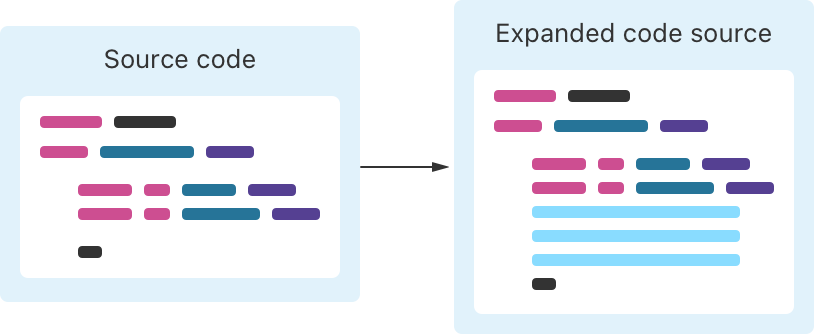
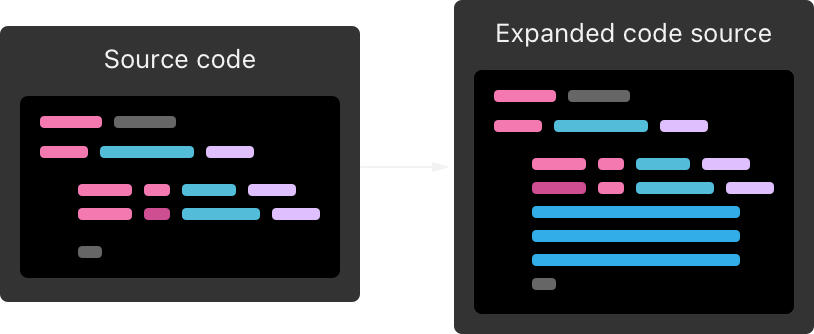
Expanding a macro is always an additive operation: Macros add new code, but they never delete or modify existing code.
宏展开始终是一种加法操作:宏会添加新代码,但绝不会删除或修改现有代码。
Both the input to a macro and the output of macro expansion are checked to ensure they're syntactically valid Swift code. Likewise, the values you pass to a macro and the values in code generated by a macro are checked to ensure they have the correct types. In addition, if the macro's implementation encounters an error when expanding that macro, the compiler treats this as a compilation error. These guarantees make it easier to reason about code that uses macros, and they make it easier to identify issues like using a macro incorrectly or a macro implementation that has a bug.
每个宏的输入和宏展开的输出都会被检查,以确保它们是语法上有效的 Swift 代码。同样,你传给宏的值以及宏生成的代码中的值也会被检查,以确保它们具有正确的类型。此外,如果宏的实现在展开宏时遇到错误,编译器会将其视为编译错误。这些保证让使用了宏的代码更容易被推导,也让人更容易发现诸如宏使用不当或宏实现有错误这样的问题。
Swift has two kinds of macros:
Swift 有两种宏:
- Freestanding macros appear on their own, without being attached to a declaration.
- 独立宏(Freestanding macros) 可单独出现,无需被附加到任何声明中。
- Attached macros modify the declaration that they're attached to.
- 附加宏(Attached macros) 会修改它被附加到的声明。
You call attached and freestanding macros slightly differently, but they both follow the same model for macro expansion, and you implement them both using the same approach. The following sections describe both kinds of macros in more detail.
附加宏和独立宏的调用方式略有不同,但它们都遵循相同的宏展开模型,并都使用相同的方法来实现。下面的章节将更详细地描述这两种宏。
Freestanding Macros 独立宏
To call a freestanding macro,
you write a number sign (#) before its name,
and you write any arguments to the macro in parentheses after its name.
For example:
要调用独立宏,需要在其名称前写入井号 (#),并在名称后的括号中写入宏的参数。例如:
func myFunction() {
    print("Currently running \(#function)")
    #warning("Something's wrong")
}
In the first line,
#function calls the function() macro from the Swift standard library.
When you compile this code,
Swift calls that macro's implementation,
which replaces #function with the name of the current function.
When you run this code and call myFunction(),
it prints "Currently running myFunction()".
In the second line,
#warning calls the warning(_:) macro from the Swift standard library
to produce a custom compile-time warning.
在函数内的第一行中,#function 调用了 Swift 标准库中的 function() 宏。当你编译此代码时,Swift 会调用该宏的实现,将 #function 替换为当前函数的名称。当你运行这段代码并调用 myFunction() 时,它会打印 “Currently running myFunction()”。在第二行中,#warning 调用了 Swift 标准库中的 warning(_:) 宏,来生成一个自定义的编译时警告。
Freestanding macros can produce a value, like #function does,
or they can perform an action at compile time, like #warning does.
独立宏可以像 #function 所做的那样产出一个值,也可以像 #warning 所做的那样在编译时执行一个操作。
Attached Macros 附加宏
To call an attached macro,
you write an at sign (@) before its name,
and you write any arguments to the macro in parentheses after its name.
要调用附加宏,需要在其名称前写入 at 符号 (@) ,并在名称后的括号中写入宏的参数。
Attached macros modify the declaration that they're attached to. They add code to that declaration, like defining a new method or adding conformance to a protocol.
附加宏会修改它们所附加到的声明。它们为被附加到的声明添加代码,比如定义一个新的方法或者增加对某个协议的遵循。
For example, consider the following code that doesn't use macros:
例如,请看下面这段不使用宏的代码:
struct SundaeToppings: OptionSet {
    let rawValue: Int
    static let nuts = SundaeToppings(rawValue: 1 << 0)
    static let cherry = SundaeToppings(rawValue: 1 << 1)
    static let fudge = SundaeToppings(rawValue: 1 << 2)
}
In this code,
each of the options in the SundaeToppings option set
includes a call to the initializer,
which is repetitive and manual.
It would be easy to make a mistake when adding a new option,
like typing the wrong number at the end of the line.
在这段代码中,SundaeToppings 选项集中的每个选项都包括对构造器的调用,这是重复的手动操作。这样的实现方式在添加新选项时容易出错,比如在行尾键入错误的数字。
Here's a version of this code that uses a macro instead:
下面是该代码使用宏后的替代版本:
@OptionSet<Int>
struct SundaeToppings {
    private enum Options: Int {
        case nuts
        case cherry
        case fudge
    }
}
This version of SundaeToppings calls an @OptionSet macro.
The macro reads the list of cases in the private enumeration,
generates the list of constants for each option,
and adds a conformance to the OptionSet protocol.
此版本的 SundaeToppings 调用了 @OptionSet 宏。这个宏会读取私有枚举类中的枚举值列表,并为其中的每个值生成常量列表,同时也会为结构体增加对 OptionSet 协议的遵循。
For comparison,
here's what the expanded version of the @OptionSet macro looks like.
You don't write this code,
and you would see it only if you specifically asked Swift
to show the macro's expansion.
作为对比,@OptionSet 宏展开后是下面这样。这段代码不是由你自己编写的,只有当你特别要求 Swift 展示宏的展开时,你才会看到它。
struct SundaeToppings {
    private enum Options: Int {
        case nuts
        case cherry
        case fudge
    }

    typealias RawValue = Int
    var rawValue: RawValue
    init() { self.rawValue = 0 }
    init(rawValue: RawValue) { self.rawValue = rawValue }
    static let nuts: Self = Self(rawValue: 1 << Options.nuts.rawValue)
    static let cherry: Self = Self(rawValue: 1 << Options.cherry.rawValue)
    static let fudge: Self = Self(rawValue: 1 << Options.fudge.rawValue)
}
extension SundaeToppings: OptionSet { }
All of the code after the private enumeration
comes from the @OptionSet macro.
The version of SundaeToppings
that uses a macro to generate all of the static variables
is easier to read and easier to maintain
than the manually coded version, earlier.
这个结构体中的私有枚举类之后的所有代码都来自于 @OptionSet 宏。使用宏生成所有静态变量的 SundaeToppings 版本比前面手动编码的版本更易于阅读和维护。
Macro Declarations 宏的声明
In most Swift code, when you implement a symbol, like a function or type, there's no separate declaration. However, for macros, the declaration and implementation are separate. A macro's declaration contains its name, the parameters it takes, where it can be used, and what kind of code it generates. A macro's implementation contains the code that expands the macro by generating Swift code.
在大多数 Swift 代码中,当你实现某个符号(如函数或类型)时,不需要单独额外的声明。但是,宏的声明和实现是分开的。宏的声明包含其名称、所需的参数、可以被使用的位置以及它可以生成怎样的代码。宏的实现则包含通过生成 Swift 代码来展开这个宏所需的代码。
You introduce a macro declaration with the macro keyword.
For example,
here's part of the declaration for
the @OptionSet macro used in the previous example:
你可以使用 macro 关键字引入一个宏的声明。例如,下面是前面例子中使用到的 @OptionSet 宏的声明的一部分:
public macro OptionSet<RawType>() =
        #externalMacro(module: "SwiftMacros", type: "OptionSetMacro")
The first line
specifies the macro's name and its arguments ---
the name is OptionSet, and it doesn't take any arguments.
The second line
uses the externalMacro(module:type:) macro from the Swift standard library
to tell Swift where the macro's implementation is located.
In this case,
the SwiftMacros module
contains a type named OptionSetMacro,
which implements the @OptionSet macro.
第一行指定了宏的名称和它的参数 —— 名称是 OptionSet,并且不带任何参数。第二行使用 Swift 标准库中的 externalMacro(module:type:) 宏来告诉 Swift 这个宏的实现在哪里。在这个例子中,SwiftMacros 模块包含一个名为 OptionSetMacro 并实现了 @OptionSet 宏的类型。
Because OptionSet is an attached macro,
its name uses upper camel case,
like the names for structures and classes.
Freestanding macros have lower camel case names,
like the names for variables and functions.
因为 OptionSet 是一个附加宏,它的名称使用大驼峰式命名法,就像结构体和类的名称那样。独立宏的名称使用小驼峰式命名法,就像变量和函数的名称那样。
Note · 注意
Macros are always declared as public.
Because the code that declares a macro
is in a different module from code that uses that macro,
there isn't anywhere you could apply a nonpublic macro.
宏的可访问性总是被声明为 public 的。
由于声明宏的代码与使用宏的代码位于不同的模块中,因此没有任何地方可以应用一个非公开可访问的宏。
A macro declaration defines the macro's roles ---
the places in source code where that macro can be called,
and the kinds of code the macro can generate.
Every macro has one or more roles,
which you write as part of the attributes
at the beginning of the macro declaration.
Here's a bit more of the declaration for @OptionSet,
including the attributes for its roles:
宏的声明定义了宏的角色 —— 包括宏在源代码中可以被调用的位置以及宏可以生成的代码种类。每个宏都有一个或多个角色,作为属性的一部分写在宏声明的开头。下面是 @OptionSet 的更完整的声明,包括了指定它的角色的属性:
@attached(member)
@attached(extension, conformances: OptionSet)
public macro OptionSet<RawType>() =
        #externalMacro(module: "SwiftMacros", type: "OptionSetMacro")
The @attached attribute appears twice in this declaration,
once for each macro role.
The first use, @attached(member), indicates that the macro
adds new members to the type you apply it to.
The @OptionSet macro adds an init(rawValue:) initializer
that's required by the OptionSet protocol,
as well as some additional members.
The second use, @attached(extension, conformances: OptionSet),
tells you that @OptionSet
adds conformance to the OptionSet protocol.
The @OptionSet macro
extends the type that you apply the macro to,
to add conformance to the OptionSet protocol.
@attached 属性在此声明中出现了两次,每个宏角色各用了一次。第一次使用时,@attached(member) 表示这个宏会向被作用到的类型添加新的成员。按 OptionSet 协议以及一些附加成员的要求,@OptionSet 宏添加了一个 init(rawValue:) 构造器。第二次使用时,@attached(extension, conformances: OptionSet) 声明了 @OptionSet 会添加对 OptionSet 协议的遵循。@OptionSet 宏会扩展被作用到的类型,使其遵循 OptionSet 协议。
For a freestanding macro,
you write the @freestanding attribute to specify its role:
对于独立宏,你可以编写 @freestanding 属性来指定其角色:
@freestanding(expression)
public macro line<T: ExpressibleByIntegerLiteral>() -> T =
        /* ... location of the macro implementation... */
The #line macro above has the expression role.
An expression macro produces a value,
or performs a compile-time action like generating a warning.
上面的 #line 宏具有 expression(表达式)的角色。表达式宏可以产生一个值,或者执行一个编译时操作,比如生成一个警告。
In addition to the macro's role,
a macro's declaration provides information about
the names of the symbols that the macro generates.
When a macro declaration provides a list of names,
it's guaranteed to produce only declarations that use those names,
which helps you understand and debug the generated code.
Here's the full declaration of @OptionSet:
除了宏的角色外,宏的声明还提供了有关这个宏所生成的符号名称的信息。当宏的声明提供了一个名称列表时,它保证只生成使用这些名称的声明,这有助于理解和调试生成的代码。下面是 @OptionSet 的完整声明:
@attached(member, names: named(RawValue), named(rawValue),
        named(`init`), arbitrary)
@attached(extension, conformances: OptionSet)
public macro OptionSet<RawType>() =
        #externalMacro(module: "SwiftMacros", type: "OptionSetMacro")
In the declaration above,
the @attached(member) macro includes arguments after the names: label
for each of the symbols that the @OptionSet macro generates.
The macro adds declarations for symbols named
RawValue, rawValue, and init ---
because those names are known ahead of time,
the macro declaration lists them explicitly.
在上面的声明中,@attached(member) 宏在 names: 标签后为 @OptionSet 宏所生成的每个符号添加了参数。这个宏声明了名为 RawValue, rawValue 和 init 的符号 —— 因为这些名称是预先知道的,宏的声明明确列出了它们。
The macro declaration also includes arbitrary after the list of names,
allowing the macro to generate declarations
whose names aren't known until you use the macro.
For example,
when the @OptionSet macro is applied to the SundaeToppings above,
it generates type properties that correspond to the enumeration cases,
nuts, cherry, and fudge.
这个宏声明还在名称列表后添加了 arbitrary,这将允许宏生成一些在使用该宏之前未知名称的声明。例如,当 @OptionSet 宏被应用于上述的 SundaeToppings 结构体时,它将生成与枚举类成员 nuts, cherry 和 fudge 相对应的类型属性。
For more information, including a full list of macro roles, see attached and freestanding in Attributes.
要了解更多信息,包括宏角色的完整列表,请参阅 特性 中的 attached 和 freestanding。
Macro Expansion 宏的展开
When building Swift code that uses macros, the compiler calls the macros' implementation to expand them.
在构建使用了宏的 Swift 代码时,编译器会调用宏的实现来展开它们。
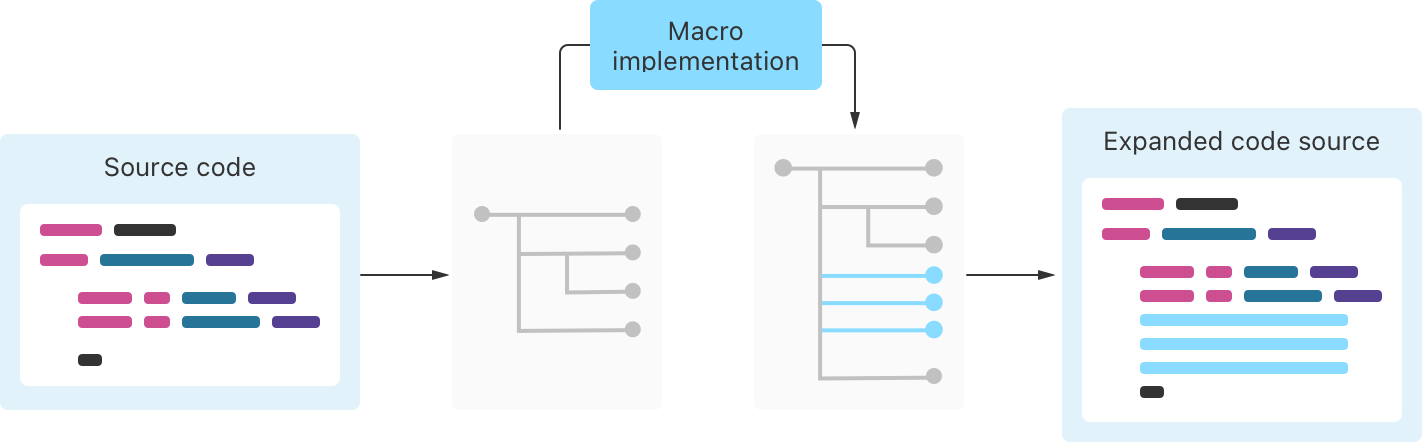
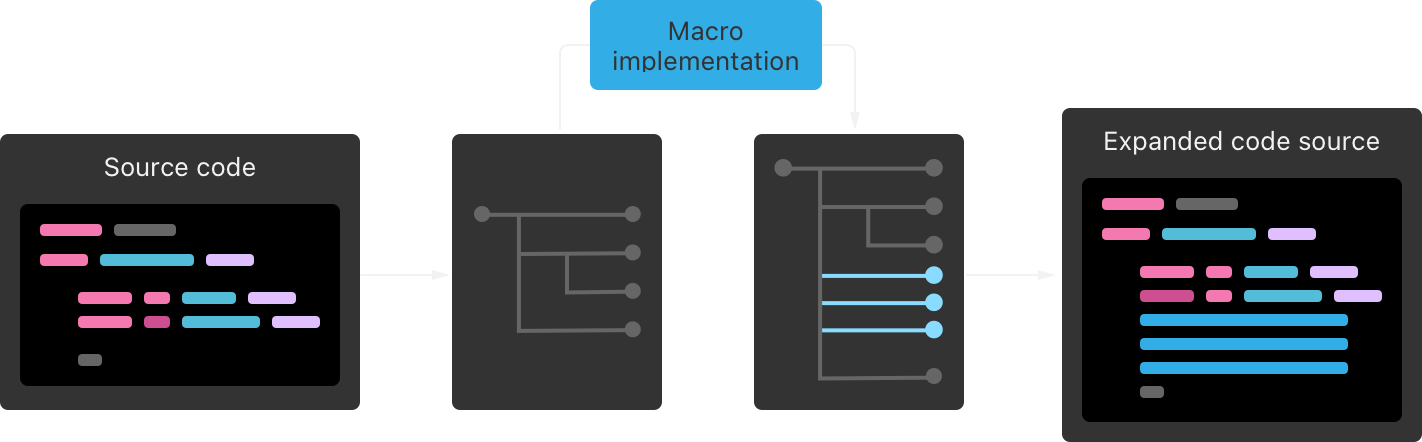
Specifically, Swift expands macros in the following way:
具体来说,Swift 会以以下方式展开宏:
- The compiler reads the code, creating an in-memory representation of the syntax.
- 编译器读取代码,创建语法的内存表示。
- The compiler sends part of the in-memory representation to the macro implementation, which expands the macro.
- 编译器将部分内存表示发送给宏的实现,宏将在此基础上展开。
- The compiler replaces the macro call with its expanded form.
- 编译器将宏的调用替换为它的展开形式。
- The compiler continues with compilation, using the expanded source code.
- 编译器使用展开后的源代码继续进行编译。
To go through the specific steps, consider the following:
为了阐述具体的步骤,用以下代码来举例:
let magicNumber = #fourCharacterCode("ABCD")The #fourCharacterCode macro takes a string that's four characters long
and returns an unsigned 32-bit integer
that corresponds to the ASCII values in the string joined together.
Some file formats use integers like this to identify data
because they're compact but still readable in a debugger.
The Implementing a Macro section below
shows how to implement this macro.
#fourCharacterCode 宏接受一个长度为四个字符的字符串作为输入,并返回一个无符号的 32 位整数,该整数对应于组成字符串的字符的 ASCII 码值的组合。一些文件格式使用这样的整数来标识数据,因为它们紧凑且在调试器中仍然可读。下面的 实现一个宏 的部分展示了如何实现这个宏。
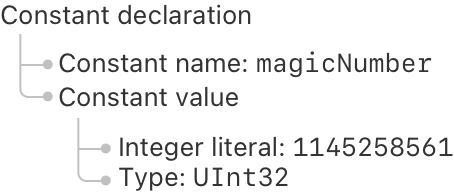
To expand the macros in the code above, the compiler reads the Swift file and creates an in-memory representation of that code known as an abstract syntax tree, or AST. The AST makes the code's structure explicit, which makes it easier to write code that interacts with that structure --- like a compiler or a macro implementation. Here's a representation of the AST for the code above, slightly simplified by omitting some extra detail:
为了展开上述代码中的宏,编译器读取 Swift 文件并创建该代码的内存表示,也就是抽象语法树(AST)。AST 使得代码的结构变得清晰,也使得编写与该结构进行交互的代码变得更容易 —— 例如编写编译器或宏的实现,都需要与 AST 进行交互。以下是上述代码的 AST 表示,略微简化,省略了一些额外的细节:
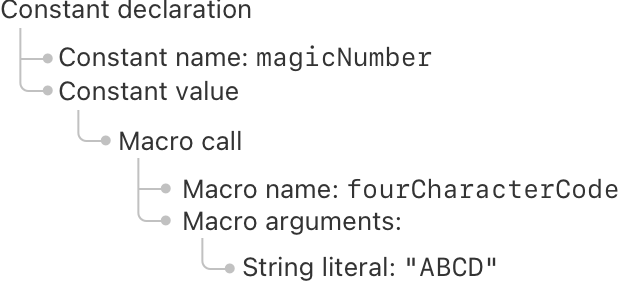
The diagram above shows how the structure of this code is represented in memory. Each element in the AST corresponds to a part of the source code. The "Constant declaration" AST element has two child elements under it, which represent the two parts of a constant declaration: its name and its value. The "Macro call" element has child elements that represent the macro's name and the list of arguments being passed to the macro.
上面的图展示了该代码的结构是如何在内存中表示的。AST 中的每个节点对应源代码的一部分。AST 的 “Constant declaration(常量声明)”节点下有两个子节点,分别表示常量声明的两个部分:它的名称和它的值。“Macro call(宏调用)”节点则有表示宏的名称和传递给宏的参数列表的子节点。
As part of constructing this AST,
the compiler checks that the source code is valid Swift.
For example, #fourCharacterCode takes a single argument,
which must be a string.
If you tried to pass an integer argument,
or forgot the quotation mark (") at the end of the string literal,
you'd get an error at this point in the process.
作为构建这个 AST 的一部分,编译器会检查源代码是否是有效的 Swift 代码。例如,#fourCharacterCode 只接受一个参数,且该参数必须是一个字符串。如果你尝试传递一个整数参数,或者在字符串字面量的末尾忘记了引号 ("),你会在这个过程中的这个点上获得一个错误。
The compiler finds the places in the code where you call a macro, and loads the external binary that implements those macros. For each macro call, the compiler passes part of the AST to that macro's implementation. Here's a representation of that partial AST:
编译器会找到代码中调用宏的地方,并加载实现这些宏的外部二进制文件。对于每个宏调用,编译器将抽象语法树(AST)的一部分传递给该宏的实现。以下是这个部分 AST 的表示:
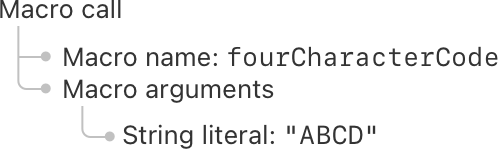
The implementation of the #fourCharacterCode macro
reads this partial AST as its input when expanding the macro.
A macro's implementation
operates only on the partial AST that it receives as its input,
meaning a macro always expands the same way
regardless of what code comes before and after it.
This limitation helps make macro expansion easier to understand,
and helps your code build faster
because Swift can avoid expanding macros that haven't changed.
#fourCharacterCode 宏的实现会在展开这个宏时读取这个部分 AST 作为输入。宏的实现仅对其接收到的部分 AST 进行操作,这意味着无论这个宏的前后代码是什么,它的展开方式始终不变。这一限制有助于使宏展开更易于理解,并帮助你的代码能更快得到构建,因为 Swift 可以不必展开那些未变更过的宏。
Swift helps macro authors avoid accidentally reading other input by restricting the code that implements macros:
Swift 能通过限制实现宏的代码,帮助宏的作者避免意外读取其他输入:
- The AST passed to a macro implementation contains only the AST elements that represent the macro, not any of the code that comes before or after it.
- 传递给宏实现的抽象语法树(AST)仅包含表示该宏的 AST 节点,而不包括其前后的任何代码。
- The macro implementation runs in a sandboxed environment that prevents it from accessing the file system or the network.
- 宏的实现运行在一个沙盒环境中,这可以防止其访问文件系统或网络。
In addition to these safeguards, the macro's author is responsible for not reading or modifying anything outside of the macro's inputs. For example, a macro's expansion must not depend on the current time of day.
除了这些保护措施,宏的作者有责任不读取或修改宏输入以外的任何内容。例如,宏的展开不得依赖于当前的时间。
The implementation of #fourCharacterCode
generates a new AST containing the expanded code.
Here's what that code returns to the compiler:
#fourCharacterCode 的实现会生成了一个包含展开后代码的新 AST。以下是上述代码会返回给编译器的内容:


When the compiler receives this expansion, it replaces the AST element that contains the macro call with the element that contains the macro's expansion. After macro expansion, the compiler checks again to ensure the program is still syntactically valid Swift and all the types are correct. That produces a final AST that can be compiled as usual:
当编译器接收到这个展开结果时,它用包含了这个宏展开结果的 AST 节点替换掉包含了宏调用的 AST 节点。在宏展开后,编译器会再次检查以确保程序仍然是语法上有效的 Swift 代码,并且所有的类型都是正确的。这会生成一个可以像往常一样编译的最终 AST:
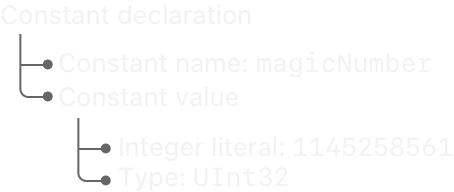
This AST corresponds to Swift code like this:
这个 AST 对应于如下的 Swift 代码:
let magicNumber = 1145258561 as UInt32In this example, the input source code has only one macro, but a real program could have several instances of the same macro and several calls to different macros. The compiler expands macros one at a time.
在这个例子中,作为输入的源代码只有一个宏,但一个真实的程序可能有某个相同宏的多个实例以及对不同宏的多个调用。编译器会一次展开一个宏。
If one macro appears inside another, the outer macro is expanded first --- this lets the outer macro modify the inner macro before it's expanded.
如果一个宏出现在另一个宏的内部,则先展开外部宏 —— 这使得外部宏可以在自己被展开之前修改它的内部宏。
Implementing a Macro 实现一个宏
To implement a macro, you make two components: A type that performs the macro expansion, and a library that declares the macro to expose it as API. These parts are built separately from code that uses the macro, even if you're developing the macro and its clients together, because the macro implementation runs as part of building the macro's clients.
要实现一个宏,你需要两个组件:一个是执行这个宏展开的类型,另一个是用来声明这个宏并将其暴露为 API 的库。这些部分与使用这个宏的代码分开构建,即使这个宏和它的使用端是一起开发的也是如此,因为这个宏的实现是作为构建这个宏的使用端的一部分而运行的。
To create a new macro using Swift Package Manager,
run swift package init --type macro ---
this creates several files,
including a template for a macro implementation and declaration.
要使用 Swift 包管理器来创建新的宏,请运行 swift package init --type macro —— 这会创建几个文件,包括一个宏的实现和声明的模板。
To add macros to an existing project,
edit the beginning of your Package.swift file as follows:
要在现有项目中添加宏,请按如下方式编辑 Package.swift 文件的开头:
- Set a Swift tools version of 5.9 or later in the
swift-tools-versioncomment. - Import the
CompilerPluginSupportmodule. - Include macOS 10.15 as a minimum deployment target in the
platformslist.
- 在
swift-tools-version注释中设置 Swift 工具版本为 5.9 或更高版本。 - 导入
CompilerPluginSupport模块。 - 在
platforms列表中将 macOS 10.15 作为最低部署目标。
The code below shows the beginning of an example Package.swift file.
下面的代码展示了作为示例的 Package.swift 文件的开头。
// swift-tools-version: 5.9

import PackageDescription
import CompilerPluginSupport

let package = Package(
    name: "MyPackage",
    platforms: [ .iOS(.v17), .macOS(.v13)],
    // ...
)
Next, add a target for the macro implementation
and a target for the macro library
to your existing Package.swift file.
For example,
you can add something like the following,
changing the names to match your project:
接下来,在现有的 Package.swift 文件中为宏的实现和宏的声明所在的库分别添加一个构建目标。例如,你可以添加类似于下面这样的内容,注意更改名称以匹配你的项目:
targets: [
    // Macro implementation that performs the source transformations.
    .macro(
        name: "MyProjectMacros",
        dependencies: [
            .product(name: "SwiftSyntaxMacros", package: "swift-syntax"),
            .product(name: "SwiftCompilerPlugin", package: "swift-syntax")
        ]
    ),

    // Library that exposes a macro as part of its API.
    .target(name: "MyProject", dependencies: ["MyProjectMacros"]),
]
The code above defines two targets:
MyProjectMacros contains the implementation of the macros,
and MyProject makes those macros available.
上面的代码定义了两个构建目标:MyProjectMacros 包含宏的实现,而 MyProject 则让这些宏变得可被使用。
The implementation of a macro
uses the SwiftSyntax module to interact with Swift code
in a structured way, using an AST.
If you created a new macro package with Swift Package Manager,
the generated Package.swift file
automatically includes a dependency on SwiftSyntax.
If you're adding macros to an existing project,
add a dependency on SwiftSyntax in your Package.swift file:
宏的实现使用 SwiftSyntax 模块,通过 AST 以结构化的方式与 Swift 代码进行交互。如果你使用 Swift 包管理器创建了一个新的宏包,生成的 Package.swift 文件将自动包含对 SwiftSyntax 的依赖关系。如果你要在现有项目中添加宏,请自行在 Package.swift 文件中添加对 SwiftSyntax 的依赖:
dependencies: [
    .package(url: "https://github.com/swiftlang/swift-syntax", from: "509.0.0")
],
Depending on your macro's role,
there's a corresponding protocol from SwiftSyntax
that the macro implementation conforms to.
For example,
consider #fourCharacterCode from the previous section.
Here's a structure that implements that macro:
根据宏的角色,宏的实现需要遵守 SwiftSyntax 中的相应协议。例如,对于上一节中的 #fourCharacterCode,下面是一个实现该宏的结构:
import SwiftSyntax
import SwiftSyntaxMacros

public struct FourCharacterCode: ExpressionMacro {
    public static func expansion(
        of node: some FreestandingMacroExpansionSyntax,
        in context: some MacroExpansionContext
    ) throws -> ExprSyntax {
        guard let argument = node.argumentList.first?.expression,
              let segments = argument.as(StringLiteralExprSyntax.self)?.segments,
              segments.count == 1,
              case .stringSegment(let literalSegment)? = segments.first
        else {
            throw CustomError.message("Need a static string")
        }

        let string = literalSegment.content.text
        guard let result = fourCharacterCode(for: string) else {
            throw CustomError.message("Invalid four-character code")
        }

        return "\(raw: result) as UInt32"
    }
}

private func fourCharacterCode(for characters: String) -> UInt32? {
    guard characters.count == 4 else { return nil }

    var result: UInt32 = 0
    for character in characters {
        result = result << 8
        guard let asciiValue = character.asciiValue else { return nil }
        result += UInt32(asciiValue)
    }
    return result
}
enum CustomError: Error { case message(String) }
If you're adding this macro to an existing Swift Package Manager project, add a type that acts as the entry point for the macro target and lists the macros that the target defines:
如果要将此宏添加到现有的使用 Swift 包管理的项目中,请添加一个类型作为宏的构建目标的入口点,并列出构建目标定义的宏:
import SwiftCompilerPlugin

@main
struct MyProjectMacros: CompilerPlugin {
    var providingMacros: [Macro.Type] = [FourCharacterCode.self]
}
The #fourCharacterCode macro
is a freestanding macro that produces an expression,
so the FourCharacterCode type that implements it
conforms to the ExpressionMacro protocol.
The ExpressionMacro protocol has one requirement,
an expansion(of:in:) method that expands the AST.
For the list of macro roles and their corresponding SwiftSyntax protocols,
see attached and freestanding
in Attributes.
#fourCharacterCode 宏是一个产出一个表达式的独立宏,因此,实现它的 FourCharacterCode 类型需遵循 ExpressionMacro 协议。ExpressionMacro 协议有一个要求,即有一个 expansion(of:in:) 方法来展开 AST。有关宏的角色列表及其相应的 SwiftSyntax 协议,请参阅 特性 中的 attached 和 freestanding。
To expand the #fourCharacterCode macro,
Swift sends the AST for the code that uses this macro
to the library that contains the macro implementation.
Inside the library, Swift calls FourCharacterCode.expansion(of:in:),
passing in the AST and the context as arguments to the method.
The implementation of expansion(of:in:)
finds the string that was passed as an argument to #fourCharacterCode
and calculates the corresponding 32-bit unsigned integer literal value.
要展开 #fourCharacterCode 宏,Swift 会将使用了此宏的代码的 AST 发送给包含该宏的实现的库。在这个库的内部,Swift 会调用 FourCharacterCode.expansion(of:in:) 方法,并将 AST 和上下文作为参数传递给该方法。expansion(of:in:) 的实现会找到作为参数传递给 #fourCharacterCode 的字符串,并计算出相对应的 32 位无符号整型字面量的值。
In the example above,
the first guard block extracts the string literal from the AST,
assigning that AST element to literalSegment.
The second guard block
calls the private fourCharacterCode(for:) function.
Both of these blocks throw an error if the macro is used incorrectly ---
the error message becomes a compiler error
at the malformed call site.
For example,
if you try to call the macro as #fourCharacterCode("AB" + "CD")
the compiler shows the error "Need a static string".
在上面的示例中,第一个 guard 块从 AST 中提取出字符串字面量,并将该 AST 节点赋值给 literalSegment。第二个 guard 块调用私有 fourCharacterCode(for:) 函数。如果宏使用不当,这两个代码块都可能会抛出错误 —— 错误信息会在被不当调用的位置作为编译器错误抛出。例如,如果你尝试以 #fourCharacterCode("AB" + "CD") 的方式来调用该宏,编译器会显示错误信息 "Need a static string"(“需要一个静态字符串”)。
The expansion(of:in:) method returns an instance of ExprSyntax,
a type from SwiftSyntax that represents an expression in an AST.
Because this type conforms to the StringLiteralConvertible protocol,
the macro implementation uses a string literal
as a lightweight syntax to create its result.
All of the SwiftSyntax types that you return from a macro implementation
conform to StringLiteralConvertible,
so you can use this approach when implementing any kind of macro.
expansion(of:in:) 方法返回了一个 ExprSyntax 的实例,ExprSyntax 是 SwiftSyntax 中的一种用于表示 AST 中的表达式的类型。由于此类型遵循 StringLiteralConvertible 协议,作为一种轻量级的语法,这个宏的实现就使用了一个简单字符串字面量来创建其结果。所有从宏实现中返回的 SwiftSyntax 类型都遵循 StringLiteralConvertible 协议,因此你也可以在实现任何宏时使用这种方法。
Developing and Debugging Macros 开发和调试宏
Macros are well suited to development using tests:
They transform one AST into another AST
without depending on any external state,
and without making changes to any external state.
In addition, you can create syntax nodes from a string literal,
which simplifies setting up the input for a test.
You can also read the description property of an AST
to get a string to compare against an expected value.
For example,
here's a test of the #fourCharacterCode macro from previous sections:
宏非常适合使用测试驱动的方式进行开发:宏可以将一个 AST 转换成另一个 AST,而无需依赖任何外部状态,也无需更改任何外部状态。此外,你还可以用字符串字面量创建语法节点,从而简化了测试输入的设置。你还可以读取 AST 的 description 属性来获取一个用来与预期值进行比较的字符串。例如,下面是对前面章节中的 #fourCharacterCode 宏的一个测试:
let source: SourceFileSyntax =
    """
    let abcd = #fourCharacterCode("ABCD")
    """

let file = BasicMacroExpansionContext.KnownSourceFile(
    moduleName: "MyModule",
    fullFilePath: "test.swift"
)

let context = BasicMacroExpansionContext(sourceFiles: [source: file])

let transformedSF = source.expand(
    macros:["fourCharacterCode": FourCharacterCode.self],
    in: context
)

let expectedDescription =
    """
    let abcd = 1145258561 as UInt32
    """

precondition(transformedSF.description == expectedDescription)
The example above tests the macro using a precondition, but you could use a testing framework instead.
上面的示例使用了一个 precondition 来测试宏,但你也可以使用测试框架来代替它。