Subscripts下标
Access the elements of a collection.
访问集合的元素
Classes, structures, and enumerations can define subscripts,
which are shortcuts for accessing the member elements of a collection, list, or sequence.
You use subscripts to set and retrieve values by index without needing
separate methods for setting and retrieval.
For example, you access elements in an Array instance as someArray[index]
and elements in a Dictionary instance as someDictionary[key].
下标可以定义在类、结构体和枚举中,是访问集合、列表或序列中元素的快捷方式。可以使用下标的索引设置和获取值,而不需要再调用对应的存取方法。举例来说,用下标访问一个 Array 实例中的元素可以写作 someArray[index],访问 Dictionary 实例中的元素可以写作 someDictionary[key]。
You can define multiple subscripts for a single type, and the appropriate subscript overload to use is selected based on the type of index value you pass to the subscript. Subscripts aren't limited to a single dimension, and you can define subscripts with multiple input parameters to suit your custom type's needs.
一个类型可以定义多个下标,系统会根据索引值的类型自动选择对应的下标重载。下标不限于一维,你可以定义具有多个入参的下标来满足自定义类型的需求。
Subscript Syntax 下标语法
Subscripts enable you to query instances of a type
by writing one or more values in square brackets after the instance name.
Their syntax is similar to both instance method syntax and computed property syntax.
You write subscript definitions with the subscript keyword,
and specify one or more input parameters and a return type,
in the same way as instance methods.
Unlike instance methods, subscripts can be read-write or read-only.
This behavior is communicated by a getter and setter
in the same way as for computed properties:
下标允许你通过在实例名称后面的方括号中传入一个或者多个索引值来对实例进行查询。它的语法类似于实例方法语法和计算型属性语法。定义下标使用 subscript 关键字,与定义实例方法类似,都是指定一个或多个输入参数和一个返回类型。与实例方法不同的是,下标可以设定为读写或只读。这种行为由 getter 和 setter 实现,类似计算型属性:
subscript(index: Int) -> Int {
    get {
        // Return an appropriate subscript value here.
    }
    set(newValue) {
        // Perform a suitable setting action here.
    }
}
The type of newValue is the same as the return value of the subscript.
As with computed properties, you can choose not to specify
the setter's (newValue) parameter.
A default parameter called newValue is provided to your setter
if you don't provide one yourself.
newValue 的类型与下标的返回值类型相同。如同计算属性,可以不指定 setter 的 (newValue) 形参。如果你没有指定形参,setter 会提供一个名为 newValue 的默认形参。
As with read-only computed properties,
you can simplify the declaration of a read-only subscript
by removing the get keyword and its braces:
如同只读计算型属性,对于只读下标的声明,你可以通过省略 get 关键字和对应的大括号组来进行简写:
subscript(index: Int) -> Int {
    // Return an appropriate subscript value here.
}
Here's an example of a read-only subscript implementation,
which defines a TimesTable structure to represent an n-times-table of integers:
下面代码演示了只读下标的实现,这里定义了一个 TimesTable 结构体,用来表示对应整数的乘法表:
struct TimesTable {
    let multiplier: Int
    subscript(index: Int) -> Int {
        return multiplier * index
    }
}
let threeTimesTable = TimesTable(multiplier: 3)
print("six times three is \(threeTimesTable[6])")
// Prints "six times three is 18".
In this example, a new instance of TimesTable is created
to represent the three-times-table.
This is indicated by passing a value of 3 to the structure's initializer
as the value to use for the instance's multiplier parameter.
在上例中,创建了一个 TimesTable 实例,用来表示整数 3 的乘法表。这是通过将数值 3 传递给结构体的 initializer,作为实例的 multiplier 形参的值来实现的。
You can query the threeTimesTable instance by calling its subscript,
as shown in the call to threeTimesTable[6].
This requests the sixth entry in the three-times-table,
which returns a value of 18, or 3 times 6.
你可以通过下标访问 threeTimesTable 实例,例如上面演示的 threeTimesTable[6]。这条语句查询了乘法表中 3 的第六个元素,返回 3 的 6 倍即 18。
Note · 注意
An n-times-table is based on a fixed mathematical rule.
It isn't appropriate to set threeTimesTable[someIndex] to a new value,
and so the subscript for TimesTable is defined as a read-only subscript.
TimesTable 例子基于一个固定的数学公式。将 threeTimesTable[someIndex] 进行赋值操作并不合适,因此下标定义为只读的。
Subscript Usage 下标用法
The exact meaning of “subscript” depends on the context in which it's used. Subscripts are typically used as a shortcut for accessing the member elements in a collection, list, or sequence. You are free to implement subscripts in the most appropriate way for your particular class or structure's functionality.
“下标”的确切含义取决于使用场景。下标通常用作访问集合、列表或序列中的成员元素的快捷方式。你可以针对自己特定的类或结构体功能来以最恰当的方式实现下标。
For example, Swift's Dictionary type implements a subscript
to set and retrieve the values stored in a Dictionary instance.
You can set a value in a dictionary
by providing a key of the dictionary's key type within subscript brackets,
and assigning a value of the dictionary's value type to the subscript:
例如,Swift 的 Dictionary 类型实现下标用于对实例中储存的值进行存取操作。为字典设值时,在下标中使用和字典的键类型相同的键,并把一个和字典的值类型相同的值赋给这个下标:
var numberOfLegs = ["spider": 8, "ant": 6, "cat": 4]
numberOfLegs["bird"] = 2
The example above defines a variable called numberOfLegs
and initializes it with a dictionary literal containing three key-value pairs.
The type of the numberOfLegs dictionary is inferred to be [String: Int].
After creating the dictionary,
this example uses subscript assignment to add
a String key of "bird" and an Int value of 2 to the dictionary.
上面的示例定义了一个名为 numberOfLegs 的变量,并用一个包含三个键值对的字典字面量初始化它。numberOfLegs 字典的类型被推断为 [String: Int]。创建字典后,此示例使用下标赋值将 String 类型的键 "bird" 和 Int 类型的值 2 添加到字典中。
For more information about Dictionary subscripting,
see Accessing and Modifying a Dictionary.
更多关于 Dictionary 下标的信息请参考 访问和修改字典.
Note · 注意
Swift's Dictionary type implements its key-value subscripting
as a subscript that takes and returns an optional type.
For the numberOfLegs dictionary above,
the key-value subscript takes and returns a value of type Int?,
or “optional int”.
The Dictionary type uses an optional subscript type to model the fact that
not every key will have a value, and to give a way to delete a value for a key
by assigning a nil value for that key.
Swift 的 Dictionary 类型将其键值下标实现为接受并返回可选类型的下标。对于上面的 numberOfLegs 字典,键值下标接受并返回 Int? 类型的值,也就是“可选的 int”。Dictionary 类型使用可选的下标类型来体现并非每个键都有对应值这一事实,同时也提供了一种删除某个键对应值的方式,只需将该键对应的值赋值为 nil 即可。
Subscript Options 下标选项
Subscripts can take any number of input parameters, and these input parameters can be of any type. Subscripts can also return a value of any type.
下标可以接受任意数量的入参,并且这些入参可以是任何类型。下标的返回值也可以是任意类型。
Like functions, subscripts can take a varying number of parameters and provide default values for their parameters, as discussed in Variadic Parameters and Default Parameter Values. However, unlike functions, subscripts can't use in-out parameters.
A class or structure can provide as many subscript implementations as it needs, and the appropriate subscript to be used will be inferred based on the types of the value or values that are contained within the subscript brackets at the point that the subscript is used. This definition of multiple subscripts is known as subscript overloading.
一个类或结构体可以根据自身需要提供多个下标实现,使用下标时将通过入参的数量和类型进行区分,自动匹配合适的下标。它通常被称为 下标重载。
While it's most common for a subscript to take a single parameter,
you can also define a subscript with multiple parameters
if it's appropriate for your type.
The following example defines a Matrix structure,
which represents a two-dimensional matrix of Double values.
The Matrix structure's subscript takes two integer parameters:
虽然下标采用单一入参是最常见的,但也可以根据情况定义接受多个入参的下标。下面的示例定义一个 Matrix 结构体,该结构体表示一个 Double 类型的二维矩阵。Matrix 结构体的下标接受两个整型参数:
struct Matrix {
    let rows: Int, columns: Int
    var grid: [Double]
    init(rows: Int, columns: Int) {
        self.rows = rows
        self.columns = columns
        grid = Array(repeating: 0.0, count: rows * columns)
    }
    func indexIsValid(row: Int, column: Int) -> Bool {
        return row >= 0 && row < rows && column >= 0 && column < columns
    }
    subscript(row: Int, column: Int) -> Double {
        get {
            assert(indexIsValid(row: row, column: column), "Index out of range")
            return grid[(row * columns) + column]
        }
        set {
            assert(indexIsValid(row: row, column: column), "Index out of range")
            grid[(row * columns) + column] = newValue
        }
    }
}
Matrix provides an initializer that takes two parameters called rows and columns,
and creates an array that's large enough to store rows * columns values of type Double.
Each position in the matrix is given an initial value of 0.0.
To achieve this, the array's size, and an initial cell value of 0.0,
are passed to an array initializer that creates and initializes a new array of the correct size.
This initializer is described in more detail
in Creating an Array with a Default Value.
Matrix 提供了一个接受两个入参的构造方法,入参分别是 rows 和 columns,创建了一个足够容纳 rows * columns 个 Double 类型的值的数组。通过传入数组长度和初始值 0.0 到数组的构造器,将矩阵中每个位置的值初始化为 0.0。关于数组的这种构造方法请参考使用默认值创建数组。
You can construct a new Matrix instance by passing
an appropriate row and column count to its initializer:
你可以通过传入合适的 row 和 column 数值来构造一个新的 Matrix 实例:
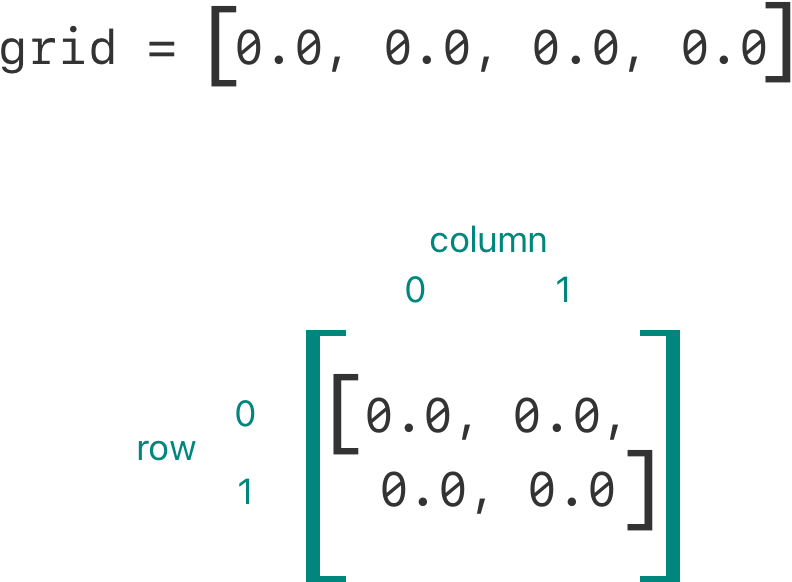
var matrix = Matrix(rows: 2, columns: 2)The example above creates a new Matrix instance with two rows and two columns.
The grid array for this Matrix instance
is effectively a flattened version of the matrix,
as read from top left to bottom right:
上例中创建了一个两行两列的 Matrix 实例。该 Matrix 实例的 grid 数组按照从左上到右下的阅读顺序将矩阵扁平化存储:
Values in the matrix can be set by passing row and column values into the subscript, separated by a comma:
将 row 和 column 的值传入下标来为矩阵设值,下标的入参使用逗号分隔:
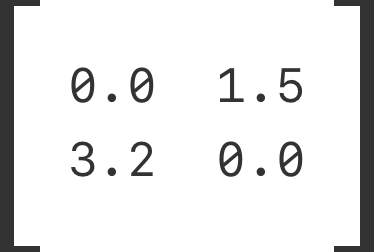
matrix[0, 1] = 1.5
matrix[1, 0] = 3.2
These two statements call the subscript's setter to set
a value of 1.5 in the top right position of the matrix
(where row is 0 and column is 1),
and 3.2 in the bottom left position
(where row is 1 and column is 0):
上面两条语句分别调用下标的 setter 将矩阵右上角位置(即 row 为 0、column 为 1 的位置)的值设置为 1.5,将矩阵左下角位置(即 row 为 1、column 为 0 的位置)的值设置为 3.2:
The Matrix subscript's getter and setter both contain an assertion
to check that the subscript's row and column values are valid.
To assist with these assertions,
Matrix includes a convenience method called indexIsValid(row:column:),
which checks whether the requested row and column
are inside the bounds of the matrix:
Matrix 下标的 getter 和 setter 中都含有断言,用来检查下标入参 row 和 column 的值是否有效。为了方便进行断言,Matrix 包含了一个名为 indexIsValid(row:column:) 的便利方法,用来检查入参 row 和 column 的值是否在矩阵范围内:
func indexIsValid(row: Int, column: Int) -> Bool {
    return row >= 0 && row < rows && column >= 0 && column < columns
}
An assertion is triggered if you try to access a subscript that's outside of the matrix bounds:
断言在下标越界时触发:
let someValue = matrix[2, 2]
// This triggers an assert, because [2, 2] is outside of the matrix bounds.
Type Subscripts 类型下标
Instance subscripts, as described above,
are subscripts that you call on an instance of a particular type.
You can also define subscripts that are called on the type itself.
This kind of subscript is called a type subscript.
You indicate a type subscript
by writing the static keyword before the subscript keyword.
Classes can use the class keyword instead,
to allow subclasses to override the superclass’s implementation of that subscript.
The example below shows how you define and call a type subscript:
正如上节所述,实例下标是在特定类型的一个实例上调用的下标。你也可以定义一种在这个类型自身上调用的下标。这种下标被称作 类型下标。你可以通过在 subscript 关键字之前写下 static 关键字的方式来表示一个类型下标。类型可以使用 class 关键字来代替 static,它允许子类重写父类中对那个下标的实现。下面的例子展示了如何定义和调用一个类型下标:
enum Planet: Int {
    case mercury = 1, venus, earth, mars, jupiter, saturn, uranus, neptune
    static subscript(n: Int) -> Planet {
        return Planet(rawValue: n)!
    }
}
let mars = Planet[4]
print(mars)