Basic Operators基本运算符
Perform operations like assignment, arithmetic, and comparison.
执行赋值、算术和比较等操作。
An operator is a special symbol or phrase that you use to
check, change, or combine values.
For example, the addition operator (+) adds two numbers,
as in let i = 1 + 2,
and the logical AND operator (&&) combines two Boolean values,
as in if enteredDoorCode && passedRetinaScan.
运算符是一种特殊的符号或短语,用于检查、更改或组合值。例如,加法运算符(+)将两个数字相加,如 let i = 1 + 2,逻辑与运算符(&&)组合两个布尔值,如 if enteredDoorCode && passedRetinaScan。
Swift supports the operators you may already know from languages like C,
and improves several capabilities to eliminate common coding errors.
The assignment operator (=) doesn't return a value,
to prevent it from being mistakenly used when
the equal to operator (==) is intended.
Arithmetic operators (+, -, *, /, % and so forth)
detect and disallow value overflow,
to avoid unexpected results when working with numbers that become larger or smaller
than the allowed value range of the type that stores them.
You can opt in to value overflow behavior
by using Swift's overflow operators,
as described in Overflow Operators.
Swift 支持类似 C 等你已所熟知的语言中的运算符,并改进了几个功能,以消除常见的编码错误。赋值运算符(=)不返回值,以防止它被误用时等于运算符(==)被意外使用。算术运算符(+、-、*、/、% 等)检测并禁止值溢出,以避免在处理超出存储它们的类型允许值范围的较大或较小数字时出现意外结果。你可以选择使用 Swift 的溢出运算符来处理值溢出行为,如 溢出运算符 中所述。
Swift also provides range operators that aren't found in C,
such as a..<b and a...b,
as a shortcut for expressing a range of values.
Swift 还提供了 C 语言中没有的区间运算符,如 a..<b 和 a...b,作为表达值范围的快捷方式。
This chapter describes the common operators in Swift. Advanced Operators covers Swift's advanced operators, and describes how to define your own custom operators and implement the standard operators for your own custom types.
本章介绍了 Swift 中的常见运算符。高级运算符 涵盖了 Swift 的高级运算符,并描述了如何定义自定义运算符以及为自定义类型实现标准运算符。
Terminology 术语
Operators are unary, binary, or ternary:
运算符可以是一元、二元或三元:
- Unary operators operate on a single target (such as
-a). Unary prefix operators appear immediately before their target (such as!b), and unary postfix operators appear immediately after their target (such asc!). - Binary operators operate on two targets (such as
2 + 3) and are infix because they appear in between their two targets. - Ternary operators operate on three targets.
Like C, Swift has only one ternary operator,
the ternary conditional operator (
a ? b : c).
- 一元运算符作用于单个目标(如
-a)。一元前置运算符紧跟在其目标之前(如!b),一元后置运算符紧跟在其目标之后(如c!)。 - 二元运算符作用于两个目标(如
2 + 3),是中置的,因为它们出现在两个目标之间。 - 三元运算符作用于三个目标。与 C 一样,Swift 只有一个三元运算符,即三元条件运算符(
a ? b : c)。
The values that operators affect are operands.
In the expression 1 + 2, the + symbol is an infix operator
and its two operands are the values 1 and 2.
运算符影响的值称为操作数。在表达式 1 + 2 中,+ 符号是一个中置运算符,它的两个操作数是值 1 和 2。
Assignment Operator 赋值运算符
The assignment operator (a = b)
initializes or updates the value of a with the value of b:
赋值运算符(a = b)用 b 的值初始化或更新 a 的值:
let b = 10
var a = 5
a = b
// a is now equal to 10
If the right side of the assignment is a tuple with multiple values, its elements can be decomposed into multiple constants or variables at once:
如果赋值运算符的右侧是一个包含多个值的元组,可以将其元素同时分解为多个常量或变量:
let (x, y) = (1, 2)
// x is equal to 1, and y is equal to 2
Unlike the assignment operator in C and Objective-C, the assignment operator in Swift doesn't itself return a value. The following statement isn't valid:
与 C 和 Objective-C 中的赋值运算符不同,Swift 中的赋值运算符本身不返回值。以下语句无效:
if x = y {
    // This isn't valid, because x = y doesn't return a value.
}
This feature prevents the assignment operator (=) from being used by accident
when the equal to operator (==) is actually intended.
By making if x = y invalid,
Swift helps you to avoid these kinds of errors in your code.
因为 Swift 语言规定 if x = y 这种写法是无效的,这个特性可以防止不小心使用赋值运算符(=) 而非等于运算符(==)。Swift 帮助你避免代码中出现这种错误。
Arithmetic Operators 算术运算符
Swift supports the four standard arithmetic operators for all number types:
Swift 为所有数值类型支持四种标准算术运算符:
- Addition (
+) - Subtraction (
-) - Multiplication (
*) - Division (
/)
- 加法(
+) - 减法(
-) - 乘法(
*) - 除法(
/)
1 + 2       // equals 3
5 - 3       // equals 2
2 * 3       // equals 6
10.0 / 2.5  // equals 4.0
Unlike the arithmetic operators in C and Objective-C,
the Swift arithmetic operators don't allow values to overflow by default.
You can opt in to value overflow behavior by using Swift's overflow operators
(such as a &+ b). See Overflow Operators.
Swift 的算术运算符与 C 和 Objective-C 中的不同,默认情况下不允许值溢出。你可以选择使用 Swift 的溢出运算符(如 a &+ b)来启用值溢出行为。请参阅 溢出运算符。
The addition operator is also supported for String concatenation:
加法运算符也支持 String 拼接:
"hello, " + "world" // equals "hello, world"Remainder Operator 余数运算符
The remainder operator (a % b)
works out how many multiples of b will fit inside a
and returns the value that's left over
(known as the remainder).
余数运算符(a % b)计算出 b 在 a 中能容纳多少个倍数,并返回剩余的值(称为余数)。
Note · 注意
The remainder operator (%) is also known as
a modulo operator in other languages.
However, its behavior in Swift for negative numbers means that,
strictly speaking, it's a remainder rather than a modulo operation.
需要注意的是,尽管余数运算符在其他语言中也被称为模运算符, 但在 Swift 中对负数的处理与模运算符有所不同。
Here's how the remainder operator works.
To calculate 9 % 4, you first work out how many 4s will fit inside 9:
让我们来看看余数运算符是如何工作的。
要计算 9 % 4,首先要确定 9 中可以包含多少个 4:
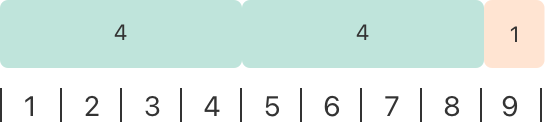
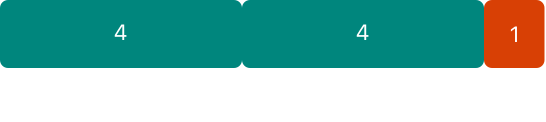
You can fit two 4s inside 9, and the remainder is 1 (shown in orange).
我们可以在 9 中容纳两个 4,剩余的是 1(用橙色表示)。
In Swift, this would be written as:
在 Swift 中,这可以写作:
9 % 4 // equals 1To determine the answer for a % b,
the % operator calculates the following equation
and returns remainder as its output:
为了得出 a % b 的结果,% 运算符会计算以下等式,并返回 remainder 作为输出:
a = (b x some multiplier) + remainder
where some multiplier is the largest number of multiples of b
that will fit inside a.
其中 some multiplier 是 a 中能容纳 b 的最大倍数。
Inserting 9 and 4 into this equation yields:
将 9 和 4 代入此等式,得:
9 = (4 x 2) + 1
The same method is applied when calculating the remainder for a negative value of a:
当计算 a 为负值时,采用相同的方法:
-9 % 4 // equals -1Inserting -9 and 4 into the equation yields:
将 -9 和 4 代入等式,得:
-9 = (4 x -2) + -1
giving a remainder value of -1.
因此余数值为 -1。
The sign of b is ignored for negative values of b.
This means that a % b and a % -b always give the same answer.
对于 b 为负值的情况,b 的符号会被忽略。这意味着 a % b 和 a % -b 总是给出相同的结果。
Unary Minus Operator 一元负号运算符
The sign of a numeric value can be toggled using a prefixed -,
known as the unary minus operator:
数值的正负号可以使用前缀 - 切换,称为一元负号运算符:
let three = 3
let minusThree = -three       // minusThree equals -3
let plusThree = -minusThree   // plusThree equals 3, or "minus minus three"
The unary minus operator (-) is prepended directly before the value it operates on,
without any white space.
一元负号运算符(-)直接加在它所作用的值前面,中间没有任何空格。
Unary Plus Operator 一元正号运算符
The unary plus operator (+) simply returns
the value it operates on, without any change:
一元正号运算符(+)只是返回它所作用的值,不做任何改变:
let minusSix = -6
let alsoMinusSix = +minusSix  // alsoMinusSix equals -6
Although the unary plus operator doesn't actually do anything, you can use it to provide symmetry in your code for positive numbers when also using the unary minus operator for negative numbers.
虽然一元加运算符实际上什么也没做,但是当你使用一元减运算符表示负数时,你可以使用它来使你的代码对正数也保持对称性。
Compound Assignment Operators 复合赋值运算符
Like C, Swift provides compound assignment operators that combine assignment (=) with another operation.
One example is the addition assignment operator (+=):
与 C 语言一样,Swift 提供了复合赋值运算符,它将赋值(=)与另一个操作结合起来。
一个例子是加法赋值运算符(+=):
var a = 1
a += 2
// a is now equal to 3
The expression a += 2 is shorthand for a = a + 2.
Effectively, the addition and the assignment are combined into one operator
that performs both tasks at the same time.
表达式 a += 2 是 a = a + 2 的简写。
实际上,加法和赋值被合并成一个同时执行这两个任务的运算符。
Note · 注意
The compound assignment operators don't return a value.
For example, you can't write let b = a += 2.
复合赋值运算符不会返回值。
例如,你不能写 let b = a += 2。
For information about the operators provided by the Swift standard library, see Operator Declarations.
有关 Swift 标准库提供的运算符的信息,请参阅 Operator Declarations。
Comparison Operators 比较运算符
Swift supports the following comparison operators:
Swift 支持以下比较运算符:
- Equal to (
a == b) - Not equal to (
a != b) - Greater than (
a > b) - Less than (
a < b) - Greater than or equal to (
a >= b) - Less than or equal to (
a <= b)
- 等于(
a == b) - 不等于(
a != b) - 大于(
a > b) - 小于(
a < b) - 大于等于(
a >= b) - 小于等于(
a <= b)
Note · 注意
Swift also provides two identity operators (=== and !==),
which you use to test whether two object references both refer to the same object instance.
For more information, see Identity Operators.
Swift 还提供了两个标识运算符(=== 和 !==),
你可以用它们来测试两个对象引用是否指向同一个对象实例。
更多信息请参阅 恒等运算符。
Each of the comparison operators returns a Bool value to indicate whether or not the statement is true:
每个比较运算符都返回一个 Bool 值来指示语句是否为真:
1 == 1   // true because 1 is equal to 1
2 != 1   // true because 2 isn't equal to 1
2 > 1    // true because 2 is greater than 1
1 < 2    // true because 1 is less than 2
1 >= 1   // true because 1 is greater than or equal to 1
2 <= 1   // false because 2 isn't less than or equal to 1
Comparison operators are often used in conditional statements,
such as the if statement:
比较运算符通常用于条件语句中,例如 if 语句:
let name = "world"
if name == "world" {
    print("hello, world")
} else {
    print("I'm sorry \(name), but I don't recognize you")
}
// Prints "hello, world", because name is indeed equal to "world".
For more about the if statement, see Control Flow.
关于 if 语句的更多信息,请参阅 控制流。
You can compare two tuples if they have the same type and the same number of values. Tuples are compared from left to right, one value at a time, until the comparison finds two values that aren't equal. Those two values are compared, and the result of that comparison determines the overall result of the tuple comparison. If all the elements are equal, then the tuples themselves are equal. For example:
如果两个元组具有相同的类型和相同数量的值,则可以比较它们。 元组是从左到右逐个值进行比较的,直到比较发现两个不相等的值为止。 这两个值将进行比较,并且该比较的结果决定了整个元组比较的结果。 如果所有元素都相等,那么这两个元组本身就相等。 例如:
(1, "zebra") < (2, "apple")   // true because 1 is less than 2; "zebra" and "apple" aren't compared
(3, "apple") < (3, "bird")    // true because 3 is equal to 3, and "apple" is less than "bird"
(4, "dog") == (4, "dog")      // true because 4 is equal to 4, and "dog" is equal to "dog"
In the example above,
you can see the left-to-right comparison behavior on the first line.
Because 1 is less than 2,
(1, "zebra") is considered less than (2, "apple"),
regardless of any other values in the tuples.
It doesn't matter that "zebra" isn't less than "apple",
because the comparison is already determined by the tuples' first elements.
However,
when the tuples' first elements are the same,
their second elements are compared ---
this is what happens on the second and third line.
在上面的示例中,你可以看到第一行的从左到右比较行为。
因为 1 小于 2,所以 (1, "zebra") 被认为小于 (2, "apple"),而不管元组中的任何其他值如何。
即使 "zebra" 不小于 "apple",也无关紧要,因为比较已经由元组的第一个元素决定了。
但是,当元组的第一个元素相同时,它们的第二个元素会进行比较 —— 这就是第二行和第三行发生的情况。
Tuples can be compared with a given operator only if the operator
can be applied to each value in the respective tuples. For example,
as demonstrated in the code below, you can compare
two tuples of type (String, Int) because
both String and Int values can be compared
using the < operator. In contrast,
two tuples of type (String, Bool) can't be compared
with the < operator because the < operator can't be applied to
Bool values.
只有当给定的运算符可以应用于各自元组中的每个值时,元组才能与该运算符进行比较。例如,如下面的代码所示,你可以比较两个类型为 (String, Int) 的元组,因为 String 和 Int 值都可以使用 < 运算符进行比较。相反,类型为 (String, Bool) 的两个元组不能使用 < 运算符进行比较,因为 < 运算符不能应用于 Bool 值。
("blue", -1) < ("purple", 1)        // OK: Evaluates to true.
("blue", false) < ("purple", true)  // Error: Can't use < to compare Boolean values.
Note · 注意
The Swift standard library includes tuple comparison operators for tuples with fewer than seven elements. To compare tuples with seven or more elements, you must implement the comparison operators yourself.
Swift 标准库包含用于具有少于七个元素的元组的比较运算符。 要比较具有七个或更多元素的元组, 你必须自己实现比较运算符。
Ternary Conditional Operator 三元条件运算符
The ternary conditional operator is a special operator with three parts,
which takes the form question ? answer1 : answer2.
It's a shortcut for evaluating one of two expressions
based on whether question is true or false.
If question is true, it evaluates answer1 and returns its value;
otherwise, it evaluates answer2 and returns its value.
三元条件运算符是一种由三部分组成的特殊运算符,其形式为 question ? answer1 : answer2。它是根据 question 的真假来计算两个表达式之一的简便写法。如果 question 为真,它会计算 answer1 并返回其值;否则,它会计算 answer2 并返回其值。
The ternary conditional operator is shorthand for the code below:
三元条件运算符是以下代码的简写形式:
if question {
    answer1
} else {
    answer2
}
Here's an example, which calculates the height for a table row. The row height should be 50 points taller than the content height if the row has a header, and 20 points taller if the row doesn't have a header:
下面是一个例子,用于计算表格行的高度。如果该行有标题,则行高应比内容高度高 50 点;如果该行没有标题,则行高应比内容高度高 20 点:
let contentHeight = 40
let hasHeader = true
let rowHeight = contentHeight + (hasHeader ? 50 : 20)
// rowHeight is equal to 90
The example above is shorthand for the code below:
上面的例子是下面代码的简写形式:
let contentHeight = 40
let hasHeader = true
let rowHeight: Int
if hasHeader {
    rowHeight = contentHeight + 50
} else {
    rowHeight = contentHeight + 20
}
// rowHeight is equal to 90
The first example's use of the ternary conditional operator means that
rowHeight can be set to the correct value on a single line of code,
which is more concise than the code used in the second example.
第一个例子使用三元条件运算符意味着rowHeight可以在一行代码中设置为正确的值,这比第二个例子中使用的代码更加简洁。
The ternary conditional operator provides an efficient shorthand for deciding which of two expressions to consider. Use the ternary conditional operator with care, however. Its conciseness can lead to hard-to-read code if overused. Avoid combining multiple instances of the ternary conditional operator into one compound statement.
三元条件运算符提供了一种有效的简写方式来决定考虑两个表达式中的哪一个。不过,要谨慎使用三元条件运算符。如果过度使用,代码的可读性会下降。避免将多个三元条件运算符实例组合成一个复合语句。
Nil-Coalescing Operator 空合并运算符
The nil-coalescing operator (a ?? b)
unwraps an optional a if it contains a value,
or returns a default value b if a is nil.
The expression a is always of an optional type.
The expression b must match the type that's stored inside a.
空合并运算符(a ?? b)如果可选项a包含一个值,则会解包该值,否则会返回默认值b(如果a为nil)。表达式a始终是一个可选类型。表达式b必须与存储在a中的类型相匹配。
The nil-coalescing operator is shorthand for the code below:
空合并运算符是以下代码的简写形式:
a != nil ? a! : bThe code above uses the ternary conditional operator and forced unwrapping (a!)
to access the value wrapped inside a when a isn't nil,
and to return b otherwise.
The nil-coalescing operator provides a more elegant way to encapsulate
this conditional checking and unwrapping in a concise and readable form.
上面的代码使用三元条件运算符和强制解包(a!)来访问 a 中包装的值(当 a 不是 nil 时),否则返回 b。空合并运算符提供了一种更优雅的方式,以简洁和可读的形式封装这种条件检查和解包。
Note · 注意
If the value of a is non-nil,
the value of b isn't evaluated.
This is known as short-circuit evaluation.
如果 a 的值是非 nil 的,则不会计算 b 的值。这被称为短路求值。
The example below uses the nil-coalescing operator to choose between a default color name and an optional user-defined color name:
下面的示例使用空合并运算符在默认颜色名称和可选用户定义的颜色名称之间进行选择:
let defaultColorName = "red"
var userDefinedColorName: String?   // defaults to nil

var colorNameToUse = userDefinedColorName ?? defaultColorName
// userDefinedColorName is nil, so colorNameToUse is set to the default of "red"
The userDefinedColorName variable is defined as an optional String,
with a default value of nil.
Because userDefinedColorName is of an optional type,
you can use the nil-coalescing operator to consider its value.
In the example above, the operator is used to determine
an initial value for a String variable called colorNameToUse.
Because userDefinedColorName is nil,
the expression userDefinedColorName ?? defaultColorName returns
the value of defaultColorName, or "red".
变量 userDefinedColorName 被定义为一个可选的 String 类型,默认值为 nil。由于 userDefinedColorName 是一个可选类型,你可以使用空合并运算符来考虑它的值。在上面的例子中,该运算符被用于确定一个名为 colorNameToUse 的 String 变量的初始值。因为 userDefinedColorName 是 nil,所以表达式 userDefinedColorName ?? defaultColorName 返回 defaultColorName 的值,即 "red"。
If you assign a non-nil value to userDefinedColorName
and perform the nil-coalescing operator check again,
the value wrapped inside userDefinedColorName is used instead of the default:
如果你给 userDefinedColorName 赋予一个非 nil 的值,并再次执行 nil 合并运算符检查,那么 userDefinedColorName 包裹的值将被使用,而不是默认值:
userDefinedColorName = "green"
colorNameToUse = userDefinedColorName ?? defaultColorName
// userDefinedColorName isn't nil, so colorNameToUse is set to "green"
Range Operators 区间运算符
Swift includes several range operators, which are shortcuts for expressing a range of values.
Swift 包含几个区间运算符,这些是表达一个值范围的快捷方式。
Closed Range Operator 闭区间运算符
The closed range operator (a...b)
defines a range that runs from a to b,
and includes the values a and b.
The value of a must not be greater than b.
闭区间运算符(a...b)定义了一个从 a 到 b 的范围,包括 a 和 b 的值。a 的值不能大于 b。
The closed range operator is useful when iterating over a range
in which you want all of the values to be used,
such as with a for-in loop:
当你遍历一个区间并希望用到其中所有的值时,闭区间运算符很有用,例如在 for-in 循环中:
for index in 1...5 {
    print("\(index) times 5 is \(index * 5)")
}
// 1 times 5 is 5
// 2 times 5 is 10
// 3 times 5 is 15
// 4 times 5 is 20
// 5 times 5 is 25
For more about for-in loops, see Control Flow.
更多关于 for-in 循环的内容,请参阅 控制流。
Half-Open Range Operator 半开区间运算符
The half-open range operator (a..<b)
defines a range that runs from a to b,
but doesn't include b.
It's said to be half-open
because it contains its first value, but not its final value.
As with the closed range operator,
the value of a must not be greater than b.
If the value of a is equal to b,
then the resulting range will be empty.
半开区间运算符(a..<b)定义了一个从 a 到 b 但不包括 b 的范围。它被称为半开是因为它包含第一个值但不包含最后一个值。与闭区间运算符一样,a 的值不能大于 b。如果 a 等于 b,那么结果范围将是空的。
Half-open ranges are particularly useful when you work with zero-based lists such as arrays, where it's useful to count up to (but not including) the length of the list:
半开区间对于处理从基数 0 开始的列表(如数组)时特别有用,因为它可以计数到列表长度(但不包括列表长度):
let names = ["Anna", "Alex", "Brian", "Jack"]
let count = names.count
for i in 0..<count {
    print("Person \(i + 1) is called \(names[i])")
}
// Person 1 is called Anna
// Person 2 is called Alex
// Person 3 is called Brian
// Person 4 is called Jack
Note that the array contains four items,
but 0..<count only counts as far as 3
(the index of the last item in the array),
because it's a half-open range.
For more about arrays, see Arrays.
注意数组包含四个元素,但 0..<count 只计数到 3(数组中最后一个元素的索引),因为它是一个半开区间。
有关数组的更多信息,请参阅 数组。
One-Sided Ranges 单侧区间
The closed range operator has an alternative form for ranges that continue as far as possible in one direction --- for example, a range that includes all the elements of an array from index 2 to the end of the array. In these cases, you can omit the value from one side of the range operator. This kind of range is called a one-sided range because the operator has a value on only one side. For example:
闭区间运算符有一种替代形式,用于一直延伸到尽可能远的区间 —— 例如,一个包含从索引 2 到数组末尾所有元素的区间。 在这些情况下,你可以省略区间运算符的一侧值。 这种区间被称为单侧区间,因为运算符只有一侧有值。 例如:
for name in names[2...] {
    print(name)
}
// Brian
// Jack

for name in names[...2] {
    print(name)
}
// Anna
// Alex
// Brian
The half-open range operator also has a one-sided form that's written with only its final value. Just like when you include a value on both sides, the final value isn't part of the range. For example:
半开区间运算符也有一种只写最后一个值的单侧形式。 就像在两侧都包含值时一样,最后一个值不包含在区间内。 例如:
for name in names[..<2] {
    print(name)
}
// Anna
// Alex
One-sided ranges can be used in other contexts, not just in subscripts. You can't iterate over a one-sided range that omits a first value, because it isn't clear where iteration should begin. You can iterate over a one-sided range that omits its final value; however, because the range continues indefinitely, make sure you add an explicit end condition for the loop. You can also check whether a one-sided range contains a particular value, as shown in the code below.
单侧区间不仅可以用于下标,还可以用于其他上下文。 对于省略了第一个值的单侧区间,你不能遍历它,因为不清楚他从哪里开始迭代。 你可以遍历省略了最后一个值的单侧区间;但是,由于该区间无限延伸,请确保为循环添加一个显式的结束条件。 你还可以检查单侧区间是否包含特定值,如下面的代码所示。
let range = ...5
range.contains(7)   // false
range.contains(4)   // true
range.contains(-1)  // true
Logical Operators 逻辑运算符
Logical operators modify or combine
the Boolean logic values true and false.
Swift supports the three standard logical operators found in C-based languages:
逻辑运算符修改或组合布尔逻辑值 true 和 false。
Swift 支持 C 语言中的三个标准逻辑运算符:
- Logical NOT (
!a) - Logical AND (
a && b) - Logical OR (
a || b)
- 逻辑非(
!a) - 逻辑与(
a && b) - 逻辑或(
a || b)
Logical NOT Operator 逻辑非运算符
The logical NOT operator (!a) inverts a Boolean value so that true becomes false,
and false becomes true.
逻辑非运算符(!a)反转布尔值,使 true 变为 false,false 变为 true。
The logical NOT operator is a prefix operator,
and appears immediately before the value it operates on,
without any white space.
It can be read as “not a”, as seen in the following example:
逻辑非运算符是一个前置运算符,紧跟在它所操作的值之前,中间没有空格。
它可以读作"非 a",如下例所示:
let allowedEntry = false
if !allowedEntry {
    print("ACCESS DENIED")
}
// Prints "ACCESS DENIED".
The phrase if !allowedEntry can be read as “if not allowed entry.”
The subsequent line is only executed if “not allowed entry” is true;
that is, if allowedEntry is false.
短语 if !allowedEntry 可以理解为 "如果不允许进入"。只有当 "不允许进入" 为真时,才会执行后续的那一行;也就是说,如果 allowedEntry 为 false。
As in this example, careful choice of Boolean constant and variable names can help to keep code readable and concise, while avoiding double negatives or confusing logic statements.
正如这个例子所示,谨慎选择布尔常量和变量名可以帮助保持代码的可读性和简洁性,同时避免双重否定或令人困惑的逻辑语句。
Logical AND Operator 逻辑与运算符
The logical AND operator (a && b) creates logical expressions
where both values must be true for the overall expression to also be true.
逻辑与运算符(a && b)构造的逻辑表达式要求两个值都为 true,整个表达式的值才为 true。
If either value is false,
the overall expression will also be false.
In fact, if the first value is false,
the second value won't even be evaluated,
because it can't possibly make the overall expression equate to true.
This is known as short-circuit evaluation.
逻辑与运算符(a && b) 创建逻辑表达式,其中两个值都必须为 true,整个表达式才为 true。如果任一值为 false,整个表达式也将为 false。事实上,如果第一个值为 false,第二个值甚至不会被评估,因为它无论如何都不可能使整个表达式等于 true。这被称为短路求值。
This example considers two Bool values
and only allows access if both values are true:
下面的例子考虑了两个 Bool 值,只有在两个值都为 true 时才允许访问:
let enteredDoorCode = true
let passedRetinaScan = false
if enteredDoorCode && passedRetinaScan {
    print("Welcome!")
} else {
    print("ACCESS DENIED")
}
// Prints "ACCESS DENIED".
Logical OR Operator 逻辑或运算符
The logical OR operator
(a || b) is an infix operator made from two adjacent pipe characters.
You use it to create logical expressions in which
only one of the two values has to be true
for the overall expression to be true.
逻辑或运算符(a || b) 是由两个相邻的管道字符组成的中置运算符。你可以使用它来创建逻辑表达式,在这种表达式中,只要其中一个值为 true,整个表达式就为 true。
Like the Logical AND operator above,
the Logical OR operator uses short-circuit evaluation to consider its expressions.
If the left side of a Logical OR expression is true,
the right side isn't evaluated,
because it can't change the outcome of the overall expression.
与上面的逻辑与运算符一样,逻辑或运算符也使用短路求值来考虑它的表达式。如果逻辑或表达式的左侧为 true,右侧就不会被评估,因为它无法改变整个表达式的结果。
In the example below,
the first Bool value (hasDoorKey) is false,
but the second value (knowsOverridePassword) is true.
Because one value is true,
the overall expression also evaluates to true,
and access is allowed:
在下面的例子中,第一个 Bool 值(hasDoorKey) 为 false,但第二个值(knowsOverridePassword) 为 true。由于有一个值为 true,整个表达式也将评估为 true,因此允许访问:
let hasDoorKey = false
let knowsOverridePassword = true
if hasDoorKey || knowsOverridePassword {
    print("Welcome!")
} else {
    print("ACCESS DENIED")
}
// Prints "Welcome!"
Combining Logical Operators 组合逻辑运算符
You can combine multiple logical operators to create longer compound expressions:
你可以组合多个逻辑运算符来创建更长的复合表达式:
if enteredDoorCode && passedRetinaScan || hasDoorKey || knowsOverridePassword {
    print("Welcome!")
} else {
    print("ACCESS DENIED")
}
// Prints "Welcome!"
This example uses multiple && and || operators to create a longer compound expression.
However, the && and || operators still operate on only two values,
so this is actually three smaller expressions chained together.
The example can be read as:
这个例子使用多个 && 和 || 运算符来创建一个更长的复合表达式。然而,&& 和 || 运算符仍然只作用于两个值,所以这实际上是三个较小的表达式链接在一起。这个例子可以理解为:
If we've entered the correct door code and passed the retina scan, or if we have a valid door key, or if we know the emergency override password, then allow access.
如果我们输入了正确的门禁代码并通过了视网膜扫描,或者我们有一把有效的门钥匙,或者我们知道紧急情况下的覆盖密码,那么就允许访问。
Based on the values of enteredDoorCode, passedRetinaScan, and hasDoorKey,
the first two subexpressions are false.
However, the emergency override password is known,
so the overall compound expression still evaluates to true.
根据 enteredDoorCode、passedRetinaScan 和 hasDoorKey 的值,前两个子表达式为 false。然而,由于知道紧急覆盖密码,整个复合表达式仍然评估为 true。
Note · 注意
The Swift logical operators && and || are left-associative,
meaning that compound expressions with multiple logical operators
evaluate the leftmost subexpression first.
Swift 逻辑运算符 && 和 || 遵循从左到右的结合顺序,这意味着带有多个逻辑运算符的复合表达式会首先评估最左边的子表达式。
Explicit Parentheses 显式括号
It's sometimes useful to include parentheses when they're not strictly needed, to make the intention of a complex expression easier to read. In the door access example above, it's useful to add parentheses around the first part of the compound expression to make its intent explicit:
有时即使不严格需要,也有必要使用括号来提高复杂表达式的可读性,让表达式的意图更加清晰。 在上面的门禁示例中,为复合表达式的第一部分添加括号是有用的,可以明确表达其意图:
if (enteredDoorCode && passedRetinaScan) || hasDoorKey || knowsOverridePassword {
    print("Welcome!")
} else {
    print("ACCESS DENIED")
}
// Prints "Welcome!"
The parentheses make it clear that the first two values are considered as part of a separate possible state in the overall logic. The output of the compound expression doesn't change, but the overall intention is clearer to the reader. Readability is always preferred over brevity; use parentheses where they help to make your intentions clear.
括号明确表示前两个条件被视为整体逻辑中的一种可能状态。 虽然复合表达式的输出没有改变,但整体意图对读者来说更加清晰明了。 可读性永远比简洁性更重要,因此在有助于阐明意图的地方使用括号是很有必要的。