Collection Types集合类型
Organize data using arrays, sets, and dictionaries.
使用数组、集合和字典组织数据。
Swift provides three primary collection types, known as arrays, sets, and dictionaries, for storing collections of values. Arrays are ordered collections of values. Sets are unordered collections of unique values. Dictionaries are unordered collections of key-value associations.
Swift 提供了三种主要的 集合类型,分别是数组、集合和字典,用于存储值集合。数组是有序的值集合。集合是无序的唯一值集合。字典是无序的键值对关联集合。
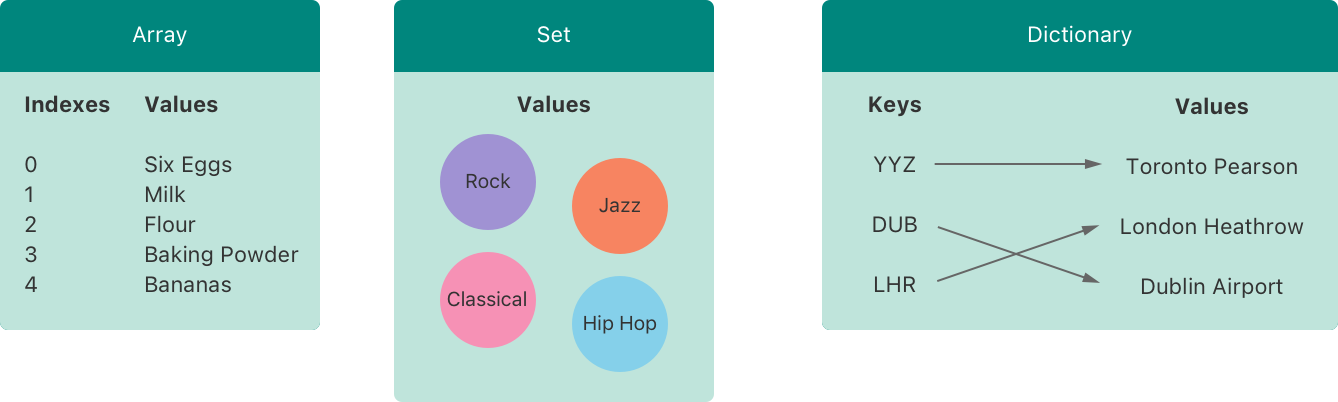
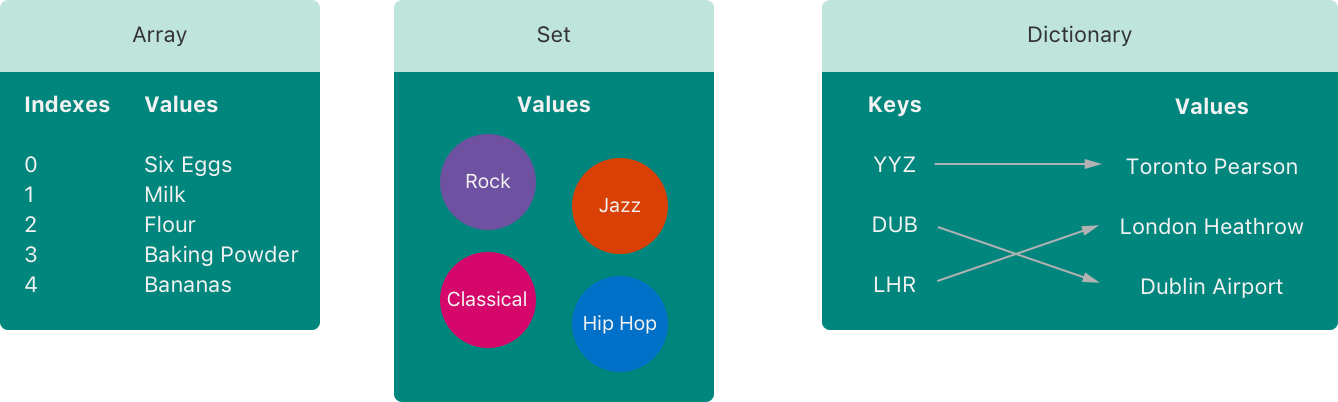
Arrays, sets, and dictionaries in Swift are always clear about the types of values and keys that they can store. This means that you can't insert a value of the wrong type into a collection by mistake. It also means you can be confident about the type of values you will retrieve from a collection.
Swift 中的数组、集合和字典对于它们可以存储的值和键的类型始终是明确的。这意味着你不能错误地将一个类型不匹配的值插入到集合中。同时,这也意味着你可以放心地知道从集合中取出的值的类型。
Mutability of Collections 集合的可变性
If you create an array, a set, or a dictionary, and assign it to a variable, the collection that's created will be mutable. This means that you can change (or mutate) the collection after it's created by adding, removing, or changing items in the collection. If you assign an array, a set, or a dictionary to a constant, that collection is immutable, and its size and contents can't be changed.
如果你创建一个数组、集合或字典,并将其赋值给一个变量,则创建的集合将是 可变的。这意味着,在创建集合后,你可以通过添加、删除或更改集合中的元素来改变(或称为 变异)集合。如果你将数组、集合或字典分配给常量,则该集合是 不可变的,并且其大小和内容无法更改。
Note · 注意
It's good practice to create immutable collections in all cases where the collection doesn't need to change. Doing so makes it easier for you to reason about your code and enables the Swift compiler to optimize the performance of the collections you create.
在所有不需要更改的情况下,创建不可变集合是一种良好的实践。这样做可以使你更容易理解代码,并使 Swift 编译器能够优化你创建的集合的性能。
Arrays 数组
An array stores values of the same type in an ordered list. The same value can appear in an array multiple times at different positions.
数组 将相同类型的值存储在一个有序列表中。相同的值可以在数组中以不同位置多次出现。
Note · 注意
Swift's Array type is bridged to Foundation's NSArray class.
For more information about using Array with Foundation and Cocoa,
see Bridging Between Array and NSArray.
Swift 的 Array 类型与 Foundation 的 NSArray 类进行了桥接。
有关如何在 Foundation 和 Cocoa 中使用 Array 的更多信息,请参阅 Bridging Between Array and NSArray。
Array Type Shorthand Syntax 数组类型简写语法
The type of a Swift array is written in full as Array<Element>,
where Element is the type of values the array is allowed to store.
You can also write the type of an array in shorthand form as [Element].
Although the two forms are functionally identical,
the shorthand form is preferred
and is used throughout this guide when referring to the type of an array.
Swift 数组的类型完整写作 Array<Element>,其中 Element 是数组允许存储的值的类型。你也可以以简写形式 [Element] 来表示数组的类型。虽然这两种形式在功能上是相同的,但简写形式更受欢迎,并且在本指南中提到数组类型时将优先使用这种形式。
Creating an Empty Array 创建空数组
You can create an empty array in Swift using two approaches.
If the context already provides type information,
such as a function argument or an already typed variable or constant,
you can use an empty array literal,
which is written as []
(an empty pair of square brackets):
在 Swift 中,你可以使用两种方法来创建空数组。如果上下文已经提供了类型信息,例如一个函数参数,或者一个已经明确类型的变量或常量,那么你可以使用一个空数组字面量,它写作 [](一对空的方括号):
var someInts: [Int] = []
print("someInts is of type [Int] with \(someInts.count) items.")
// Prints "someInts is of type [Int] with 0 items."
Alternatively, you can create an empty array of a certain type
using explicit initializer syntax,
by writing the element type in square brackets
followed by parentheses ---
for example, [Int]() in the following:
或者,你可以使用显式的初始化器语法来创建某种特定类型的空数组,即在方括号中写入元素类型,后面再跟上一对圆括号——例如下面代码中的 [Int]():
var someInts = [Int]()
print("someInts is of type [Int] with \(someInts.count) items.")
// Prints "someInts is of type [Int] with 0 items."
Both approaches produce the same result. However, an empty array literal is shorter and usually easier to read.
这两种方法效果相同。不过,空数组字面量写法更短,通常也更易读。
In both cases, you can use the empty array literal ([]) to
reassign an empty array to an existing variable:
无论使用哪种初始化方法,你都可以使用空数组字面量 ([])将一个空数组重新赋值给一个已存在的变量:
someInts.append(3)
// someInts now contains 1 value of type Int
someInts = []
// someInts is now an empty array, but is still of type [Int]
Creating an Array with a Default Value 使用默认值创建数组
Swift's Array type also provides
an initializer for creating an array of a certain size
with all of its values set to the same default value.
You pass this initializer
a default value of the appropriate type (called repeating):
and the number of times that value is repeated in the new array (called count):
Swift 的 Array 类型还提供了一个构造器,用于创建特定大小的数组,其所有值都设置为相同的默认值。你向此构造器传递适当类型的默认值(称为 repeating):以及该值在新数组中重复的次数(称为 count):
var threeDoubles = Array(repeating: 0.0, count: 3)
// threeDoubles is of type [Double], and equals [0.0, 0.0, 0.0]
Creating an Array by Adding Two Arrays Together 通过合并两个数组创建一个新数组
You can create a new array by adding together two existing arrays with compatible types
with the addition operator (+).
The new array's type is inferred from the type of the two arrays you add together:
你可以通过使用加法运算符(+) 将两个具有兼容类型的现有数组相加来创建新数组。新数组的类型是从你相加的两个数组的类型推断出来的:
var anotherThreeDoubles = Array(repeating: 2.5, count: 3)
// anotherThreeDoubles is of type [Double], and equals [2.5, 2.5, 2.5]

var sixDoubles = threeDoubles + anotherThreeDoubles
// sixDoubles is inferred as [Double], and equals [0.0, 0.0, 0.0, 2.5, 2.5, 2.5]
Creating an Array with an Array Literal 使用数组字面量创建数组
You can also initialize an array with an array literal, which is a shorthand way to write one or more values as an array collection. An array literal is written as a list of values, separated by commas, surrounded by a pair of square brackets:
你还可以使用 数组字面量 来初始化数组,这是将一个或多个值写入数组集合的简写方法。数组字面量以值列表的形式写入,用逗号分隔,用一对方括号括起来:
[<#value 1#>, <#value 2#>, <#value 3#>]The example below creates an array called shoppingList to store String values:
下面的示例创建了一个名为 shoppingList 的数组来存储 String 值:
var shoppingList: [String] = ["Eggs", "Milk"]
// shoppingList has been initialized with two initial items
The shoppingList variable is declared as
“an array of string values”, written as [String].
Because this particular array has specified a value type of String,
it's allowed to store String values only.
Here, the shoppingList array is initialized with two String values
("Eggs" and "Milk"), written within an array literal.
shoppingList 变量被声明为“字符串值数组”,写作 [String]。由于该数组指定了值类型为 String,因此它只允许存储 String 类型的值。在这里,shoppingList 数组通过数组字面量初始化了两个 String 值("Eggs" 和 "Milk")。
Note · 注意
The shoppingList array is declared as a variable (with the var introducer)
and not a constant (with the let introducer)
because more items are added to the shopping list in the examples below.
shoppingList 数组被声明为变量(使用 var 关键字)而不是常量(使用 let 关键字),因为在下面的示例中,更多的商品要被添加到购物清单中。
In this case, the array literal contains two String values and nothing else.
This matches the type of the shoppingList variable's declaration
(an array that can only contain String values),
and so the assignment of the array literal is permitted
as a way to initialize shoppingList with two initial items.
在这个例子中,数组字面量只包含两个 String 值,且没有其他内容。这与 shoppingList 变量的声明类型(一个只能包含 String 值的数组)相匹配,因此允许使用这个数组字面量来初始化 shoppingList,并包含两个初始项目。
Thanks to Swift's type inference,
you don't have to write the type of the array
if you're initializing it with an array literal containing values of the same type.
The initialization of shoppingList could have been written in a shorter form instead:
得益于 Swift 的类型推断功能,如果你使用包含相同类型值的数组字面量进行初始化,则无需显式地写出数组的类型。shoppingList 的初始化可以改为以更简短的形式编写:
var shoppingList = ["Eggs", "Milk"]Because all values in the array literal are of the same type,
Swift can infer that [String] is
the correct type to use for the shoppingList variable.
因为数组字面量中的所有值都是相同的类型,Swift 可以推断出 [String] 是 shoppingList 变量应该使用的正确类型。
You can include a comma after last value in an array literal, which is known as a trailing comma:
你可以在数组字面量的最后一个值后面加上一个逗号,这称为尾随逗号:
var shoppingList = [
    "Eggs",
    "Milk",
]
Because the trailing comma makes every line end the same way, it's a useful way to write arrays like the one above that have one value per line. When you change the array, you only need to add, remove, or reorder values --- you don't have to add or remove commas.
因为尾随逗号使每一行的结尾都一样,所以在编写像上面这样每行一个值的数组时,这是一种很有用的方式。当你修改数组时,你只需要添加、删除或重新排列值 —— 而不需要添加或删除逗号。
Accessing and Modifying an Array 访问和修改数组
You access and modify an array through its methods and properties, or by using subscript syntax.
你可以通过数组的方法和属性或使用下标语法来访问和修改数组。
To find out the number of items in an array, check its read-only count property:
要找出数组中的项数,可以检查其只读属性 count:
print("The shopping list contains \(shoppingList.count) items.")
// Prints "The shopping list contains 2 items."
Use the Boolean isEmpty property
as a shortcut for checking whether the count property is equal to 0:
使用布尔值 isEmpty 属性作为检查 count 属性是否等于 0 的快捷方式:
if shoppingList.isEmpty {
    print("The shopping list is empty.")
} else {
    print("The shopping list isn't empty.")
}
// Prints "The shopping list isn't empty."
You can add a new item to the end of an array by calling the array's append(_:) method:
你可以通过调用数组的 append(_:) 方法将新元素添加到数组的末尾:
shoppingList.append("Flour")
// shoppingList now contains 3 items, and someone is making pancakes
Alternatively, append an array of one or more compatible items
with the addition assignment operator (+=):
或者,可以使用加法赋值运算符(+=)将一个或多个兼容项的数组追加到现有数组中:
shoppingList += ["Baking Powder"]
// shoppingList now contains 4 items
shoppingList += ["Chocolate Spread", "Cheese", "Butter"]
// shoppingList now contains 7 items
Retrieve a value from the array by using subscript syntax, passing the index of the value you want to retrieve within square brackets immediately after the name of the array:
使用 下标语法 从数组中检索值,在数组名称后面的方括号内传递要检索的值的索引:
var firstItem = shoppingList[0]
// firstItem is equal to "Eggs"
Note · 注意
The first item in the array has an index of 0, not 1.
Arrays in Swift are always zero-indexed.
数组中的第一项的索引为 0,而不是 1。Swift 中的数组始终是零索引的。
You can use subscript syntax to change an existing value at a given index:
你可以使用下标语法来更改给定索引处的现有值:
shoppingList[0] = "Six eggs"
// the first item in the list is now equal to "Six eggs" rather than "Eggs"
When you use subscript syntax,
the index you specify needs to be valid.
For example, writing shoppingList[shoppingList.count] = "Salt"
to try to append an item to the end of the array
results in a runtime error.
当你使用下标语法时,你指定的索引需要有效。例如,编写 shoppingList[shoppingList.count] = "Salt" 以尝试将项目追加到数组末尾会导致运行时错误。
You can also use subscript syntax to change a range of values at once,
even if the replacement set of values has a different length than the range you are replacing.
The following example replaces "Chocolate Spread", "Cheese", and "Butter"
with "Bananas" and "Apples":
你还可以使用下标语法一次更改一个范围的值,即使替换值集的长度与要替换的范围不同。以下示例将 "Chocolate Spread", "Cheese" 和 "Butter" 替换为 "Bananas" 和 "Apples":
shoppingList[4...6] = ["Bananas", "Apples"]
// shoppingList now contains 6 items
To insert an item into the array at a specified index,
call the array's insert(_:at:) method:
要将项目插入数组中指定索引处,请调用数组的 insert(_:at:) 方法:
shoppingList.insert("Maple Syrup", at: 0)
// shoppingList now contains 7 items
// "Maple Syrup" is now the first item in the list
This call to the insert(_:at:) method inserts a new item with a value of "Maple Syrup"
at the very beginning of the shopping list,
indicated by an index of 0.
对 insert(_:at:) 方法的调用会在购物清单的最开头插入一个值为 "Maple Syrup" 的新项目,由索引 0 表示。
Similarly, you remove an item from the array with the remove(at:) method.
This method removes the item at the specified index and returns the removed item
(although you can ignore the returned value if you don't need it):
同样,使用 remove(at:) 方法从数组中删除项目。此方法删除指定索引处的项目并返回已删除的项目(如果你不需要,可以忽略返回的值):
let mapleSyrup = shoppingList.remove(at: 0)
// the item that was at index 0 has just been removed
// shoppingList now contains 6 items, and no Maple Syrup
// the mapleSyrup constant is now equal to the removed "Maple Syrup" string
Note · 注意
If you try to access or modify a value for an index
that's outside of an array's existing bounds,
you will trigger a runtime error.
You can check that an index is valid before using it
by comparing it to the array's count property.
The largest valid index in an array is count - 1
because arrays are indexed from zero ---
however, when count is 0 (meaning the array is empty),
there are no valid indexes.
如果你尝试访问或修改超出数组现有边界的索引的值,将触发运行时错误。你可以在使用索引之前通过将其与数组的 count 属性进行比较来检查索引是否有效。数组中最大的有效索引是 count - 1,因为数组是从零开始编制索引的,---但是,当 count 为 0(意味着数组为空)时,没有有效的索引。
Any gaps in an array are closed when an item is removed,
and so the value at index 0 is once again equal to "Six eggs":
当删除一个项目时,数组中的任何间隙都会被关闭,因此索引 0 处的值再次等于 "Six eggs":
firstItem = shoppingList[0]
// firstItem is now equal to "Six eggs"
If you want to remove the final item from an array,
use the removeLast() method rather than the remove(at:) method
to avoid the need to query the array's count property.
Like the remove(at:) method, removeLast() returns the removed item:
如果要从数组中删除最后一项,请使用 removeLast() 方法而不是 remove(at:) 方法,以避免查询数组的 count 属性。与 remove(at:) 方法一样,removeLast() 返回已删除的项目:
let apples = shoppingList.removeLast()
// the last item in the array has just been removed
// shoppingList now contains 5 items, and no apples
// the apples constant is now equal to the removed "Apples" string
Iterating Over an Array 遍历一个数组
You can iterate over the entire set of values in an array with the for-in loop:
你可以使用 for-in 循环遍历数组中整个的值的集合:
for item in shoppingList {
    print(item)
}
// Six eggs
// Milk
// Flour
// Baking Powder
// Bananas
If you need the integer index of each item as well as its value,
use the enumerated() method to iterate over the array instead.
For each item in the array,
the enumerated() method returns a tuple
composed of an integer and the item.
The integers start at zero and count up by one for each item;
if you enumerate over a whole array,
these integers match the items' indices.
You can decompose the tuple into temporary constants or variables
as part of the iteration:
如果你需要每个项目的整数索引及其值,请使用 enumerated() 方法遍历数组。对于数组中的每个元素,enumerated() 方法返回一个由整数和项组成的元组。整数从 0 开始,每个项目按 1 计数; 如果枚举整个数组,则这些整数将与这元素的索引匹配。你可以将这些元组分解为临时常量或变量,作为遍历的一部分:
for (index, value) in shoppingList.enumerated() {
    print("Item \(index + 1): \(value)")
}
// Item 1: Six eggs
// Item 2: Milk
// Item 3: Flour
// Item 4: Baking Powder
// Item 5: Bananas
For more about the for-in loop, see For-In Loops.
有关 for-in 循环的更多信息,请参阅 For-In 循环.
Sets 集合
A set stores distinct values of the same type in a collection with no defined ordering. You can use a set instead of an array when the order of items isn't important, or when you need to ensure that an item only appears once.
集合 将相同类型的不同值存储在没有定义序列化的集合中。当项的顺序不重要,或者需要确保项只出现一次时,可以使用集合而不是数组。
Note · 注意
Swift's Set type is bridged to Foundation's NSSet class.
For more information about using Set with Foundation and Cocoa,
see Bridging Between Set and NSSet.
Swift 的 Set 类型桥接到 Foundation 的 NSSet 类。
有关将 Set 与 Foundation 和 Cocoa 一起使用的更多信息,请参阅 Bridging Between Set and NSSet。
Hash Values for Set Types 集合类型的哈希值
A type must be hashable in order to be stored in a set ---
that is, the type must provide a way to compute a hash value for itself.
A hash value is an Int value that's the same for all objects that compare equally,
such that if a == b,
the hash value of a is equal to the hash value of b.
一个类型必须是 可哈希的 才能存储在集合中---也就是说,该类型必须提供一种为自身计算 哈希值 的方法。哈希值是一个 Int 类型的值,对于所有相等的对象,它们的哈希值相同。也就是说,如果 a == b,那么 a 的哈希值必须等于 b 的哈希值。
All of Swift's basic types (such as String, Int, Double, and Bool)
are hashable by default, and can be used as set value types or dictionary key types.
Enumeration case values without associated values
(as described in Enumerations)
are also hashable by default.
Swift 的所有基本类型(如 String、Int、Double 和 Bool)默认都是可哈希的,可以用作集合的值类型或字典的键类型。没有关联值的枚举 case 值(如 枚举 中描述的那样)默认也是可哈希的。
Note · 注意
You can use your own custom types as set value types or dictionary key types
by making them conform to the Hashable protocol
from the Swift standard library.
For information about implementing the required hash(into:) method,
see Hashable.
For information about conforming to protocols, see Protocols.
Set Type Syntax 集类型语法
The type of a Swift set is written as Set<Element>,
where Element is the type that the set is allowed to store.
Unlike arrays, sets don't have an equivalent shorthand form.
Swift 集合的类型写作 Set<Element>,其中 Element 是集合允许存储的类型。与数组不同,集合没有相应的简写形式。
Creating and Initializing an Empty Set 创建和初始化一个空集
You can create an empty set of a certain type using initializer syntax:
你可以使用构造器语法创建一个特定类型的空集:
var letters = Set<Character>()
print("letters is of type Set<Character> with \(letters.count) items.")
// Prints "letters is of type Set<Character> with 0 items."
Note · 注意
The type of the letters variable is inferred to be Set<Character>,
from the type of the initializer.
letters 变量的类型根据构造器的类型推断为 Set<Character>。
Alternatively, if the context already provides type information, such as a function argument or an already typed variable or constant, you can create an empty set with an empty array literal:
或者如果上下文已经提供了类型信息,例如函数参数或已经定义类型的变量或常量,你可以使用空数组字面量创建一个空集合:
letters.insert("a")
// letters now contains 1 value of type Character
letters = []
// letters is now an empty set, but is still of type Set<Character>
Creating a Set with an Array Literal 使用数组字面量创建集合
You can also initialize a set with an array literal, as a shorthand way to write one or more values as a set collection.
你也可以使用数组字面量初始化一个集合,这是一种将一个或多个值写入集合的简写方式。
The example below creates a set called favoriteGenres to store String values:
下面的示例创建了一个名为 favoriteGenres 的集合,用于存储 String 值:
var favoriteGenres: Set<String> = ["Rock", "Classical", "Hip hop"]
// favoriteGenres has been initialized with three initial items
The favoriteGenres variable is declared as
“a set of String values”, written as Set<String>.
Because this particular set has specified a value type of String,
it's only allowed to store String values.
Here, the favoriteGenres set is initialized with three String values
("Rock", "Classical", and "Hip hop"), written within an array literal.
favoriteGenres 变量被声明为“String 值的集合”,写作 Set<String>。由于该集合指定了值类型为 String,因此它 只能 存储 String 值。在这里,favoriteGenres 集合通过数组字面量初始化了三个 String 值("Rock"、"Classical" 和 "Hip hop")。
Note · 注意
The favoriteGenres set is declared as a variable (with the var introducer)
and not a constant (with the let introducer)
because items are added and removed in the examples below.
favoriteGenres 集合被声明为变量(使用 var 关键字),而不是常量(使用 let 关键字),因为在后续的示例中会添加和移除元素。
A set type can't be inferred from an array literal alone,
so the type Set must be explicitly declared.
However, because of Swift's type inference,
you don't have to write the type of the set's elements
if you're initializing it with an array literal
that contains values of just one type.
The initialization of favoriteGenres could have been written in a shorter form instead:
集合类型无法仅通过数组字面量推断,因此必须显式声明类型 Set。但是,由于 Swift 的类型推断功能,如果你使用一个只包含单一类型值的数组字面量进行初始化,就无需写出集合元素的类型。favoriteGenres 的初始化可以用更简短的形式编写为:
var favoriteGenres: Set = ["Rock", "Classical", "Hip hop"]Because all values in the array literal are of the same type,
Swift can infer that Set<String> is
the correct type to use for the favoriteGenres variable.
因为数组字面量中的所有值都是相同的类型,Swift 可以推断出 Set<String> 是 favoriteGenres 变量的正确类型。
Accessing and Modifying a Set 访问和修改集合
You access and modify a set through its methods and properties.
你可以通过集合的方法和属性来访问和修改集合。
To find out the number of items in a set,
check its read-only count property:
要查找集合中的元素数量,可以检查其只读属性 count:
print("I have \(favoriteGenres.count) favorite music genres.")
// Prints "I have 3 favorite music genres."
Use the Boolean isEmpty property
as a shortcut for checking whether the count property is equal to 0:
使用布尔值 isEmpty 属性作为检查 count 属性是否等于 0 的快捷方式:
if favoriteGenres.isEmpty {
    print("As far as music goes, I'm not picky.")
} else {
    print("I have particular music preferences.")
}
// Prints "I have particular music preferences."
You can add a new item into a set by calling the set's insert(_:) method:
你可以通过调用集合的 insert(_:) 方法将新元素添加到集合中:
favoriteGenres.insert("Jazz")
// favoriteGenres now contains 4 items
You can remove an item from a set by calling the set's remove(_:) method,
which removes the item if it's a member of the set,
and returns the removed value,
or returns nil if the set didn't contain it.
Alternatively, all items in a set can be removed with its removeAll() method.
你可以通过调用集合的 remove(_:) 方法从集合中移除一个元素,该方法会在元素是集合的成员时将其移除,并返回被移除的值;如果集合中不包含该元素,则返回 nil。另外,可以使用 removeAll() 方法移除集合中的所有元素。
if let removedGenre = favoriteGenres.remove("Rock") {
    print("\(removedGenre)? I'm over it.")
} else {
    print("I never much cared for that.")
}
// Prints "Rock? I'm over it."
To check whether a set contains a particular item, use the contains(_:) method.
要检查集合是否包含特定元素,可以使用 contains(_:) 方法。
if favoriteGenres.contains("Funk") {
    print("I get up on the good foot.")
} else {
    print("It's too funky in here.")
}
// Prints "It's too funky in here."
Iterating Over a Set 遍历集合
You can iterate over the values in a set with a for-in loop.
你可以使用 for-in 循环遍历集合中的值。
for genre in favoriteGenres {
    print("\(genre)")
}
// Classical
// Jazz
// Hip hop
For more about the for-in loop, see For-In Loops.
有关 for-in 循环的更多信息,请参阅 For-In 循环.
Swift's Set type doesn't have a defined ordering.
To iterate over the values of a set in a specific order,
use the sorted() method,
which returns the set's elements as an array
sorted using the < operator.
Swift 的 Set 类型没有定义的顺序。要按特定顺序遍历集合中的值,可以使用 sorted() 方法,该方法返回集合的元素作为一个数组,并按 < 运算符排序。
for genre in favoriteGenres.sorted() {
    print("\(genre)")
}
// Classical
// Hip hop
// Jazz
Performing Set Operations 执行集合操作
You can efficiently perform fundamental set operations, such as combining two sets together, determining which values two sets have in common, or determining whether two sets contain all, some, or none of the same values.
你可以高效地执行基本的集合操作,例如将两个集合组合在一起、确定两个集合之间的共同值,或判断两个集合是否包含相同的所有值、部分值或没有相同的值。
Fundamental Set Operations 基本集合操作
The illustration below depicts two sets --- a and b ---
with the results of various set operations represented by the shaded regions.
下图描绘了 --- a 和 b --- 两个集合,其中各种集合操作的结果由阴影区域表示。
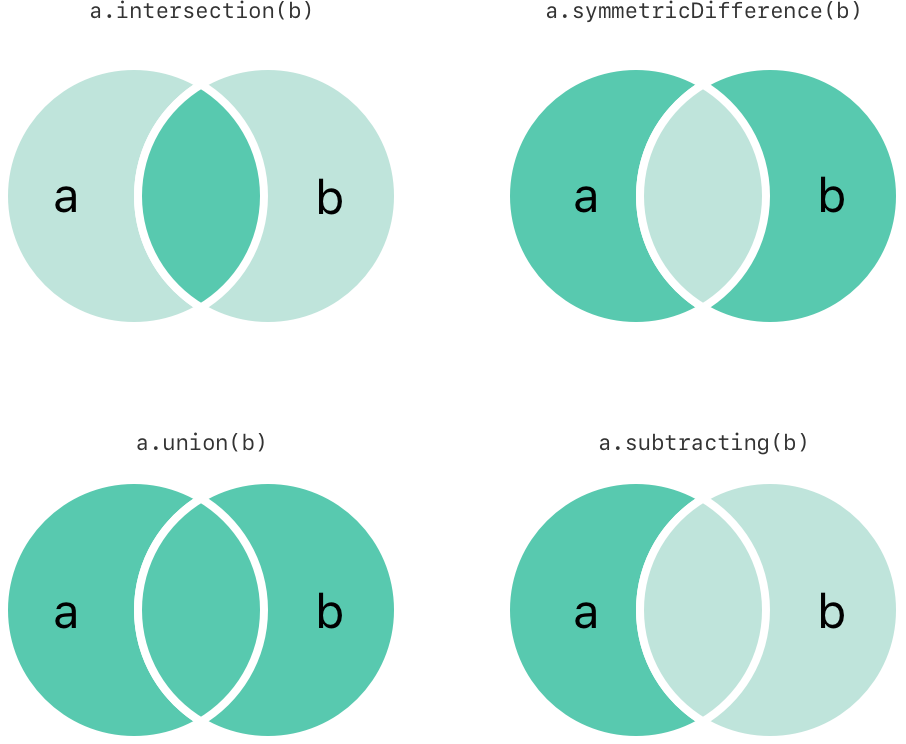
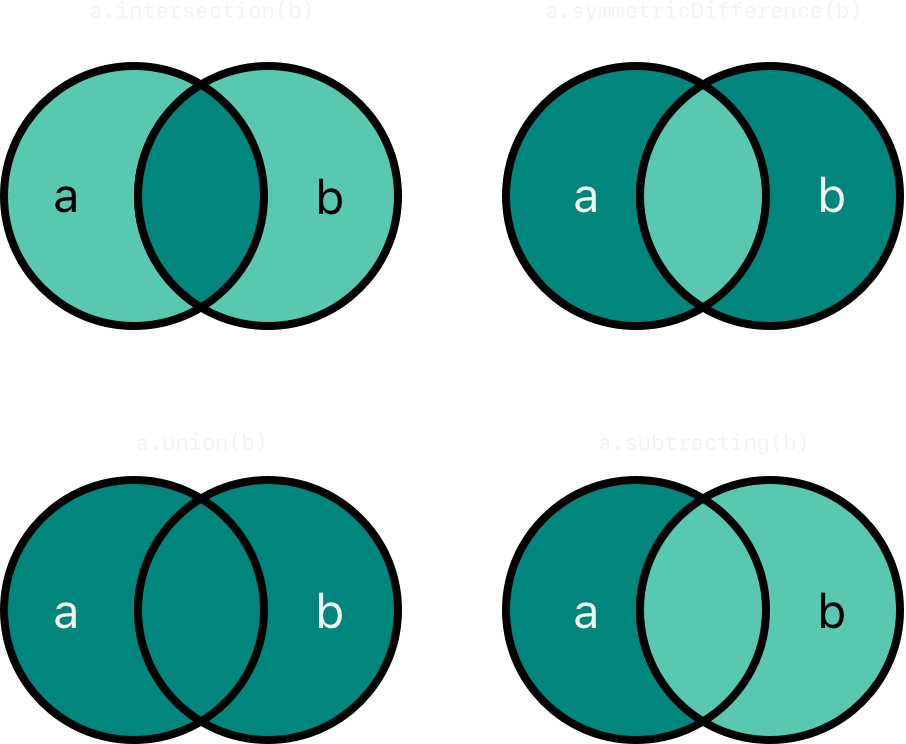
- Use the
intersection(_:)method to create a new set with only the values common to both sets. - Use the
symmetricDifference(_:)method to create a new set with values in either set, but not both. - Use the
union(_:)method to create a new set with all of the values in both sets. - Use the
subtracting(_:)method to create a new set with values not in the specified set.
- 使用
intersection(_:)方法创建一个只包含两个集合共有值的新集合。 - 使用
symmetricDifference(_:)方法创建一个包含两个集合中存在但不同时存在的值的新集合。 - 使用
union(_:)方法创建一个包含两个集合中所有值的新集合。 - 使用
subtracting(_:)方法创建一个不包含指定集合中值的新集合。
let oddDigits: Set = [1, 3, 5, 7, 9]
let evenDigits: Set = [0, 2, 4, 6, 8]
let singleDigitPrimeNumbers: Set = [2, 3, 5, 7]

oddDigits.union(evenDigits).sorted()
// [0, 1, 2, 3, 4, 5, 6, 7, 8, 9]
oddDigits.intersection(evenDigits).sorted()
// []
oddDigits.subtracting(singleDigitPrimeNumbers).sorted()
// [1, 9]
oddDigits.symmetricDifference(singleDigitPrimeNumbers).sorted()
// [1, 2, 9]
Set Membership and Equality 集合成员关系与相等
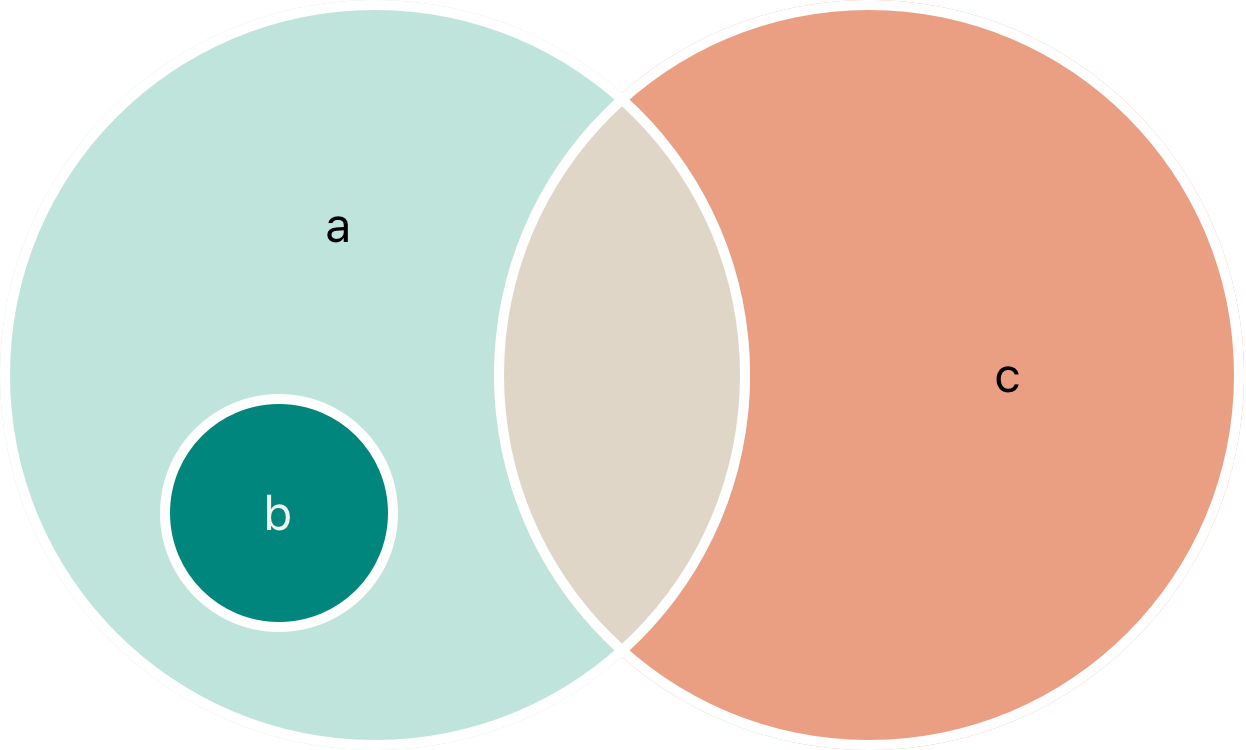
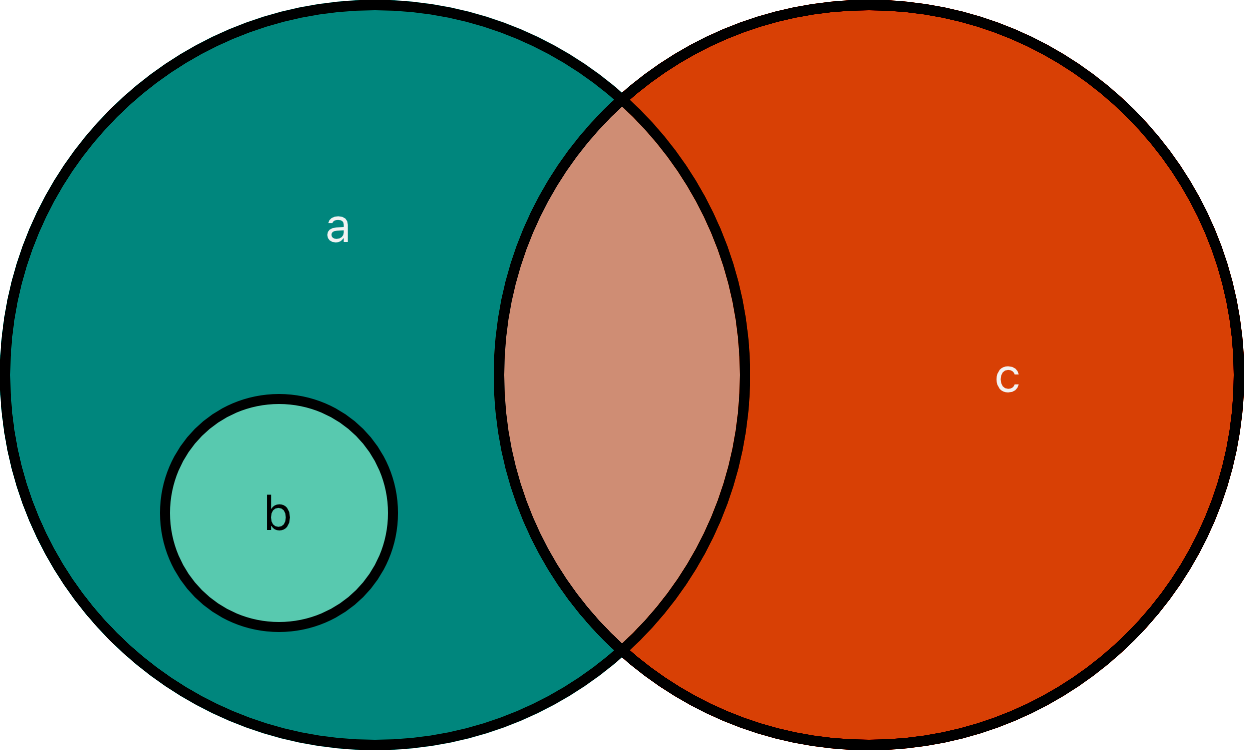
The illustration below depicts three sets --- a, b and c ---
with overlapping regions representing elements shared among sets.
Set a is a superset of set b,
because a contains all elements in b.
Conversely, set b is a subset of set a,
because all elements in b are also contained by a.
Set b and set c are disjoint with one another,
because they share no elements in common.
下图描述了三个集合 --- a、b 和 c,其中重叠区域表示集合间共享的元素。集合 a 是集合 b 的 超集,因为 a 包含了 b 中的所有元素。相反,集合 b 是集合 a 的 子集,因为 b 中的所有元素都包含在 a 中。集合 b 和集合 c 是 不相交的,因为它们没有任何共同的元素。
- Use the “is equal” operator (
==) to determine whether two sets contain all of the same values. - Use the
isSubset(of:)method to determine whether all of the values of a set are contained in the specified set. - Use the
isSuperset(of:)method to determine whether a set contains all of the values in a specified set. - Use the
isStrictSubset(of:)orisStrictSuperset(of:)methods to determine whether a set is a subset or superset, but not equal to, a specified set. - Use the
isDisjoint(with:)method to determine whether two sets have no values in common.
- 使用 “等于” 运算符 (
==)判断两个集合是否包含相同的所有值。 - 使用
isSubset(of:)方法判断一个集合的所有值是否包含在指定集合中。 - 使用
isSuperset(of:)方法判断一个集合是否包含指定集合中的所有值。 - 使用
isStrictSubset(of:)或isStrictSuperset(of:)方法判断一个集合是否是指定集合的子集或超集(但不相等)。 - 使用
isDisjoint(with:)方法判断两个集合是否没有共同的值。
let houseAnimals: Set = ["🐶", "🐱"]
let farmAnimals: Set = ["🐮", "🐔", "🐑", "🐶", "🐱"]
let cityAnimals: Set = ["🐦", "🐭"]

houseAnimals.isSubset(of: farmAnimals)
// true
farmAnimals.isSuperset(of: houseAnimals)
// true
farmAnimals.isDisjoint(with: cityAnimals)
// true
Dictionaries 字典
A dictionary stores associations between keys of the same type and values of the same type in a collection with no defined ordering. Each value is associated with a unique key, which acts as an identifier for that value within the dictionary. Unlike items in an array, items in a dictionary don't have a specified order. You use a dictionary when you need to look up values based on their identifier, in much the same way that a real-world dictionary is used to look up the definition for a particular word.
字典 将相同类型的键与集合中相同类型的值之间的关联存储在集合中,没有定义顺序。每个值都与一个唯一键相关联,该 键 充当字典中该值的标识符。与数组中的元素不同,字典中的元素没有指定的顺序。当你需要根据值的标识符查找值时可以使用字典,其方式与使用实际字典查找特定单词的定义的方式大致相同。
Note · 注意
Swift's Dictionary type is bridged to Foundation's NSDictionary class.
For more information about using Dictionary with Foundation and Cocoa,
see Bridging Between Dictionary and NSDictionary.
Swift 的 Dictionary 类型与 Foundation 的 NSDictionary 类相互桥接。
有关将 Dictionary 与 Foundation 和 Cocoa 一起使用的更多信息,请参阅 Bridging Between Dictionary and NSDictionary。
Dictionary Type Shorthand Syntax 字典类型简写语法
The type of a Swift dictionary is written in full as Dictionary<Key, Value>,
where Key is the type of value that can be used as a dictionary key,
and Value is the type of value that the dictionary stores for those keys.
Swift 字典的完整类型写作 Dictionary<Key, Value>,其中 Key 是可以用作字典键的值类型,而 Value 是字典为这些键存储的值类型。
Note · 注意
A dictionary Key type must conform to the Hashable protocol,
like a set's value type.
字典 Key 类型必须遵循 Hashable 协议,这与集合的值类型相同。
You can also write the type of a dictionary in shorthand form as [Key: Value].
Although the two forms are functionally identical,
the shorthand form is preferred
and is used throughout this guide when referring to the type of a dictionary.
你也可以将字典的类型以简写形式写成 [Key: Value]。虽然这两种形式在功能上是相同的,但简写形式更受欢迎,并且在本指南中提到字典类型时将使用这种形式。
Creating an Empty Dictionary 创建空字典
As with arrays,
you can create an empty Dictionary of a certain type by using initializer syntax:
与数组一样,你可以使用构造器语法创建特定类型的空 Dictionary:
var namesOfIntegers: [Int: String] = [:]
// namesOfIntegers is an empty [Int: String] dictionary
This example creates an empty dictionary of type [Int: String]
to store human-readable names of integer values.
Its keys are of type Int, and its values are of type String.
此示例创建了一个类型为 [Int: String] 的空字典,以存储整数值的可读名称。它的键的类型为 Int,值的类型为 String。
If the context already provides type information,
you can create an empty dictionary with an empty dictionary literal,
which is written as [:]
(a colon inside a pair of square brackets):
如果上下文已经提供了类型信息,你可以使用空字典字面量创建一个空字典,写作 [:](在一对方括号内的冒号)。
namesOfIntegers[16] = "sixteen"
// namesOfIntegers now contains 1 key-value pair
namesOfIntegers = [:]
// namesOfIntegers is once again an empty dictionary of type [Int: String]
Creating a Dictionary with a Dictionary Literal 使用字典字面量创建字典
You can also initialize a dictionary with a dictionary literal,
which has a similar syntax to the array literal seen earlier.
A dictionary literal is a shorthand way to write
one or more key-value pairs as a Dictionary collection.
你还可以使用 字典字面量 初始化字典,其语法与之前看到的数组字面量类似。字典字面量是一种简便方式,可以将一个或多个键值对写成 Dictionary 集合。
A key-value pair is a combination of a key and a value. In a dictionary literal, the key and value in each key-value pair are separated by a colon. The key-value pairs are written as a list, separated by commas, surrounded by a pair of square brackets:
键值对 是键与值的组合。在字典字面量中,每个键值对中的键和值由冒号分隔。键值对以列表形式书写,用逗号分隔,并用一对方括号括起来:
[<#key 1#>: <#value 1#>, <#key 2#>: <#value 2#>, <#key 3#>: <#value 3#>]The example below creates a dictionary to store the names of international airports. In this dictionary, the keys are three-letter International Air Transport Association codes, and the values are airport names:
下面的示例创建了一个字典,用于存储国际机场的名称。在这个字典中,键是三个字母的国际航空运输协会代码,而值是机场名称:
var airports: [String: String] = ["YYZ": "Toronto Pearson", "DUB": "Dublin"]The airports dictionary is declared as having a type of [String: String],
which means “a Dictionary whose keys are of type String,
and whose values are also of type String”.
airports 字典被声明为类型 [String: String],这意味着“一个键的类型为 String,值的类型也为 String 的 Dictionary”。
Note · 注意
The airports dictionary is declared as a variable (with the var introducer),
and not a constant (with the let introducer),
because more airports are added to the dictionary in the examples below.
airports 字典被声明为一个变量(使用 var 关键字),而不是常量(使用 let 关键字),因为在下面的示例中会向字典中添加更多机场。
The airports dictionary is initialized with
a dictionary literal containing two key-value pairs.
The first pair has a key of "YYZ" and a value of "Toronto Pearson".
The second pair has a key of "DUB" and a value of "Dublin".
airports 字典通过一个包含两个键值对的字典字面量进行初始化。第一个键值对的键是 "YYZ",值是 "Toronto Pearson"。第二个键值对的键是 "DUB",值是 "Dublin"。
This dictionary literal contains two String: String pairs.
This key-value type matches the type of the airports variable declaration
(a dictionary with only String keys, and only String values),
and so the assignment of the dictionary literal is permitted
as a way to initialize the airports dictionary with two initial items.
这个字典字面量包含两个 String: String 键值对。这个键值类型与 airports 变量声明的类型匹配(即只能 String 键和只能 String 值的字典),因此将字典字面量赋值给 airports 字典是允许的,从而用两个初始项初始化该字典。
As with arrays,
you don't have to write the type of the dictionary
if you're initializing it with a dictionary literal whose keys and values have consistent types.
The initialization of airports could have been written in a shorter form instead:
与数组一样,如果使用的字典字面量的键和值具有一致的类型,则不必指定字典的类型。airports 的初始化可以用更简短的形式来编写,如下所示:
var airports = ["YYZ": "Toronto Pearson", "DUB": "Dublin"]Because all keys in the literal are of the same type as each other,
and likewise all values are of the same type as each other,
Swift can infer that [String: String] is
the correct type to use for the airports dictionary.
因为字面量中的所有键都是同一类型,所有值也是同一类型,Swift 能够推断出 [String: String] 是用于 airports 字典的正确类型。
Like array literals, dictionary literals can include a trailing comma after the last key-value pair:
和数组字面量一样,字典字面量也可以在最后一个键值对后面加上尾随逗号:
var airports = [
    "YYZ": "Toronto Pearson",
    "DUB": "Dublin",
]
Accessing and Modifying a Dictionary 访问和修改字典
You access and modify a dictionary through its methods and properties, or by using subscript syntax.
你可以通过字典的方法和属性,或者使用下标语法来访问和修改字典。
As with an array, you find out the number of items in a Dictionary
by checking its read-only count property:
与数组一样,你可以通过检查字典的只读属性 count 来获取 Dictionary 中元素的数量。
print("The airports dictionary contains \(airports.count) items.")
// Prints "The airports dictionary contains 2 items."
Use the Boolean isEmpty property
as a shortcut for checking whether the count property is equal to 0:
使用布尔值 isEmpty 属性作为检查 count 属性是否等于 0 的快捷方式:
if airports.isEmpty {
    print("The airports dictionary is empty.")
} else {
    print("The airports dictionary isn't empty.")
}
// Prints "The airports dictionary isn't empty."
You can add a new item to a dictionary with subscript syntax. Use a new key of the appropriate type as the subscript index, and assign a new value of the appropriate type:
你可以使用下标语法向字典添加新元素。使用适当类型的新键作为下标索引,并分配一个适当类型的新值:
airports["LHR"] = "London"
// the airports dictionary now contains 3 items
You can also use subscript syntax to change the value associated with a particular key:
你还可以使用下标语法来更改与特定键关联的值:
airports["LHR"] = "London Heathrow"
// the value for "LHR" has been changed to "London Heathrow"
As an alternative to subscripting,
use a dictionary's updateValue(_:forKey:) method
to set or update the value for a particular key.
Like the subscript examples above, the updateValue(_:forKey:) method
sets a value for a key if none exists,
or updates the value if that key already exists.
Unlike a subscript, however,
the updateValue(_:forKey:) method returns the old value after performing an update.
This enables you to check whether or not an update took place.
作为下标的替代方法,请使用字典的 updateValue(_:forKey:) 方法来设置或更新特定键的值。与上面的下标示例一样,updateValue(_:forKey:) 方法会在键不存在时为该键设置一个值,或者在该键已存在时更新其值。但是,与下标不同的是,updateValue(_:forKey:) 方法在执行更新后返回 旧 值。这使你能够检查是否进行了更新。
The updateValue(_:forKey:) method returns an optional value
of the dictionary's value type.
For a dictionary that stores String values, for example,
the method returns a value of type String?,
or “optional String”.
This optional value contains the old value for that key if one existed before the update,
or nil if no value existed:
updateValue(_:forKey:) 方法返回字典值类型的可选值。例如,对于存储 String 值的字典,该方法返回类型为 String?,即“可选的 String”。这个可选值在更新前如果该键存在,则包含该键的旧值;如果该键之前没有值,则返回 nil。
if let oldValue = airports.updateValue("Dublin Airport", forKey: "DUB") {
    print("The old value for DUB was \(oldValue).")
}
// Prints "The old value for DUB was Dublin."
You can also use subscript syntax to retrieve a value from the dictionary for a particular key.
Because it's possible to request a key for which no value exists,
a dictionary's subscript returns an optional value of the dictionary's value type.
If the dictionary contains a value for the requested key,
the subscript returns an optional value containing the existing value for that key.
Otherwise, the subscript returns nil:
你还可以使用下标语法从字典中为特定键检索值。由于可能请求不存在值的键,字典的下标会返回该字典值类型的可选值。如果字典中包含所请求键的值,下标将返回一个包含该键现有值的可选值。否则,下标将返回 nil。
if let airportName = airports["DUB"] {
    print("The name of the airport is \(airportName).")
} else {
    print("That airport isn't in the airports dictionary.")
}
// Prints "The name of the airport is Dublin Airport."
You can use subscript syntax to remove a key-value pair from a dictionary
by assigning a value of nil for that key:
你可以使用下标语法通过为某个键赋值为 nil 来从字典中删除一个键值对。
airports["APL"] = "Apple International"
// "Apple International" isn't the real airport for APL, so delete it
airports["APL"] = nil
// APL has now been removed from the dictionary
Alternatively, remove a key-value pair from a dictionary
with the removeValue(forKey:) method.
This method removes the key-value pair if it exists
and returns the removed value,
or returns nil if no value existed:
你还可以使用 removeValue(forKey:) 方法从字典中删除键值对。该方法在键值对存在时会将其移除并返回被移除的值,如果不存在该值,则返回 nil。
if let removedValue = airports.removeValue(forKey: "DUB") {
    print("The removed airport's name is \(removedValue).")
} else {
    print("The airports dictionary doesn't contain a value for DUB.")
}
// Prints "The removed airport's name is Dublin Airport."
Iterating Over a Dictionary 遍历字典
You can iterate over the key-value pairs in a dictionary with a for-in loop.
Each item in the dictionary is returned as a (key, value) tuple,
and you can decompose the tuple's members into temporary constants or variables
as part of the iteration:
你可以使用 for-in 循环遍历字典中的键值对。字典中的每个元素会作为一个 (key, value) 元组返回,你可以在迭代过程中将元组的成员分解为临时常量或变量。
for (airportCode, airportName) in airports {
    print("\(airportCode): \(airportName)")
}
// LHR: London Heathrow
// YYZ: Toronto Pearson
For more about the for-in loop, see For-In Loops.
有关 for-in 循环的更多信息,请参阅 For-In 循环.
You can also retrieve an iterable collection of a dictionary's keys or values
by accessing its keys and values properties:
你还可以通过访问字典的 keys 和 values 属性,获取字典的键或值的可遍历集合。
for airportCode in airports.keys {
    print("Airport code: \(airportCode)")
}
// Airport code: LHR
// Airport code: YYZ

for airportName in airports.values {
    print("Airport name: \(airportName)")
}
// Airport name: London Heathrow
// Airport name: Toronto Pearson
If you need to use a dictionary's keys or values
with an API that takes an Array instance, initialize a new array
with the keys or values property:
如果你需要将字典的键或值与采用 Array 实例的 API 一起使用,可以使用 keys 或 values 属性初始化一个新的数组。
let airportCodes = [String](airports.keys)
// airportCodes is ["LHR", "YYZ"]

let airportNames = [String](airports.values)
// airportNames is ["London Heathrow", "Toronto Pearson"]
Swift's Dictionary type doesn't have a defined ordering.
To iterate over the keys or values of a dictionary in a specific order,
use the sorted() method on its keys or values property.
Swift 的 Dictionary 类型没有定义的顺序。要以特定顺序迭代字典的键或值,可以对其 keys 或 values 属性使用 sorted() 方法。