Properties属性
Access stored and computed values that are part of an instance or type.
访问属于实例或类型的存储值和计算值。
Properties associate values with a particular class, structure, or enumeration. Stored properties store constant and variable values as part of an instance, whereas computed properties calculate (rather than store) a value. Computed properties are provided by classes, structures, and enumerations. Stored properties are provided only by classes and structures.
属性将值与特定的类、结构或枚举关联。存储属性将常量和变量值作为实例的一部分进行存储,而计算属性则计算(而不是存储)一个值。计算属性由类、结构和枚举提供。存储属性仅由类和结构体提供。
Stored and computed properties are usually associated with instances of a particular type. However, properties can also be associated with the type itself. Such properties are known as type properties.
存储和计算属性通常与特定类型的实例相关联。然而,属性也可以与类型本身相关联。这种属性称为类型属性。
In addition, you can define property observers to monitor changes in a property's value, which you can respond to with custom actions. Property observers can be added to stored properties you define yourself, and also to properties that a subclass inherits from its superclass.
另外,还可以定义属性观察器来监控属性值的变化,以此来触发自定义的操作。属性观察器可以添加到类本身定义的存储属性上,也可以添加到从父类继承的属性上。
You can also use a property wrapper to reuse code in the getter and setter of multiple properties.
你也可以利用属性包装器在多个属性的 getter 和 setter 中复用代码。
Stored Properties 存储属性
In its simplest form, a stored property is a constant or variable
that's stored as part of an instance of a particular class or structure.
Stored properties can be either
variable stored properties (introduced by the var keyword)
or constant stored properties (introduced by the let keyword).
简单来说,存储属性是作为特定类或结构实例的一部分所存储的常量或变量。存储属性可以是变量存储属性(用关键字 var 定义)
也可以是常量存储属性(用关键字 let 定义)。
You can provide a default value for a stored property as part of its definition, as described in Default Property Values. You can also set and modify the initial value for a stored property during initialization. This is true even for constant stored properties, as described in Assigning Constant Properties During Initialization.
可以在定义存储属性的时候指定默认值,请参考 默认属性值 一节。还可以在构造过程中设置和修改存储属性的初始值,甚至修改常量存储属性的值,请参考 构造过程中常量属性的赋值 一节。
The example below defines a structure called FixedLengthRange,
which describes a range of integers
whose range length can't be changed after it's created:
下面的例子定义了一个名为 FixedLengthRange的结构体,该结构体用于描述整数的区间,且这个区间值在被创建后不能被修改。
struct FixedLengthRange {
    var firstValue: Int
    let length: Int
}
var rangeOfThreeItems = FixedLengthRange(firstValue: 0, length: 3)
// the range represents integer values 0, 1, and 2
rangeOfThreeItems.firstValue = 6
// the range now represents integer values 6, 7, and 8
Instances of FixedLengthRange have
a variable stored property called firstValue
and a constant stored property called length.
In the example above, length is initialized when the new range is created
and can't be changed thereafter, because it's a constant property.
FixedLengthRange 的实例包含一个名为 firstValue的变量存储属性和一个名为 length的常量存储属性。在上面的例子中, length 在创建实例的时候被初始化,且之后无法修改它的值,因为它是一个常量属性。
Stored Properties of Constant Structure Instances 常量结构体实例的存储属性
If you create an instance of a structure and assign that instance to a constant, you can't modify the instance's properties, even if they were declared as variable properties:
如果创建了一个结构体实例并将其赋值给一个常量,则无法修改该实例的任何属性,即使它们被声明为可变属性:
let rangeOfFourItems = FixedLengthRange(firstValue: 0, length: 4)
// this range represents integer values 0, 1, 2, and 3
rangeOfFourItems.firstValue = 6
// this will report an error, even though firstValue is a variable property
Because rangeOfFourItems is declared as a constant (with the let keyword),
it isn't possible to change its firstValue property,
even though firstValue is a variable property.
因为 rangeOfFourItems 被声明为常量(使用 let 关键字),所以即使 firstValue 是一个可变属性,也无法再修改它了。
This behavior is due to structures being value types. When an instance of a value type is marked as a constant, so are all of its properties.
这种行为是由于结构体属于值类型。当值类型的实例被声明为常量的时候,它的所有属性也就成了常量。
The same isn't true for classes, which are reference types. If you assign an instance of a reference type to a constant, you can still change that instance's variable properties.
属于引用类型的类别则不一样,把一个引用类型的实例赋给一个常量后,依然可以修改该实例的可变属性。
Lazy Stored Properties 延时加载存储属性
A lazy stored property is a property whose initial value isn't calculated
until the first time it's used.
You indicate a lazy stored property by writing
the lazy modifier before its declaration.
延时加载存储属性是指当第一次被调用的时候才会计算其初始值的属性。在属性声明前使用 lazy 来标示一个延时加载存储属性。
Note · 注意
You must always declare a lazy property as a variable (with the var keyword),
because its initial value might not be retrieved until
after instance initialization completes.
Constant properties must always have a value before initialization completes,
and therefore can't be declared as lazy.
必须将延时加载属性声明成变量(使用 var 关键词),因为属性的初始值可能在实例构造完成之后才会得到。而常量属性在构造过程完成之前必须要有初始值,因此无法声明成延时加载。
Lazy properties are useful when the initial value for a property is dependent on outside factors whose values aren't known until after an instance's initialization is complete. Lazy properties are also useful when the initial value for a property requires complex or computationally expensive setup that shouldn't be performed unless or until it's needed.
延时加载属性在属性的初始值依赖于外部因素,且这些因素的值在实例初始化完成后才会知道时非常有用。或者当获得属性的值因为需要复杂或者大量的计算,而应该采用需要的时候再计算的方式,延时加载属性也会很有用。
The example below uses a lazy stored property to avoid
unnecessary initialization of a complex class.
This example defines two classes called DataImporter and DataManager,
neither of which is shown in full:
下面的例子使用了延时加载存储属性来避免复杂类中不必要的初始化工作。例子中定义了 DataImporter 和 DataManager 两个类,下面是部分代码:
class DataImporter {
    /*
    DataImporter is a class to import data from an external file.
    The class is assumed to take a nontrivial amount of time to initialize.
    */
    var filename = "data.txt"
    // the DataImporter class would provide data importing functionality here
}

class DataManager {
    lazy var importer = DataImporter()
    var data: [String] = []
    // the DataManager class would provide data management functionality here
}

let manager = DataManager()
manager.data.append("Some data")
manager.data.append("Some more data")
// the DataImporter instance for the importer property hasn't yet been created
The DataManager class has a stored property called data,
which is initialized with a new, empty array of String values.
Although the rest of its functionality isn't shown,
the purpose of this DataManager class is to manage and provide access to
this array of String data.
DataManager 类包含一个名为 data 的存储属性,它被初始化为一个新的空 String 数组。这里没有给出它的其余功能,只需知道 DataManager 类的目的是管理这个 String 数据数组并提供对它的访问即可。
Part of the functionality of the DataManager class
is the ability to import data from a file.
This functionality is provided by the DataImporter class,
which is assumed to take a nontrivial amount of time to initialize.
This might be because a DataImporter instance needs to open a file
and read its contents into memory when the DataImporter instance is initialized.
DataManager 的一个功能是从文件中导入数据。这个功能由 DataImporter 类提供,DataImporter 完成初始化需要消耗不少时间:因为它的实例在初始化时可能需要打开文件并读取文件中的内容到内存中。
Because it's possible for a DataManager instance to manage its data
without ever importing data from a file,
DataManager doesn't create a new DataImporter instance
when the DataManager itself is created.
Instead, it makes more sense to create the DataImporter instance
if and when it's first used.
DataManager 管理数据时也可能不从文件中导入数据。所以当 DataManager 的实例被创建时,不会创建一个 DataImporter 的实例,更明智的做法是第一次用到 DataManager 的时候才去创建它。
Because it's marked with the lazy modifier,
the DataImporter instance for the importer property
is only created when the importer property is first accessed,
such as when its filename property is queried:
由于使用了 lazy,DataImporter 的实例 importer 属性只有在第一次被访问的时候才被创建。比如访问它的属性 filename 的时候:
print(manager.importer.filename)
// the DataImporter instance for the importer property has now been created
// Prints "data.txt".
Note · 注意
If a property marked with the lazy modifier
is accessed by multiple threads simultaneously
and the property hasn't yet been initialized,
there's no guarantee that the property will be initialized only once.
如果一个被标记为 lazy 的属性在没有初始化时就同时被多个线程访问,则无法保证该属性只会被初始化一次。
Stored Properties and Instance Variables 存储属性和实例变量
If you have experience with Objective-C, you may know that it provides two ways to store values and references as part of a class instance. In addition to properties, you can use instance variables as a backing store for the values stored in a property.
如果你有过使用 Objective-C 的经验,应该知道 Objective-C 为类实例存储值和引用提供了两种方法。除了属性之外,还可以使用实例变量作为一个备份存储将变量值赋值给属性。
Swift unifies these concepts into a single property declaration. A Swift property doesn't have a corresponding instance variable, and the backing store for a property isn't accessed directly. This approach avoids confusion about how the value is accessed in different contexts and simplifies the property's declaration into a single, definitive statement. All information about the property --- including its name, type, and memory management characteristics --- is defined in a single location as part of the type's definition.
Swift 编程语言中把这些理论统一用属性来实现。Swift 中的属性没有对应的实例变量,属性的备份存储也无法直接访问。这就避免了不同场景下访问方式的困扰,同时也将属性的定义简化成一个语句。属性的全部信息——包括命名、类型和内存管理特征——作为类型定义的一部分,都定义在一个地方。
Computed Properties 计算属性
In addition to stored properties, classes, structures, and enumerations can define computed properties, which don't actually store a value. Instead, they provide a getter and an optional setter to retrieve and set other properties and values indirectly.
除存储属性外,类、结构体和枚举还可以定义计算属性。计算属性不直接存储值,而是提供一个 getter 和一个可选的 setter,来间接获取和设置其他属性或变量的值。
struct Point {
    var x = 0.0, y = 0.0
}
struct Size {
    var width = 0.0, height = 0.0
}
struct Rect {
    var origin = Point()
    var size = Size()
    var center: Point {
        get {
            let centerX = origin.x + (size.width / 2)
            let centerY = origin.y + (size.height / 2)
            return Point(x: centerX, y: centerY)
        }
        set(newCenter) {
            origin.x = newCenter.x - (size.width / 2)
            origin.y = newCenter.y - (size.height / 2)
        }
    }
}
var square = Rect(origin: Point(x: 0.0, y: 0.0),
    size: Size(width: 10.0, height: 10.0))
let initialSquareCenter = square.center
// initialSquareCenter is at (5.0, 5.0)
square.center = Point(x: 15.0, y: 15.0)
print("square.origin is now at (\(square.origin.x), \(square.origin.y))")
// Prints "square.origin is now at (10.0, 10.0)".
This example defines three structures for working with geometric shapes:
此示例定义了三个用于处理几何形状的结构:
Pointencapsulates the x- and y-coordinate of a point.Sizeencapsulates awidthand aheight.Rectdefines a rectangle by an origin point and a size.
Point封装了一个点的 x 和 y 坐标。Size包含width和height.Rect通过一个原点和大小来定义一个矩形。
The Rect structure also provides a computed property called center.
The current center position of a Rect can always be determined from its origin and size,
and so you don't need to store the center point as an explicit Point value.
Instead, Rect defines a custom getter and setter for a computed variable called center,
to enable you to work with the rectangle's center as if it were a real stored property.
Rect 还提供了一个名为 center 的计算属性。Rect 的当前中心位置始终可以由其 origin 和 size 确定,因此不需要将中心点存储为一个显式的 Point 值。Rect 为名为 center 的计算变量定义了自定义的 getter 和 setter,使你可以像使用真正的存储属性一样使用矩形的 center。
The example above creates a new Rect variable called square.
The square variable is initialized with an origin point of (0, 0),
and a width and height of 10.
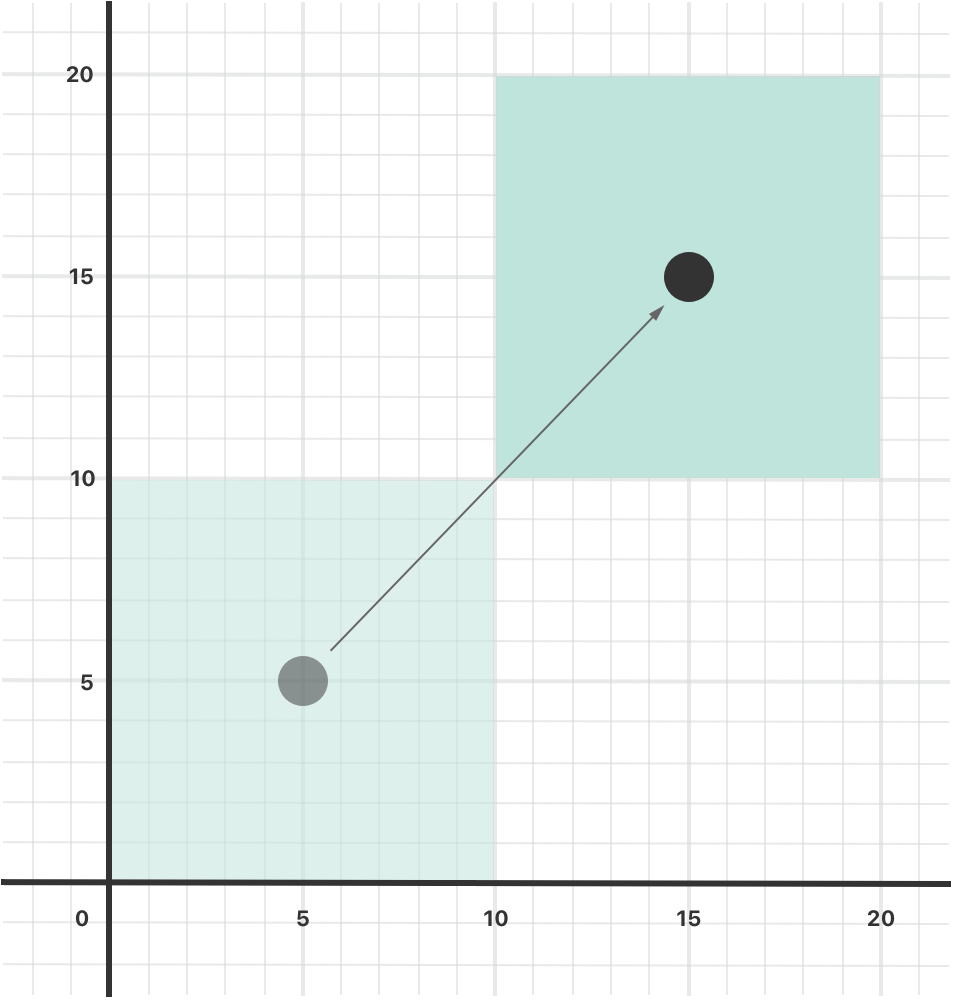
This square is represented by the light green square in the diagram below.
上面的示例创建了一个名为 square 的 Rect 变量,初始值原点是 (0, 0),宽度和高度均为 10。如下图中的浅绿色正方形所示。
The square variable's center property is then accessed through dot syntax (square.center),
which causes the getter for center to be called,
to retrieve the current property value.
Rather than returning an existing value,
the getter actually calculates and returns a new Point to represent the center of the square.
As can be seen above, the getter correctly returns a center point of (5, 5).
square 的 center 属性可以通过点运算符(square.center)来访问,这会调用该属性的 getter 来获取它的值。跟直接返回已经存在的值不同,getter 实际上是通过计算然后返回一个新的 Point 来表示 square 的中心点,如代码所示,它正确返回了中心点 (5, 5)。
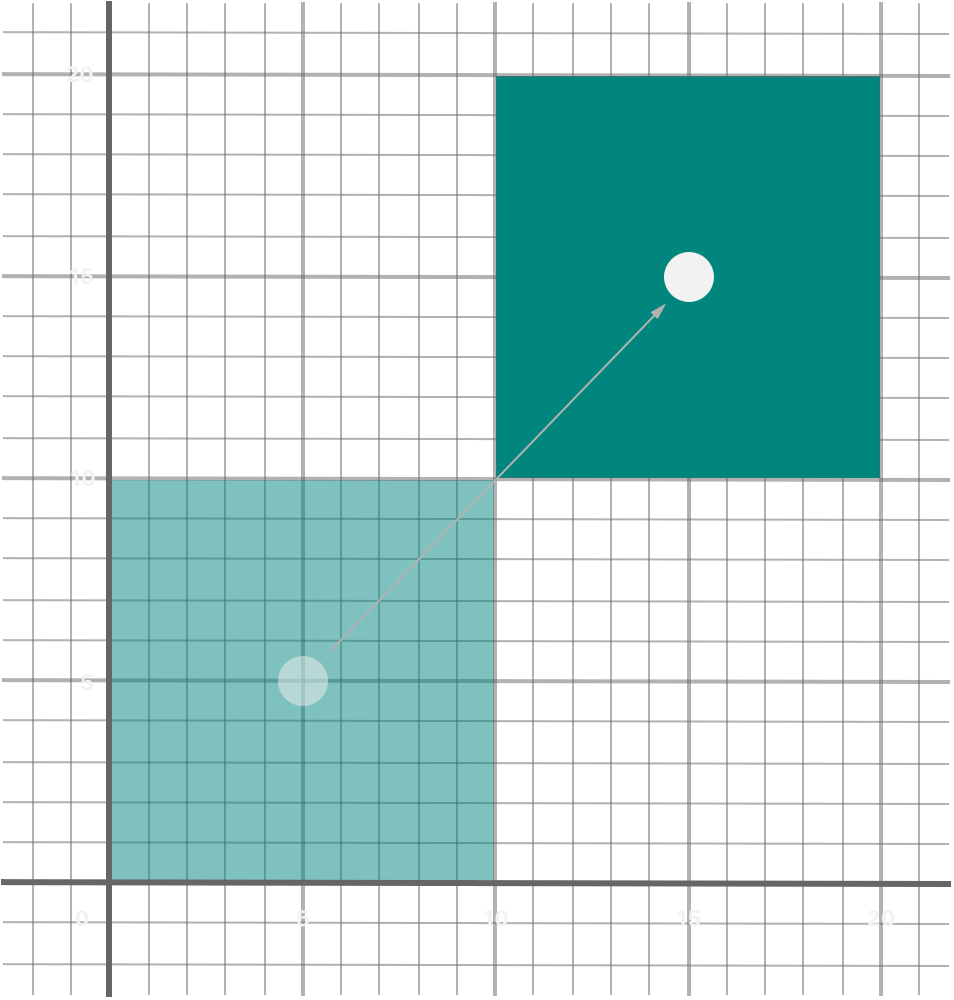
The center property is then set to a new value of (15, 15),
which moves the square up and to the right,
to the new position shown by the dark green square in the diagram below.
Setting the center property calls the setter for center,
which modifies the x and y values of the stored origin property,
and moves the square to its new position.
将 center 属性设置为新的值 (15, 15),会将正方形向上和向右移动,移动到下图中深绿色正方形所示的新位置。设置 center 属性会调用 center 的 setter,修改存储的 origin 属性的 x 和 y 值,从而将正方形移动到新的位置。
Shorthand Setter Declaration 简化 Setter 声明
If a computed property's setter doesn't define a name for the new value to be set,
a default name of newValue is used.
Here's an alternative version of the Rect structure
that takes advantage of this shorthand notation:
如果计算属性的 setter 没有为要设置的新值定义名称,则默认会使用 newValue 作为名称。这里是利用这种简写方式的 Rect 结构体的另一个版本:
struct AlternativeRect {
    var origin = Point()
    var size = Size()
    var center: Point {
        get {
            let centerX = origin.x + (size.width / 2)
            let centerY = origin.y + (size.height / 2)
            return Point(x: centerX, y: centerY)
        }
        set {
            origin.x = newValue.x - (size.width / 2)
            origin.y = newValue.y - (size.height / 2)
        }
    }
}
Shorthand Getter Declaration 简化 Getter 声明
If the entire body of a getter is a single expression,
the getter implicitly returns that expression.
Here's another version of the Rect structure
that takes advantage of this shorthand notation
and the shorthand notation for setters:
如果 getter 的主体是一个单一表达式,那么 getter 会隐式返回该表达式。这里是另一个利用这种 getter 和 setter 简写方式的 Rect 结构体版本:
struct CompactRect {
    var origin = Point()
    var size = Size()
    var center: Point {
        get {
            Point(x: origin.x + (size.width / 2),
                  y: origin.y + (size.height / 2))
        }
        set {
            origin.x = newValue.x - (size.width / 2)
            origin.y = newValue.y - (size.height / 2)
        }
    }
}
Omitting the return from a getter
follows the same rules as omitting return from a function,
as described in Functions With an Implicit Return.
省略 getter 中的 return 遵循与函数省略 return 相同的规则,详见 隐式返回的函数。
Read-Only Computed Properties 只读计算属性
A computed property with a getter but no setter is known as a read-only computed property. A read-only computed property always returns a value, and can be accessed through dot syntax, but can't be set to a different value.
只有 getter 而没有 setter 的计算属性被称为只读计算属性。只读计算属性总是返回一个值,可以通过点运算符访问,但不能设置为其他值。
Note · 注意
You must declare computed properties --- including read-only computed properties ---
as variable properties with the var keyword, because their value isn't fixed.
The let keyword is only used for constant properties,
to indicate that their values can't be changed once they're set
as part of instance initialization.
你必须将计算属性——包括只读计算属性——声明为使用 var 关键字的变量属性,因为它们的值并非固定的。let 关键字只用于常量属性,表示它们的值在实例初始化时设置后就无法更改。
You can simplify the declaration of a read-only computed property
by removing the get keyword and its braces:
可以通过省略 get 关键字和它的花括号来简化只读计算属性的声明:
struct Cuboid {
    var width = 0.0, height = 0.0, depth = 0.0
    var volume: Double {
        return width * height * depth
    }
}
let fourByFiveByTwo = Cuboid(width: 4.0, height: 5.0, depth: 2.0)
print("the volume of fourByFiveByTwo is \(fourByFiveByTwo.volume)")
// Prints "the volume of fourByFiveByTwo is 40.0".
This example defines a new structure called Cuboid,
which represents a 3D rectangular box with width, height, and depth properties.
This structure also has a read-only computed property called volume,
which calculates and returns the current volume of the cuboid.
It doesn't make sense for volume to be settable,
because it would be ambiguous as to which values of width, height, and depth
should be used for a particular volume value.
Nonetheless, it's useful for a Cuboid to provide a read-only computed property
to enable external users to discover its current calculated volume.
这个示例定义了一个名为 Cuboid 的新结构体,用于表示一个具有 width、height 和 depth 属性的三维立方体。该结构体还包含一个名为 volume 的只读计算属性,用于计算并返回立方体的当前体积。volume 属性不应是可设置的,因为这样会导致对于应使用哪些 width、height 和 depth 值来计算特定体积产生歧义。然而,Cuboid 提供一个只读计算属性来让外部用户了解其当前计算的体积是非常有用的。
Property Observers 属性观察器
Property observers observe and respond to changes in a property's value. Property observers are called every time a property's value is set, even if the new value is the same as the property's current value.
属性观察器用于监测并响应属性值的变化。每次属性值被设置时,无论新值是否与当前值相同,属性观察器都会被调用。
You can add property observers in the following places:
属性观察器可以添加在以下位置:
- Stored properties that you define
- Stored properties that you inherit
- Computed properties that you inherit
- 自定义的存储属性
- 继承的存储属性
- 继承的计算属性
For an inherited property, you add a property observer by overriding that property in a subclass. For a computed property that you define, use the property's setter to observe and respond to value changes, instead of trying to create an observer. Overriding properties is described in Overriding.
对于继承的属性,可以通过在子类中重写该属性来添加属性观察器。对于自定义的计算属性,应使用属性的 setter 来观察和响应值的变化,而不是试图创建一个观察器。重写属性的相关内容详见 重写。
You have the option to define either or both of these observers on a property:
可以为属性添加以下一个或两个观察器:
willSetis called just before the value is stored.didSetis called immediately after the new value is stored.
willSet在值存储之前被调用。didSet在新值存储之后立即被调用。
If you implement a willSet observer,
it's passed the new property value as a constant parameter.
You can specify a name for this parameter as part of your willSet implementation.
If you don't write the parameter name and parentheses within your implementation,
the parameter is made available with a default parameter name of newValue.
如果实现了 willSet 观察器,新的属性值会作为一个常量参数传递。可以在 willSet 实现中为这个参数指定名称。如果没有在实现中写出参数名称和括号,则该参数将以默认名称 newValue 提供。
Similarly, if you implement a didSet observer,
it's passed a constant parameter containing the old property value.
You can name the parameter or use the default parameter name of oldValue.
If you assign a value to a property within its own didSet observer,
the new value that you assign replaces the one that was just set.
同样地,如果实现了 didSet 观察器,旧的属性值会作为一个常量参数传递。可以命名这个参数,也可以使用默认名称 oldValue。如果在 didSet 观察器内为属性赋值,所分配的新值将覆盖刚刚设置的值。
Note · 注意
The willSet and didSet observers of superclass properties
are called when a property is set in a subclass initializer,
after the superclass initializer has been called.
They aren't called while a class is setting its own properties
in the body of the initializer.
For more information about initializer delegation, see Initializer Delegation for Value Types and Initializer Delegation for Class Types.
Here's an example of willSet and didSet in action.
The example below defines a new class called StepCounter,
which tracks the total number of steps that a person takes while walking.
This class might be used with input data from a pedometer or other step counter
to keep track of a person's exercise during their daily routine.
下面是一个 willSet 和 didSet 实际应用的例子。以下示例定义了一个名为 StepCounter 的新类,用于跟踪一个人在行走时所走的总步数。这个类可以与计步器或其他步数计数器的输入数据配合使用,以记录一个人在日常锻炼中的活动情况。
class StepCounter {
    var totalSteps: Int = 0 {
        willSet(newTotalSteps) {
            print("About to set totalSteps to \(newTotalSteps)")
        }
        didSet {
            if totalSteps > oldValue  {
                print("Added \(totalSteps - oldValue) steps")
            }
        }
    }
}
let stepCounter = StepCounter()
stepCounter.totalSteps = 200
// About to set totalSteps to 200
// Added 200 steps
stepCounter.totalSteps = 360
// About to set totalSteps to 360
// Added 160 steps
stepCounter.totalSteps = 896
// About to set totalSteps to 896
// Added 536 steps
The StepCounter class declares a totalSteps property of type Int.
This is a stored property with willSet and didSet observers.
StepCounter 类声明了一个名为 totalSteps 的 Int 类型属性。这是一个具有 willSet 和 didSet 观察器的存储属性。
The willSet and didSet observers for totalSteps are called
whenever the property is assigned a new value.
This is true even if the new value is the same as the current value.
每当 totalSteps 属性被赋予新值时,它的 willSet 和 didSet 观察器都会被调用,即使新值与当前值相同也是如此。
This example's willSet observer uses
a custom parameter name of newTotalSteps for the upcoming new value.
In this example, it simply prints out the value that's about to be set.
这个例子中的 willSet 观察器为即将设置的新值使用了自定义参数名称 newTotalSteps,在这里,它简单地打印出即将被设置的值。
The didSet observer is called after the value of totalSteps is updated.
It compares the new value of totalSteps against the old value.
If the total number of steps has increased,
a message is printed to indicate how many new steps have been taken.
The didSet observer doesn't provide a custom parameter name for the old value,
and the default name of oldValue is used instead.
didSet 观察器在 totalSteps 的值更新后被调用。它将 totalSteps 的新值与旧值进行比较。如果步数总数增加了,则会打印一条消息,指示增加了多少步数。didSet 观察器没有为旧值提供自定义参数名称,使用的是默认名称 oldValue。
Note · 注意
If you pass a property that has observers
to a function as an in-out parameter,
the willSet and didSet observers are always called.
This is because of the copy-in copy-out memory model for in-out parameters:
The value is always written back to the property at the end of the function.
For a detailed discussion of the behavior of in-out parameters,
see In-Out Parameters.
如果将一个具有观察器的属性作为 in-out 参数传递给函数,那么 willSet 和 didSet 观察器总是会被调用。这是因为 in-out 参数的复制-写回内存模型:在函数结束时,值总是会被写回属性。关于 in-out 参数行为的详细讨论,请参见 In-Out 参数。
Property Wrappers 属性包装器
A property wrapper adds a layer of separation between code that manages how a property is stored and the code that defines a property. For example, if you have properties that provide thread-safety checks or store their underlying data in a database, you have to write that code on every property. When you use a property wrapper, you write the management code once when you define the wrapper, and then reuse that management code by applying it to multiple properties.
属性包装器在管理属性存储方式的代码和定义属性的代码之间添加了一层分离。例如,如果有一些属性需要提供线程安全检查或将其底层数据存储在数据库中,那么你必须在每个属性上编写这些代码。而使用属性包装器时,只需在定义包装器时编写一次管理代码,然后通过将其应用于多个属性来重复使用这些管理代码。
To define a property wrapper,
you make a structure, enumeration, or class
that defines a wrappedValue property.
In the code below,
the TwelveOrLess structure ensures that
the value it wraps always contains a number less than or equal to 12.
If you ask it to store a larger number, it stores 12 instead.
要定义属性包装器,需要创建一个结构体、枚举或类,并定义一个 wrappedValue 属性。在下面的代码中,TwelveOrLess 结构体确保它所包装的值始终不大于 12。如果试图存储更大的数字,它会将数字存储为 12。
@propertyWrapper
struct TwelveOrLess {
    private var number = 0
    var wrappedValue: Int {
        get { return number }
        set { number = min(newValue, 12) }
    }
}
The setter ensures that new values are less than or equal to 12, and the getter returns the stored value.
setter 确保新值不大于 12,而 getter 返回存储的值。
Note · 注意
The declaration for number in the example above
marks the variable as private,
which ensures number is used only
in the implementation of TwelveOrLess.
Code that's written anywhere else
accesses the value using the getter and setter for wrappedValue,
and can't use number directly.
For information about private, see Access Control.
上例中 number 的声明被标记为 private,这确保了 number 只能在 TwelveOrLess 的实现中使用。其他地方的代码只能通过 wrappedValue 的 getter 和 setter 来访问这个值,而不能直接使用 number。关于 private 的更多信息,请参见 访问控制。
You apply a wrapper to a property
by writing the wrapper's name before the property
as an attribute.
Here's a structure that stores a rectangle
that uses the TwelveOrLess property wrapper
to ensure its dimensions are always 12 or less:
可以通过在属性前作为特性写上包装器的名称来应用包装器。下面是一个存储矩形的结构体,使用 TwelveOrLess 属性包装器来确保其尺寸始终不超过 12:
struct SmallRectangle {
    @TwelveOrLess var height: Int
    @TwelveOrLess var width: Int
}

var rectangle = SmallRectangle()
print(rectangle.height)
// Prints "0".

rectangle.height = 10
print(rectangle.height)
// Prints "10".

rectangle.height = 24
print(rectangle.height)
// Prints "12".
The height and width properties get their initial values
from the definition of TwelveOrLess,
which sets TwelveOrLess.number to zero.
The setter in TwelveOrLess treats 10 as a valid value
so storing the number 10 in rectangle.height proceeds as written.
However, 24 is larger than TwelveOrLess allows,
so trying to store 24 end up setting rectangle.height
to 12 instead, the largest allowed value.
height 和 width 属性的初始值来自 TwelveOrLess 的定义,其中将 TwelveOrLess.number 设置为0。TwelveOrLess 中的 setter 将 10 视为有效值,因此将数字 10 存储在 rectangle.height 中的操作能成功。然而,24 超出了 TwelveOrLess 允许的范围,因此尝试存储 24 最终会将 rectangle.height 设置为 12,这是允许的最大值。
When you apply a wrapper to a property,
the compiler synthesizes code that provides storage for the wrapper
and code that provides access to the property through the wrapper.
(The property wrapper is responsible for storing the wrapped value,
so there's no synthesized code for that.)
You could write code that uses the behavior of a property wrapper,
without taking advantage of the special attribute syntax.
For example,
here's a version of SmallRectangle
from the previous code listing
that wraps its properties in the TwelveOrLess structure explicitly,
instead of writing @TwelveOrLess as an attribute:
当为属性应用包装器时,编译器会生成代码,为包装器提供存储空间,并通过包装器提供对属性的访问。(属性包装器负责存储被包装的值,因此不会为此生成代码。)可以编写代码使用属性包装器的行为,而不必利用特殊的特性语法。例如,下面是前面代码示例中 SmallRectangle 的一个版本,它明确的将其属性包装在 TwelveOrLess 结构体中,而不是将 @TwelveOrLess 写作一个特性:
struct SmallRectangle {
    private var _height = TwelveOrLess()
    private var _width = TwelveOrLess()
    var height: Int {
        get { return _height.wrappedValue }
        set { _height.wrappedValue = newValue }
    }
    var width: Int {
        get { return _width.wrappedValue }
        set { _width.wrappedValue = newValue }
    }
}
The _height and _width properties
store an instance of the property wrapper, TwelveOrLess.
The getter and setter for height and width
wrap access to the wrappedValue property.
_height 和 _width 属性存储了属性包装器 TwelveOrLess 的一个实例。height 和 width 的 getter 和 setter 包装了对 wrappedValue 属性的访问。
Setting Initial Values for Wrapped Properties 设置被包装属性的初始值
The code in the examples above
sets the initial value for the wrapped property
by giving number an initial value in the definition of TwelveOrLess.
Code that uses this property wrapper
can't specify a different initial value for a property
that's wrapped by TwelveOrLess ---
for example,
the definition of SmallRectangle
can't give height or width initial values.
To support setting an initial value or other customization,
the property wrapper needs to add an initializer.
Here's an expanded version of TwelveOrLess called SmallNumber
that defines initializers that set the wrapped and maximum value:
上面示例中的代码通过在 TwelveOrLess 的定义中为 number 赋予初始值来设置被包装属性的初始值。使用该属性包装器的代码不能为被 TwelveOrLess 包装的属性指定不同的初始值——例如,SmallRectangle 的定义不能为 height 或 width 赋予初始值。为了支持设置初始值或其他自定义,属性包装器需要添加一个构造器。这里是 TwelveOrLess 的扩展版本,名为 SmallNumber,它定义了可以设置被包装值和最大值的构造器:
@propertyWrapper
struct SmallNumber {
    private var maximum: Int
    private var number: Int

    var wrappedValue: Int {
        get { return number }
        set { number = min(newValue, maximum) }
    }

    init() {
        maximum = 12
        number = 0
    }
    init(wrappedValue: Int) {
        maximum = 12
        number = min(wrappedValue, maximum)
    }
    init(wrappedValue: Int, maximum: Int) {
        self.maximum = maximum
        number = min(wrappedValue, maximum)
    }
}
The definition of SmallNumber includes three initializers ---
init(), init(wrappedValue:), and init(wrappedValue:maximum:) ---
which the examples below use
to set the wrapped value and the maximum value.
For information about initialization and initializer syntax,
see Initialization.
SmallNumber 的定义包括三个构造器——init()、init(wrappedValue:) 和 init(wrappedValue:maximum:)——下面的示例使用这些构造器来设置被包装值和最大值。关于初始化和构造器语法的更多信息,请参见 构造过程。
When you apply a wrapper to a property and you don't specify an initial value,
Swift uses the init() initializer to set up the wrapper.
For example:
当为属性应用包装器且未指定初始值时,Swift 使用 init() 构造器来设置包装器。例如:
struct ZeroRectangle {
    @SmallNumber var height: Int
    @SmallNumber var width: Int
}

var zeroRectangle = ZeroRectangle()
print(zeroRectangle.height, zeroRectangle.width)
// Prints "0 0".
The instances of SmallNumber that wrap height and width
are created by calling SmallNumber().
The code inside that initializer
sets the initial wrapped value and the initial maximum value,
using the default values of zero and 12.
The property wrapper still provides all of the initial values,
like the earlier example that used TwelveOrLess in SmallRectangle.
Unlike that example,
SmallNumber also supports writing those initial values
as part of declaring the property.
通过调用 SmallNumber() 创建了用于包装 height 和 width 的 SmallNumber 实例。该构造器中的代码使用默认值 0 和 12 设置了初始包装值和初始最大值。属性包装器仍然提供所有的初始值,就像前面在 SmallRectangle 中使用 TwelveOrLess 的示例一样。但与该示例不同,SmallNumber 还支持在声明属性时写入这些初始值。
When you specify an initial value for the property,
Swift uses the init(wrappedValue:) initializer to set up the wrapper.
For example:
当为属性指定初始值时,Swift 使用 init(wrappedValue:) 构造器来设置包装器。例如:
struct UnitRectangle {
    @SmallNumber var height: Int = 1
    @SmallNumber var width: Int = 1
}

var unitRectangle = UnitRectangle()
print(unitRectangle.height, unitRectangle.width)
// Prints "1 1".
When you write = 1 on a property with a wrapper,
that's translated into a call to the init(wrappedValue:) initializer.
The instances of SmallNumber that wrap height and width
are created by calling SmallNumber(wrappedValue: 1).
The initializer uses the wrapped value that's specified here,
and it uses the default maximum value of 12.
当在具有包装器的属性上写 = 1 时,这会被转换为调用 init(wrappedValue:) 构造器。用于包装 height 和 width 的 SmallNumber 实例通过调用 SmallNumber(wrappedValue: 1) 创建。构造器使用了这里指定的包装值,并使用默认的最大值 12。
When you write arguments in parentheses after the custom attribute,
Swift uses the initializer that accepts those arguments to set up the wrapper.
For example, if you provide an initial value and a maximum value,
Swift uses the init(wrappedValue:maximum:) initializer:
当在自定义特性后面的括号中写入参数时,Swift 使用接受这些参数的构造器来设置包装器。例如,如果提供了初始值和最大值,Swift 会使用 init(wrappedValue:maximum:) 构造器:
struct NarrowRectangle {
    @SmallNumber(wrappedValue: 2, maximum: 5) var height: Int
    @SmallNumber(wrappedValue: 3, maximum: 4) var width: Int
}

var narrowRectangle = NarrowRectangle()
print(narrowRectangle.height, narrowRectangle.width)
// Prints "2 3".

narrowRectangle.height = 100
narrowRectangle.width = 100
print(narrowRectangle.height, narrowRectangle.width)
// Prints "5 4".
The instance of SmallNumber that wraps height
is created by calling SmallNumber(wrappedValue: 2, maximum: 5),
and the instance that wraps width
is created by calling SmallNumber(wrappedValue: 3, maximum: 4).
用于包装 height 的 SmallNumber 实例是通过调用 SmallNumber(wrappedValue: 2, maximum: 5) 创建的,而用于包装 width 的实例是通过调用 SmallNumber(wrappedValue: 3, maximum: 4) 创建的。
By including arguments to the property wrapper, you can set up the initial state in the wrapper or pass other options to the wrapper when it's created. This syntax is the most general way to use a property wrapper. You can provide whatever arguments you need to the attribute, and they're passed to the initializer.
通过在属性包装器中包含参数,可以在包装器中设置初始状态或在创建时传递其他选项。这种语法是使用属性包装器的最通用方式,可以为特性提供所需的任何参数,这些参数会被传递给构造器。
When you include property wrapper arguments,
you can also specify an initial value using assignment.
Swift treats the assignment like a wrappedValue argument
and uses the initializer that accepts the arguments you include.
For example:
当包含属性包装器参数时,还可以通过赋值指定初始值。Swift 会将该赋值视为 wrappedValue 参数,并使用接受所包含参数的构造器。例如:
struct MixedRectangle {
    @SmallNumber var height: Int = 1
    @SmallNumber(maximum: 9) var width: Int = 2
}

var mixedRectangle = MixedRectangle()
print(mixedRectangle.height)
// Prints "1".

mixedRectangle.height = 20
print(mixedRectangle.height)
// Prints "12".
The instance of SmallNumber that wraps height
is created by calling SmallNumber(wrappedValue: 1),
which uses the default maximum value of 12.
The instance that wraps width
is created by calling SmallNumber(wrappedValue: 2, maximum: 9).
用于包装 height 的 SmallNumber 实例是通过调用 SmallNumber(wrappedValue: 1) 创建的,使用默认的最大值 12。用于包装 width 的实例是通过调用 SmallNumber(wrappedValue: 2, maximum: 9) 创建的。
Projecting a Value From a Property Wrapper 从属性包装器中呈现一个值
In addition to the wrapped value,
a property wrapper can expose additional functionality
by defining a projected value ---
for example, a property wrapper that manages access to a database
can expose a flushDatabaseConnection() method on its projected value.
The name of the projected value is the same as the wrapped value,
except it begins with a dollar sign ($).
Because your code can't define properties that start with $
the projected value never interferes with properties you define.
除了被包装的值之外,属性包装器还可以通过定义被呈现值来提供额外的功能——例如,管理数据库访问的属性包装器可以在其被呈现值上暴露一个 flushDatabaseConnection() 方法。被呈现值的名称与被包装值相同,只是以美元符号 ($) 开头。由于代码中不能定义以 $ 开头的属性,因此被呈现值不会与定义的属性产生冲突。
In the SmallNumber example above,
if you try to set the property to a number that's too large,
the property wrapper adjusts the number before storing it.
The code below adds a projectedValue property to the SmallNumber structure
to keep track of whether the property wrapper
adjusted the new value for the property before storing that new value.
在上面的 SmallNumber 示例中,如果尝试将属性设置为一个过大的数字,属性包装器会在存储之前调整该数字。下面的代码向 SmallNumber 结构体添加了一个 projectedValue 属性,用于跟踪属性包装器在存储新值之前是否调整了该新值。
@propertyWrapper
struct SmallNumber {
    private var number: Int
    private(set) var projectedValue: Bool

    var wrappedValue: Int {
        get { return number }
        set {
            if newValue > 12 {
                number = 12
                projectedValue = true
            } else {
                number = newValue
                projectedValue = false
            }
        }
    }

    init() {
        self.number = 0
        self.projectedValue = false
    }
}
struct SomeStructure {
    @SmallNumber var someNumber: Int
}
var someStructure = SomeStructure()

someStructure.someNumber = 4
print(someStructure.$someNumber)
// Prints "false".

someStructure.someNumber = 55
print(someStructure.$someNumber)
// Prints "true".
Writing someStructure.$someNumber accesses the wrapper's projected value.
After storing a small number like four,
the value of someStructure.$someNumber is false.
However,
the projected value is true
after trying to store a number that's too large, like 55.
写作 someStructure.$someNumber 时会访问包装器的被呈现值。存储像 4 这样的小数字后,someStructure.$someNumber 的值是 false。然而,在尝试存储过大的数字(如 55)后,被呈现值会变为 true。
A property wrapper can return a value of any type as its projected value.
In this example,
the property wrapper exposes only one piece of information ---
whether the number was adjusted ---
so it exposes that Boolean value as its projected value.
A wrapper that needs to expose more information
can return an instance of some other type,
or it can return self
to expose the instance of the wrapper as its projected value.
属性包装器可以将任何类型的值作为其被呈现值。在这个例子中,属性包装器只暴露了一条信息——数字是否被调整——因此它将这个布尔值作为被呈现值暴露出来。需要暴露更多信息的包装器可以返回某种其他类型的实例,或者返回 self,以将包装器的实例作为被呈现值暴露出来。
When you access a projected value from code that's part of the type,
like a property getter or an instance method,
you can omit self. before the property name,
just like accessing other properties.
The code in the following example refers to the projected value
of the wrapper around height and width as $height and $width:
当在类型的代码中(如属性的 getter 或实例方法)访问被呈现值时,可以省略属性名称前的 self.,就像访问其他属性一样。以下示例中的代码将围绕 height 和 width 的包装器的被呈现值分别引用为 $height 和 $width:
enum Size {
    case small, large
}

struct SizedRectangle {
    @SmallNumber var height: Int
    @SmallNumber var width: Int

    mutating func resize(to size: Size) -> Bool {
        switch size {
        case .small:
            height = 10
            width = 20
        case .large:
            height = 100
            width = 100
        }
        return $height || $width
    }
}
Because property wrapper syntax is just syntactic sugar
for a property with a getter and a setter,
accessing height and width
behaves the same as accessing any other property.
For example,
the code in resize(to:) accesses height and width
using their property wrapper.
If you call resize(to: .large),
the switch case for .large sets the rectangle's height and width to 100.
The wrapper prevents the value of those properties
from being larger than 12,
and it sets the projected value to true,
to record the fact that it adjusted their values.
At the end of resize(to:),
the return statement checks $height and $width
to determine whether
the property wrapper adjusted either height or width.
由于属性包装器语法只是带有 getter 和 setter 的属性的语法糖,访问 height 和 width 的行为与访问其他属性相同。例如,resize(to:) 中的代码使用它们的属性包装器访问 height 和 width。如果调用 resize(to: .large),那么 .large 的 switch 分支会将矩形的高度和宽度设置为 100。包装器会防止这些属性的值大于 12,并将被呈现值设置为 true,以记录它调整了这些值的事实。在 resize(to:) 的末尾,return 语句检查 $height 和 $width 以确定属性包装器是否调整了 height 或 width。
Global and Local Variables 全局变量和局部变量
The capabilities described above for computing and observing properties are also available to global variables and local variables. Global variables are variables that are defined outside of any function, method, closure, or type context. Local variables are variables that are defined within a function, method, or closure context.
上面描述的用于计算和观察属性的功能同样适用于全局变量和局部变量。全局变量是定义在任何函数、方法、闭包或类型上下文之外的变量。局部变量是在函数、方法或闭包上下文中定义的变量。
The global and local variables you have encountered in previous chapters have all been stored variables. Stored variables, like stored properties, provide storage for a value of a certain type and allow that value to be set and retrieved.
在前面的章节中遇到的全局变量和局部变量都是存储变量。存储变量与存储属性类似,为某种类型的值提供存储,并允许设置和获取该值。
However, you can also define computed variables and define observers for stored variables, in either a global or local scope. Computed variables calculate their value, rather than storing it, and they're written in the same way as computed properties.
然而,也可以在全局或局部范围内定义计算变量并为存储变量定义观察器。计算变量计算它们的值,而不是存储它,并且它们的写法与计算属性相同。
Note · 注意
Global constants and variables are always computed lazily,
in a similar manner to Lazy Stored Properties.
Unlike lazy stored properties,
global constants and variables don't need to be marked with the lazy modifier.
Local constants and variables are never computed lazily.
全局常量和变量总是以类似于 延时加载存储属性 的方式被延迟计算。与延迟存储属性不同,全局常量和变量不需要用 lazy 修饰符标记。
局部常量和变量从不延迟计算。
You can apply a property wrapper to a local stored variable,
but not to a global variable or a computed variable.
For example,
in the code below, myNumber uses SmallNumber as a property wrapper.
可以将属性包装器应用于局部存储变量,但不能应用于全局变量或计算变量。例如,下面的代码中,myNumber 使用 SmallNumber 作为属性包装器。
func someFunction() {
    @SmallNumber var myNumber: Int = 0

    myNumber = 10
    // now myNumber is 10

    myNumber = 24
    // now myNumber is 12
}
Like when you apply SmallNumber to a property,
setting the value of myNumber to 10 is valid.
Because the property wrapper doesn't allow values higher than 12,
it sets myNumber to 12 instead of 24.
就像将 SmallNumber 应用于属性一样,将 myNumber 的值设置为 10 是有效的。由于属性包装器不允许超过 12 的值,它会将 myNumber 设置为 12,而不是 24。
Type Properties 类型属性
Instance properties are properties that belong to an instance of a particular type. Every time you create a new instance of that type, it has its own set of property values, separate from any other instance.
实例属性是属于特定类型实例的属性。每次创建该类型的新实例时,它都有自己的一组属性值,实例之间的属性相互独立。
You can also define properties that belong to the type itself, not to any one instance of that type. There will only ever be one copy of these properties, no matter how many instances of that type you create. These kinds of properties are called type properties.
还可以定义属于类型本身的属性,而不是属于该类型的某个实例。无论创建多少个该类型的实例,这些属性都只有一份。这类属性称为类型属性。
Type properties are useful for defining values that are universal to all instances of a particular type, such as a constant property that all instances can use (like a static constant in C), or a variable property that stores a value that's global to all instances of that type (like a static variable in C).
类型属性对于定义对特定类型的所有实例通用的值非常有用,例如所有实例都可以使用的常量属性(类似于 C 语言中的静态常量),或存储对该类型的所有实例都全局有效的值的变量属性(类似于 C 语言中的静态变量)。
Stored type properties can be variables or constants. Computed type properties are always declared as variable properties, in the same way as computed instance properties.
存储的类型属性可以是变量或常量。计算的类型属性始终像计算实例属性一样声明为变量属性。
Note · 注意
Unlike stored instance properties, you must always give stored type properties a default value. This is because the type itself doesn't have an initializer that can assign a value to a stored type property at initialization time.
Stored type properties are lazily initialized on their first access.
They're guaranteed to be initialized only once,
even when accessed by multiple threads simultaneously,
and they don't need to be marked with the lazy modifier.
与存储实例属性不同,存储类型属性必须始终指定默认值。这是因为类型本身没有构造器,无法在初始化时为存储类型属性赋值。
存储类型属性在第一次访问时会被延迟初始化。即使在多个线程同时访问时,也保证只会初始化一次,并且不需要用 lazy 修饰符标记。
Type Property Syntax 类型属性语法
In C and Objective-C, you define static constants and variables associated with a type as global static variables. In Swift, however, type properties are written as part of the type's definition, within the type's outer curly braces, and each type property is explicitly scoped to the type it supports.
在 C 和 Objective-C 中,定义与类型关联的静态常量和变量时,通常作为全局静态变量来定义。然而,在 Swift 中,类型属性是作为类型定义的一部分编写的,在类型的外部大括号内,每个类型属性都明确地限定在它所支持的类型范围内。
You define type properties with the static keyword.
For computed type properties for class types,
you can use the class keyword instead
to allow subclasses to override the superclass’s implementation.
The example below shows the syntax for stored and computed type properties:
使用 static 关键字定义类型属性。对于类类型的计算类型属性,可以使用 class 关键字,允许子类重写父类的实现。下面的示例展示了存储类型属性和计算类型属性的语法:
struct SomeStructure {
    static var storedTypeProperty = "Some value."
    static var computedTypeProperty: Int {
        return 1
    }
}
enum SomeEnumeration {
    static var storedTypeProperty = "Some value."
    static var computedTypeProperty: Int {
        return 6
    }
}
class SomeClass {
    static var storedTypeProperty = "Some value."
    static var computedTypeProperty: Int {
        return 27
    }
    class var overrideableComputedTypeProperty: Int {
        return 107
    }
}
Note · 注意
The computed type property examples above are for read-only computed type properties, but you can also define read-write computed type properties with the same syntax as for computed instance properties.
上面的计算类型属性示例是针对只读计算类型属性的,但也可以使用与计算实例属性相同的语法定义读写计算类型属性。
Querying and Setting Type Properties 获取和设置类型属性的值
Type properties are queried and set with dot syntax, just like instance properties. However, type properties are queried and set on the type, not on an instance of that type. For example:
类型属性的查询和设置使用点语法,就像实例属性一样。然而,类型属性是针对类型本身进行查询和设置的,而不是针对该类型的某个实例。例如:
print(SomeStructure.storedTypeProperty)
// Prints "Some value."
SomeStructure.storedTypeProperty = "Another value."
print(SomeStructure.storedTypeProperty)
// Prints "Another value."
print(SomeEnumeration.computedTypeProperty)
// Prints "6".
print(SomeClass.computedTypeProperty)
// Prints "27".
The examples that follow use two stored type properties as part of a structure
that models an audio level meter for a number of audio channels.
Each channel has an integer audio level between 0 and 10 inclusive.
接下来的示例使用了两个存储类型属性,作为一个结构体的一部分,用于模拟多个音频通道的音频电平仪。每个通道的音频电平都是一个介于 0 到 10 之间的整数(包括 0 和 10)。
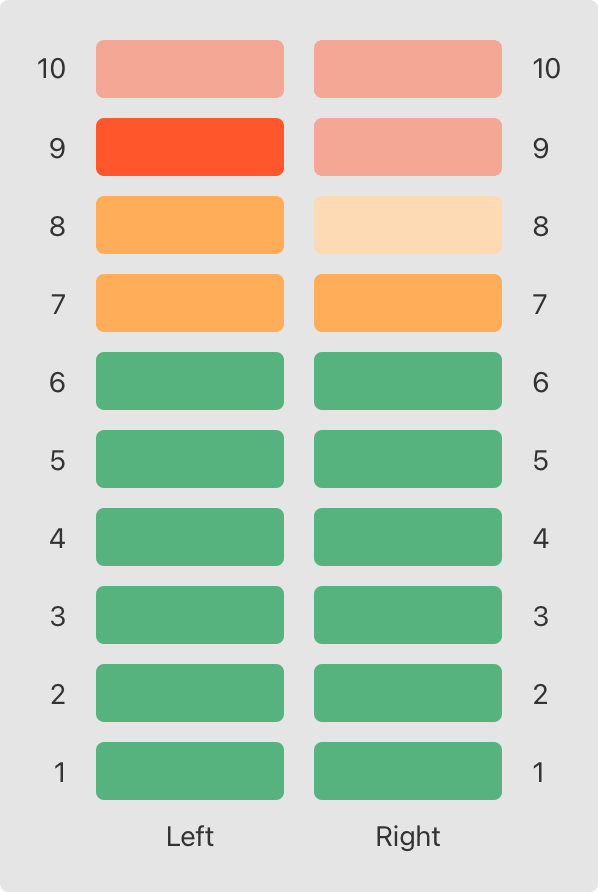
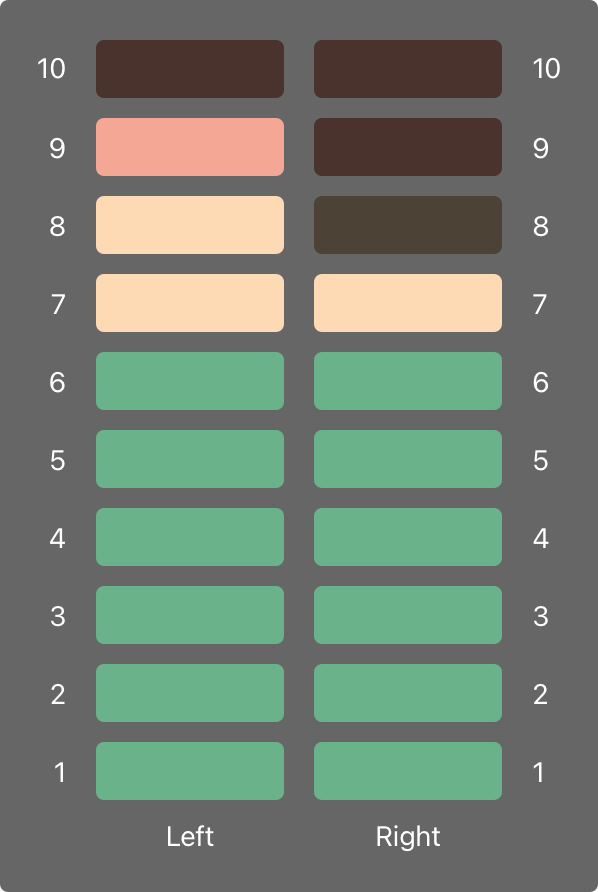
The figure below illustrates how two of these audio channels can be combined
to model a stereo audio level meter.
When a channel's audio level is 0, none of the lights for that channel are lit.
When the audio level is 10, all of the lights for that channel are lit.
In this figure, the left channel has a current level of 9,
and the right channel has a current level of 7:
下图展示了如何将这两个音频通道组合在一起,以模拟一个立体声音频电平仪。当某个通道的音频电平为 0 时,该通道的指示灯全部熄灭;当音频电平为 10 时,该通道的指示灯全部点亮。在这个图中,左通道的当前电平为 9,右通道的当前电平为 7:
The audio channels described above are represented by
instances of the AudioChannel structure:
上述音频通道由 AudioChannel 结构体的实例表示:
struct AudioChannel {
    static let thresholdLevel = 10
    static var maxInputLevelForAllChannels = 0
    var currentLevel: Int = 0 {
        didSet {
            if currentLevel > AudioChannel.thresholdLevel {
                // cap the new audio level to the threshold level
                currentLevel = AudioChannel.thresholdLevel
            }
            if currentLevel > AudioChannel.maxInputLevelForAllChannels {
                // store this as the new overall maximum input level
                AudioChannel.maxInputLevelForAllChannels = currentLevel
            }
        }
    }
}
The AudioChannel structure defines two stored type properties to support its functionality.
The first, thresholdLevel, defines the maximum threshold value an audio level can take.
This is a constant value of 10 for all AudioChannel instances.
If an audio signal comes in with a higher value than 10,
it will be capped to this threshold value (as described below).
AudioChannel 结构体定义了两个存储类型属性来支持其功能。第一个,thresholdLevel,定义了音频电平的最大阈值。对于所有 AudioChannel 实例,这个值是一个恒定的 10。如果输入的音频信号值高于 10,它将被限制在这个阈值内(如下所述)。
The second type property is
a variable stored property called maxInputLevelForAllChannels.
This keeps track of the maximum input value that has been received
by any AudioChannel instance.
It starts with an initial value of 0.
第二个类型属性是一个名为 maxInputLevelForAllChannels 的变量存储属性,用于跟踪任何 AudioChannel 实例所接收到的最大输入值。该属性初始值为 0。
The AudioChannel structure also defines
a stored instance property called currentLevel,
which represents the channel's current audio level on a scale of 0 to 10.
AudioChannel 结构体还定义了一个存储实例属性,称为 currentLevel,表示通道当前的音频电平,范围从 0 到 10。
The currentLevel property has a didSet property observer
to check the value of currentLevel whenever it's set.
This observer performs two checks:
currentLevel 属性有一个 didSet 属性观察器,每当设置 currentLevel 时检查其值。这个观察器执行两个检查:
- If the new value of
currentLevelis greater than the allowedthresholdLevel, the property observer capscurrentLeveltothresholdLevel. - If the new value of
currentLevel(after any capping) is higher than any value previously received by anyAudioChannelinstance, the property observer stores the newcurrentLevelvalue in themaxInputLevelForAllChannelstype property.
- 如果
currentLevel的新值大于允许的thresholdLevel,属性观察器会将currentLevel限制在thresholdLevel。 - 如果
currentLevel的新值(在任何限制之后)高于之前任何AudioChannel实例接收到的值,属性观察器会将新的currentLevel值存储在maxInputLevelForAllChannels类型属性中。
Note · 注意
In the first of these two checks,
the didSet observer sets currentLevel to a different value.
This doesn't, however, cause the observer to be called again.
在这两个检查中的第一个中,didSet 观察器将 currentLevel 设置为不同的值。但这不会导致观察器再次被调用。
You can use the AudioChannel structure to create
two new audio channels called leftChannel and rightChannel,
to represent the audio levels of a stereo sound system:
可以使用 AudioChannel 结构体创建两个新的音频通道,称为 leftChannel 和 rightChannel,用于表示立体声音响系统的音频电平:
var leftChannel = AudioChannel()
var rightChannel = AudioChannel()
If you set the currentLevel of the left channel to 7,
you can see that the maxInputLevelForAllChannels type property
is updated to equal 7:
如果将左通道的 currentLevel 设置为 7,可以看到 maxInputLevelForAllChannels 类型属性更新为 7:
leftChannel.currentLevel = 7
print(leftChannel.currentLevel)
// Prints "7".
print(AudioChannel.maxInputLevelForAllChannels)
// Prints "7".
If you try to set the currentLevel of the right channel to 11,
you can see that the right channel's currentLevel property
is capped to the maximum value of 10,
and the maxInputLevelForAllChannels type property is updated to equal 10:
如果尝试将右通道的 currentLevel 设置为 11,可以看到右通道的 currentLevel 属性被限制在最大值 10,并且 maxInputLevelForAllChannels 类型属性更新为 10:
rightChannel.currentLevel = 11
print(rightChannel.currentLevel)
// Prints "10".
print(AudioChannel.maxInputLevelForAllChannels)
// Prints "10".